Four Tools for Tracking Topics in Social Media

binoculars1

Photo credit: jlcwalker

I’ve written previously about the inadequacy of Google Alerts for tracking information and conversations around a given topic. Google has some algorithm for determining what content ends up in your daily email. Sometimes it’s good, many times there’s little value there.

Today, Telligent’s George Dearing tweeted this:

i’ve got a Google Alert set-up for enterprise 2.0..can you say diminishing returns? Paltry at best. #enterprise2.0

I’m currently using four different services for tracking information and conversations around ‘Enterprise 2.0’. With these four, I’ve got good coverage on the state of the sector and what people are buzzing about.

I wanted to share the four services I’m currently using. I follow  ‘Enterprise 2.0’, but you can use them for any topic you’re tracking. The four tools differ in how they use ‘authority’ as a basis for surfacing what’s new and relevant for a topic. Here they are:

four-info-tools-plotted-by-authority

I’ll describe the four below, starting from high use of authority and working backwards.

Google Alerts

Yeah, Google Alerts are imperfect. But they’re still pretty good for a quick read on potentially interesting topics. I don’t know exactly what Google uses, but I think it’s safe to assume it follows a similar path to search results.

Google Alerts do give a nice selection of news, website and blog updates around a topic. They limit the number of results, which makes them easy to scan quickly to see if there’s anything of interest.

One problem with these results is that they often contain links that really aren’t helpful in keeping up with a topic. I attribute this to the imperfections of computer algorithms in identifying what’s valuable.

I’d also like to give a special shout-out to Sacha Chua, whose blog always manages to make it into Google Alerts for ‘Enterprise 2.0’. She may have cracked the Google Alerts algorithm.

Filtrbox

Filtrbox is a service that lets you track mentions of keywords you’re tracking across a variety of media types:

  • Mainstream media
  • Blogs
  • Social media

The service is great for digging up nuggets throughout the web. The daily email can be a little daunting, with many more results than what you see in your Google Alert.

You can create separate folders on Filtrbox. For instance, I have an ‘Enterprise 2.0’ folder. Inside that folder, I track mentions of ‘enterprise 2.0’ and ‘social software’ as sub-folders. My daily email includes both sub-folders. This sub-folder approach is a great way to tie different keywords into a common topic.

Filtrbox lets you decide what level of authority to use in filtering results for your topics. Called FiltrRank, the algorithm scores content on a 1 to 10 scale.  You simply “turn the dial” to require a higher level of authority in your results. I don’t know what the secret sauce for FiltrRank is.

Filtrbox also lets you block domains, so that you can avoid seeing results for specific websites. Pretty handy, actually.

MicroPlaza

MicroPlaza is a service, in beta, which tracks content based on tweets. The core idea is that the higher the number of tweets, the more interesting the tweeted content is.

MicroPlaza doesn’t just scan all tweets to deliver popular posts. Rather, it uses who you follow as the starting basis. If someone you follow tweets a link, MicroPlaza will rank the content based on all tweets of that link, not just who you follow.

But it starts by having someone you follow tweeting it. Otherwise you won’t see it in your list of popular content.

The really innovative thing that MicroPlaza has done is Tribes. A Tribe is a group of people you follow on Twitter, according to however you want to group them. For instance, I’ve created my own ‘Enterprise 2.0’ Tribe.

This is powerful stuff. Tribes narrows the range of content I see to be more closely linked to a topic I care about. It still leverages the total popularity of those tweeted links throughout Twitter, but only if someone from my Tribe tweeted it.

MicroPlaza is still in beta. I may be able to get you an invite, leave a comment if you’re interested.

FriendFeed Lists

FriendFeed is the uber information tracking service. With one subscription, you get a variety of a person’s activity streams: tweets, blog posts, bookmarks, Google Reader shares, etc. You can also track people that haven’t joined FriendFeed via the imaginary friends feature.

FriendFeed includes a feature called Lists. Lists are your own selected groups of people you follow on FriendFeed. I have an ‘Enterprise 2.0’ List with over 70 different people I follow in the industry.

I’ve also created a public Enterprise 2.0 Room on FriendFeed. This Room tracks tweets and Del.icio.us bookmarks related to the Enterprise 2.0 world.

FriendFeed Lists can include not only people, but Rooms as well. So my Enterprise 2.0 Room is included in my Enterprise 2.0 List. The List becomes my one place to track the ongoing observations and relevant content for what I want to track.

I ranked this the lowest in terms of authority-based filtering. The filtering really happens by who you put in your List. You can select individuals who for you personally constitute authorities, and leverage what they’re finding interesting. The Del.icio.us bookmarks constitute another implicit basis for authority. Bookmarking is a fairly engaged activity of retention, meaning the associated content has value.

As I wrote before in Follow Everything by a Select Few, Select Content by Everyone, FriendFeed Lists are a great way to stay on top of a topic.

How About You?

Those are my current tools for tracking what’s happening on a topic. I’m sure there are others out there. What are your favorite tools?

*****

See this post on FriendFeed: http://friendfeed.com/search?q=%22Four+Tools+for+Tracking+Topics+in+Social+Media%22

Quick Hack for a Twitter Follow Bug

There is a bug in Twitter that causes you to be unable to follow specific, random people. What happens is you click the ‘Follow’ button on a person’s homepage, and you get a message telling you that you’re not allowed to. Or possibly the page just hangs up, without letting you follow.

Jeremy Schultz and I had this issue. We were following one another when one day we noticed that we…weren’t. We’d been involuntary unfollowed from one another.

So we each tried to follow each other again, only to be frustrated by our inability to do so. Neither of us had problems following others.

Then one day, I saw Shel Israel tweet this:

Amazingly, having @cheeky_geeky, block, then unblock me allows me to follow him. @biz please note. Thx, whoever made the recco.

I sent that tweet to Jeremy. He then blocked me on Twitter, then unblocked me. He then reported

@bhc3 It worked! Blocked, unblocked, follow, success. Thanks!

And I’m able to follow him as well.

So there’s your hack to deal with this problem should you encounter it.

Strategic Intuition: The Innovation of Flickr and Twitter

At the Defrag conference last November, all attendees received a copy of Strategic Intuition by Columbia professor William Duggan. It’s taken me a while to get around to it, but I am really enjoying this book.

So what is strategic intuition? It’s the process that leads to that flash of insight that hits you upside the head. Here’s how Duggan describes that:

It’s an open secret that good ideas come to you as flashes of insight, often when you don’t expect them. It’s probably happened to you – in the shower, or stepping onto a train, or stuck in traffic, falling asleep, swimming, or brushing your teeth in the morning.

Suddenly it hits you. It all comes together in your mind. You connect the dots. It can be one big “Aha!” or a series of smaller ones that together show you the way ahead. The fog clears and you see what to do. It seems so obvious. A moment before you had no idea. Now you do.

Professor Duggan’s work relates to the processes that lead up to that “aha!” moment. Yes, it turns out there’s a lot that happens before we’re struck with such blinding insights. And this research leads to some intriguing ways to think about pursuing innovation.

The book is chock full of perspectives from different fields that relate to his core premise of strategic intuition. If you read the book, you’ll get them all. Two that most interested me were:

  1. European military strategists: von Clausewitz vs. Jomini
  2. Ancient Asian philosophy: Dharma and Karma

I’m not passionate about either of those topics, yet when you read how Duggan relates them to the ways in which people innovate, they become quite compelling.

von Clausewitz vs. Jomini

I’m not going to bore you with details of the military strategy treatises of von Clausewitz and Jomini. Suffice to say that both are influential to this day in terms of their thinking about conducting military campaigns. Duggan distinguishes the two of them this way:

von Clausewitz focuses on considering the conditions at hand, having one’s mind open to new alternatives and pulling together disparate elements from previous experience to address battlefield situations. Jomini argues for establishing the objective clearly, setting a plan of attack and organizing everything centered around the plan of attack.

From Duggan’s perspective, von Clausewitz’s approach is more in-line with creativity and inspired ideas. This is the important part – that the best ideas cannot be willed into existence. Rather, they occur naturally as a result of combining previous experience and knowledge.

von Clausewitz’s work included four principles related to coup d’ oeil, French for a strike of the eye, a glance. Duggan relies heavily on these four principles throughout the book:

  1. Examples from history. The point here is that there is a wealth of relevant information from the past that is useful for the future. Our minds actually access this information subconsciously.
  2. Presence of mind. As Duggan writes, “You clear your mind of all expectations and previous ideas of what you might do or even what your goal is.” This mental state is important for developing new ideas.
  3. The flash of insight itself. This is something you’ll know. You “see” an idea clearly, one that wasn’t there minutes ago. It probably consumes you for a while. It’s a good thing.
  4. Resolution. It’s one thing to have a great idea. It’s another to execute on it. You have to be ready to follow through on what strategic intuition has given you.

Duggan relates these lessons to Napoleon’s success as a military commander. He later relates them to Bill Gates with Microsoft, and Sergei Brin and Larry Page with Google.

Let’s turn to the Asian philosophy.

Dharma and Karma

I’ve never really studied what karma is about. My level of understanding could be tied to a bumper sticker that says “My karma ran over your dogma” and karma points on Plurk.

Yet Duggan does a masterful job of taking the reader through some basic information about the Asian philosophies of Hindu, Buddhist and Tao. He ultimately settles on the philosophies of Dharma and Karma:

  • Dharma: Your own set of thoughts and actions. These are in your control.
  • Karma: The set of circumstances which you are presented. These are outside your control.

This is where Duggan has a bit of his own flash of insight. He relates the concepts of Dharma and Karma to von Clausewitz’s coup d’ oeil. He references this quote by Napoleon, who was more von Clausewitz than Jomini:

I never truly was my own master but was always ruled by circumstances.

In the Buddhist sense, you “go with the flow” instead of “get what you want”. In both Western and Eastern culture, there is a mysticism or religious aspect to this idea. I don’t think you need to to be particularly spiritual to understand this. We understand that there are circumstances every day that (i) affect us; and (ii)  are outside our control.

Putting This into Practice

In reading this, you can’t help but note the serendipity of the whole thing. There are a set of circumstances that will affect outcomes, and you can’t control them. You will experience flashes of insight, but only based on the prior experiences and knowledge that you happen to have.

It’s here where you really do need to be comfortable with this situation, where Eastern philosophy is useful.  The biggest lesson I take from Duggan’s book is the “presence of mind” principle. The willingness to consider a change in circumstances and see alternatives based on prior ideas that have worked.

The hard part is to drop the well-though out plans you may have for achieving some objective. If you’re seeing success with a plan, then by all means see it through. If you’re not, is it only a problem of poor execution? Or is there something else that should be tried, an idea that emerges from something that is working? Especially in a corporate environment, the ability to just drop a project plan is hard. But empowering employees to follow “what works” relative to a given set of circumstances can be particularly valuable.

Let’s see how this applies to two well-known companies in the sociasl media space, Flickr and Twitter.

Flickr: Leveraging What Works

How many people know that Flickr got its start in a massively multiplayer online game? A company called Ludicorp offered this game, which didn’t really take off in usage. But as a part of that game, a Ludicorp engineer created a tool to upload and share photos on a public page. That particular tool got more response than the game itself did. Ludicorp’s Caterina Fake knew she had something of interest on her hands. She scrapped the online game, and pursued the online photo sharing idea.

Here’s where you really need to consider von Clausewitz vs. Jomini. The Jomini style of strategy would have had Fake continue to push on the multiplayer online game. She had a defined objective, and she had to pursue it come hell or high water.

The von Clausewitz and Dharma/Karma perspectives argue that Fake was being given a great gift. Some small piece in all that Ludicorp work was resonating, it just wasn’t the part they had anticipated. Fake had the presence of mind to recognize this, and to pursue the new idea where it took her.

Twitter: Combining What Works

Interestingly, the roots of Twitter go all the way back to the year 2000. As Steve Parks documents, Jack Dorsey was starting a business at the tail end of the 1990s’ dot com boom. He started a company to dispatch couriers, taxis and emergency services through the web. At the same time, he was an early user of the new LiveJournal blogging service. You can also see that he was aware of AOL’s Instant Messenger application for chatting with friends.

As Dorsey tells it:

One night in July of that year I had an idea to make a more “live” LiveJournal. Real-time, up-to-date, from the road. Akin to updating your AIM status from wherever you are, and sharing it.

He carried this idea around for the next five years, until he had a chance to put it in place as the company for which he worked in 2006, Odeo, was flagging. His idea was coded by Odeo engineers, and Twitter was born.

Professor Duggan places a great emphasis in his book on combining ideas, experience and knowledge from different realms to create something new and compelling. These previous ideas, combined and applied to a new situation, are the fuel for the flash of insight. In von Clausewitz’s approach, these are the “examples from history”.

Look at the influences of Dorsey before he came up with the idea for Twitter in 2000:

  • The need to share statuses easily with multiple people for his dispatch service
  • The self-expression provided by LiveJournal
  • The real-time communication of IM

With these influences, he conceived of Twitter. And look how it came about: “one night in July”. He can remember the specific circumstances and timing when the flash of insight hit him.

What It Means for You and Me

It would be wrong to assume that setting an objective is not relevant in this process. In reading this blog post, it’s possible that one could come away with the thought that you just kind of wait until a flash of insight hits you.

It’s important to distinguish between having an objective, and being unyielding in pursuing the plan to achieve it. It’s another to have an objective, and to have the flexibility to change the plan or even the objective.

I also believe these flashes of insight only come when you’re focused on something. Focus is the catalyst for our minds to piece together different experiences and knowledge, and gives a channel for where insight can emerge.

Personally, I won’t stop establishing objectives and planning for them. But this book has been influential to me in having “presence of mind” in pursuit of these objectives.

*****

See this post on FriendFeed: http://friendfeed.com/search?required=q&q=%22Strategic+Intuition%3A+The+Innovation+of+Flickr+and+Twitter%22

My Ten Favorite Tweets – Week Ending 032009

From the home office in Manhattan…

#1: The unintended meme….cisco fatty http://tinyurl.com/d5dzdc

#2: RT @jenn bah. “cisco fatty” is no “I KISS YOU”, Kids on the Interwebs will meme anything these days. When I was young, we used 2 meme uphill

#3: “Twitter Most Popular Among Working Adults” Nielsen February stats http://bit.ly/CQRty

#4: Reading about WordPress’s new microblogging offering ‘P2’ http://bit.ly/zPf9B Looks great, perfect for internal company tweeting

#5: Reading – SXSW – Jumping Sharks, Hunting Snarks, Punting Sparks and Something Stark by @freecloud http://bit.ly/Ocm

#6: Wondering which will be cheaper for wireless…3G iPhone tether or an EVDO card?

#7: Reading: Spigit Launches New Version Of Idea Generation Innovation Software on @techcrunch http://bit.ly/1aoLVS

#8: The Schwab commercials with the people who have been turned into animation are oddly compelling. You just stare at these real-life cartoons.

#9: Grey’s Anatomy, finder of cool music at a level comparable to Apple commercials.

#10: I didn’t know there was certification for such a thing: The Life Coach Institute http://bit.ly/uhNzH

Breathe: Reflections on the Cisco Fatty Story

And I feel like I’m naked in front of the crowd
Cause these words are my diary, screaming out loud
And I know that you’ll use them, however you want to

Anna Nalick, Breathe (2 AM)

Earlier this week, I wrote the post How to Tweet Your Way Out of a Job. As it seems like much of the online world now knows, it told the tale of how a young woman tweeted her reaction to a Cisco job offer.  If I get a post that pops 2,000 views, I’m ecstatic. What happened with this particular post defies anything I’ve ever experienced.

But that feeling is tempered by an awareness of what @theconnor must be feeling.

Things are returning to normal here on the blog, and I wanted to record a few thoughts for posterity.

Original Incident

I don’t catch every tweet of the people I follow on Twitter. But I happened to be on the Twitter home page when Cisco’s Tim Levad responded to the following tweet by @theconnor:

Cisco just offered me a job! Now I have to weigh the utility of a fatty paycheck against the daily commute to San Jose and hating the work.

Tim’s responded by calling her out for this message. She had just summarily dismissed the job, and by extension, Cisco. I’m sure Cisco employees take pride in their work, and here’s an outsider dismissing the prospect of working there. So Tim responded in kind, telling her that her hiring manager would be interested in knowing her attitude before she’d even started the job.

Right there, terrible move by @theconnor. And she was penalized for it.

If this had only been the tweet by @theconnor, I wouldn’t blog that. I don’t follow her anyway, and people can tweet what they want. It was Tim’s reaction that elevated this to newsworthy status. A parallel can be drawn with the case of the Ketchum PR guy who tweeted a disparaging remark about Memphis. That by itself wasn’t newsworthy. What made it newsworthy was the reaction of his Memphis-based client, FedEx.

It’s not the original tweet. It’s the reaction by an offended party.

Viral

As I mentioned, this post far exceeds anything I’ve even seen. It seemed to get early traction on Twitter. Then it got picked up on Reddit. Then, TechCrunch’s Michael Arrington tweeted about it, which spread on Twitter. Before you know, the post goes viral on both Reddit and Twitter. It then hit Techmeme.

As of the time I’m writing this, the post has been viewed 102,000 times. Here’s what the traffic graph of my blog for the last 30 weeks looks like:

im-not-actually-a-geek-weekly-trafficI doubt I’ll ever see a post go this viral again. It’s hard to describe your feelings as you watch this happen. Incredulous is a good word.

I learned the power of reddit.com. If you hit the front page of that site, the traffic is huge. I also ended up as the Hawt Post on wordpress.com, which also has a lot of traffic. Little things I didn’t know.

Cisco Fatty

This was really interesting. The story took on its own descriptive meme: cisco fatty. Where did that term come from?

In the post, I needed a reference to @theconnor’s tweet about the Cisco offer. But she had taken her account private, so I went to Twitter search. I figured a simple search query for cisco fatty would do the trick, and it did for a while. Her tweet was the only thing that was returned.

What happened though, is that as people clicked that search link to see her tweet for themselves, they saw a search page with the words cisco fatty. And some wags began to refer to it as the “cisco fatty” incident. Soon, that term was all over Twitter. There are also blog posts that refer to the cisco fatty.

I have to admit, I chuckled at some of the tweets where the term was used. This was one of my favorite meta tweets about the meme:

bah. “cisco fatty” is no “I KISS YOU”, Kids on the Interwebs will meme anything these days. When I was young, we used to meme uphill…

If you don’t know what I KISS YOU is, click here for info.

Opportunism

Some guy sensed the meme potential “cisco fatty”, and set up a site called ciscofatty.com, complete with Google ads. Little more than a splog initially, the dude didn’t have the courtesy to link back to my post. He then has been thoughtlessly adding details about @theconnor from her now-removed personal website.

The guy was clever enough to see the potential of the term. But then he blows it by going overboard. As one person tweeted:

The dude who put up the Cisco Fatty website, plastering personal info about the Twitterer at the center of this debacle is a total douche.

The unfortunate thing is that articles and posts have linked to his site, and folks are tweeting links to it.

False Privacy of Not Being Well-Known

I can see how one could slip into an overly comfortable feeling that Twitter is like email or IM. You tweet things and get positive reactions from those with whom you interact. Or more likely, a lot of what you tweet gets no reaction. You slowly get more comfortable with the medium, and notice the wide variety of personal information are sharing on Twitter.

I can very easily see someone developing a false sense of privacy in this realm. After all, there are millions of people tweeting, and nobody and watch all that they post.

But public tweets are not email. Twitter search and the retweet protocol make anyone’s tweet accessible everywhere. With Twitter, you have to keep your guard up. It’s unfortunate, but I look at it as a small price to pay for the self-expression, learning, interacting and connecting you can do via Twitter.

The thing is, I’m sure every few minutes someone somewhere tweets something that crosses the line of propriety. The vast majority of these are never known. But as this case shows, the potential is always there.

Thoughts on @theconnor

The young woman at the center of this is laying low, waiting for of this to pass. And it will. It’s already slowing down a lot here at the end of the week.

She has achieved something she didn’t want, a measure of Internet notoriety. I’m not expert in these matters. But I’ve seen how people handle these things, whether it’s Internet fame or incidents that occur in business, Hollywood, professional sports, etc. She can embrace or refute her notoriety.

If she wanted to, she could embrace this. Here’s how I mean. She’s part of Gen Y. This is the next generation coming into the workforce. Her tweet about “hating the work” may actually be a rallying cry for many of her peers looking at their future.

She could write a very persuasive article about the feelings of her generation. Not that she hates Cisco, or the job she was going to do there. Rather, she was expressing some of the frustration of her generation. My guess is that she could actually write her essay on a widely-read site of some type (e.g. TechCrunch, Time, etc.).

I can see why she might not want to do this. She may not want any more limelight, and have concern about what employers will think if she did write such a piece. There will be plenty of people that will be critical of her if she did write anything.

But she does have the opportunity to channel the interest in the story and her own notoriety into something she didn’t have at the start of this week. My sense is that she has a platform right now.

Regardless, I wish her the best.

I’m @bhc3 on Twitter.

How to Tweet Your Way Out of a Job

oops

Photo credit: Victoria-Ann

I saw this exchange on Twitter, which is a painful lesson in how NOT to use Twitter in this tough economy.

A lucky job applicant tweeted the following:

Cisco just offered me a job! Now I have to weigh the utility of a fatty paycheck against the daily commute to San Jose and hating the work.

This tweet caught the attention of Tim Levad, a channel partner advocate for Cisco. To which he responded:

Who is the hiring manager. I’m sure they would love to know that you will hate the work. We here at Cisco are versed in the web.

Ouch! The person who dissed the Cisco offer quickly took their Twitter account private. But Twitter search retained the record.

Remember a couple months ago when the PR guy’s tweet about Memphis came back to bite him? This is another example of the need to be careful with what you post on Twitter, and social media in general.

I’m @bhc3 on Twitter.

Twitter Rolling Out House Ads

Just saw this on my Twitter home page:

twitter-house-ad

I’ve seen one for Twitter widgets and one for Twitter search. They’re “house ads” now – i.e. only for Twitter’s own services. But perhaps these are a precursor to future advertising.

My Ten Favorite Tweets – Week Ending 031309

From the home office in Austin, Texas…

#1: @defrag has been saying he thinks the economy is slowly coming around. To that end: http://bit.ly/pP5bd and http://bit.ly/nRkzv

#2: “I think the days of the traditional San Francisco startup approach are numbered.” http://bit.ly/jyw4H

#3: @petefields Companies should follow all who follow them. I’d bet companies’ tweet reading is more keyword & @reply based, not person based.

#4: Maybe it’s just me, but Techmeme has improved a lot recently in terms of the variety of interesting stories. Human editor + user tips = +1

#5: “Facebook is the SharePoint of the Internet” http://bit.ly/4fu73o

#6: This shouldn’t be too controversial…The Case Against Breast-Feeding in April’s Atlantic Magazine http://bit.ly/Xs4ZG

#7: If browsers were women http://bit.ly/kO1su (h/t @mona)

#8: I’ve been blissfully unaware of what Sophie’s Choice is about all these years. My wife told me about it last night. Never gonna watch that.

#9: Actively banishing artists showing up in my Last.fm recommendations: Peter Cetera, Richard Marx, John Parr.

#10: In an email f/ my son’s preschool: One kid: “We’ll take them home in the future”. My son Harrison: “But I’ve never been to the future.”

Microblogging Will Marginalize Corporate Email

In case you missed it last week, Google CEO Eric Schmidt had this to say about the microblogging service Twitter:

Speaking as a computer scientist, I view all of these as sort of poor man’s email systems. In other words, they have aspects of an email system, but they don’t have a full offering. To me, the question about companies like Twitter is: Do they fundamentally evolve as sort of a note phenomenon, or do they fundamentally evolve to have storage, revocation, identity, and all the other aspects that traditional email systems have? Or do email systems themselves broaden what they do to take on some of that characteristic?

At first blush, this seemed like an example of Google not ‘getting it’ when it comes to Twitter (see the comments to the linked blog post above). But I think he’s actually on to something. It is a new way of posting notes about what you’re doing, but it also has a lot of communications usage via @replies and direct messages (DMs).

Reflecting both on Schmidt’s statement, and my own use of Yammer at my company, I’m seeing that microblogging is slowly replacing a lot of my email activity.

As more companies take up microblogging with services like Yammer, Socialcast, Present.ly and SocialText Signals, employee communications amongst employees will both increase and divert away from email. Something like this:

microblogging-marginalizes-email

Socialcast’s Tim Young said this about email:

Email is dead. If your company is relying on email for communication and collaboration, your company is walking dead in this new economy.

Being the CEO of Socialcast, that’s not a surprising statement. But I think he’s more right than wrong.

The shift I describe applies regardless of the microblogging application used. Since I’m actually familiar with Yammer as a user, I’ll talk about its features in the context of this shift.

Yammer Follows the Innovator’s Dilemma Path

A useful context for thinking about Yammer versus corporate email is Clayton Christensen’s Innovator’s Dilemma. Generally, the premise is that incumbent companies need to grow and increase the functionality of their products. This increases the products’ complexity and cost, but also increases margins. But as the incumbents are doing this, it opens an opportunity at the lower end of functionality for new companies to come in and attack the incumbents’ base. From Wikipedia, here’s a graphic that demonstrates the concept:

innovators-dilemma-disruption-graph

A useful way to think about the Innovator’s Dilemma in the enterprise software space comes from this blog post, Enterprise Software Innovator’s Dilemma. Existing vendors expand the functionality of their products, heavily relying on the requests of large customers. Over time, this has the effect of creating a robust, highly functional and more expensive offering. This trend is what opens the door for new vendors to come in.

Let’s consider Yammer in this context. Simple microblogging runs along the “low quality use” in some ways. At least in terms of the feature set. But it certainly takes “use case share” away from email.

If all you could do was make public notes, that’s the end of the story. Microblogging does not replace email. But these guys are advancing their product, and are rising up the performance axis.

Here is what Yammer now offers:

  • Behind the firewall installation
  • Public notes
  • @replies
  • DMs
  • Groups
  • Private groups
  • File attachments
  • Favorites (a form of bookmarking)
  • Tagging
  • Conversation threading
  • Unlimited character length (i.e. not limited to 140 characters)
  • Search

Look at that list. When you think about your own internal email usage, what ‘s missing? Folders or the Gmail equivalent of tags seem to be something for the down the road. I’m not an IT manager, so I’m sure there are some heavy duty infrastructure aspects of Microsoft Exchange/Outlook and Lotus Notes that are not there. Thus, Yammer still has the insurgent, disruptor profile relative to corporate email.

But don’t underestimate that. There’s what IT knows is needed behind the scenes. and then there’s what the users actually do when given the different applications.

Expanding Communications, Marginalizing Email

Microblogging’s premise is that public proclamations of what you’re doing and information that you find are a new activity for people, and they have value. Information is shared much more easily and in-the-flow of what we’re all doing anyway. In an office setting, I continue to find the way Dave Winer describes it quite useful: narrating your work.

This use case is what promises to dramatically increase communications among employees. As we’re seeing with Twitter’s explosive growth, it takes time for people to grok why they should microblog. But once they “get it”, it takes off.

So services like Yammer have your attention as you post updates and read what others post. In reaction to what someone posts, you hit the Reply button. You’re having a conversation that others can see, and join in if they want. You decide to have separate conversation with someone in this context. Do you open up your email? Or just click “Private Message” to someone? I’m willing to bet you’ll do the latter.

Which starts the marginalization of corporate email. Why? Because a lot of what’s going to generate interactions is occurring right on that microblogging app you’re looking at. It’s the most natural thing to act in-the-flow and use that application in lieu of email. Well-designed microblogging applications are also quite seductive in terms of ease-of-use.

As I’ve written before, email’s role changes in this scenario. The logical end use cases are:

  • Notifications
  • External communications

This isn’t something that’s imminent. Email is quite entrenched in daily workflow, older generations aren’t likely to stop using it and internal microblogging is still nascent.

But no one said the Innovator’s Dilemma plays out over the course of a couple years. It will take time. But watch the trends.

I’m @bhc3 on Twitter.

My Ten Favorite Tweets – Week Ending 030609

From the home office in Damascus, Syria….

#1: Twitter has another huge growth month in February, per compete.com: http://bit.ly/aJ0p

#2: It always cracks me up when people say Twitter is nothing more than glorified IRC (http://bit.ly/KD3H6). Most people I know never used IRC

#3: A lot of posts like this lately: “Twitter destined to replace Google Search” http://bit.ly/14G7nn Some truth, but overstated.

#4: On Enterprise 2.0: “There is a big difference between an integrated user experience and a suite.” ReadWriteWeb http://bit.ly/6Njb

#5: Flashes of insight cannot be willed, they are spontaneous – Willam Duggan, Strategic Intuition

#6: Visa commercial uses Smashing Pumpkins “Today” as its theme. Visa gains some cool points.

#7 Anyone remember the Nestea Plunge? I have this game with my 4 y.o. son where I catch him falling backwards. Call it the Nestea Plunge.

#8: Just want to note for the record…last night’s ’24’ was great. The show is strong this season.

#9: I miss the plastic bags we’d get from grocery stores here in SF. They were perfect for the little trash cans around the house. #ecoprogress

#10: My 4 y.o. son Harrison is a huge fan of the PBD Kids website http://pbskids.org/ Well done, incl. games with his fave PBS characters.

The 10/20/30 Presentation Approach Fails in Social Media

Photo credit: Presentaiton Helper

Photo credit: Presentation Helper

Guy Kawasaki has a well known blog post from 2005, The 10/20/30 Rule of PowerPoint, in which he articulates why less-is-more when it comes to presentations. This post is really good for in-person presentations, and continues to be well-received as seen by the blog links to the post and Google search results.

The tenets of Guy’s post include:

  • Only 10 slides, because the audience will only be able to follow that many
  • Target 20 minutes of talking
  • Font size no smaller than 30 point

The post is part of a larger canon regarding presentations. For maximum effect, keep each slide simple, with few words and no bullet points. Graphics are a better way to present concepts, with the presenter narrating heavily. These principles have vastly improved presentations in-person or on a conference call.

But they’re terrible when it comes to social media. At best, they force readers of the presentation to guess what the presentation is saying. At worst, they cause people to come away with the wrong impression of what is being said. This week saw an example of that.

Fred Wilson and Twitter’s Search Plans

Fred Wilson, the Union Square Ventures venture capitalist behind Twitter, gave a presentation titled Startup culture, the Internet, and Television. Included in that presentation was this slide:

fred-wilson-slide-twitter-search

Now Twitter is the subject of much speculation. And this slide seems to show something about their future. Search + matching users + featured user. Of course, all we have to go on is this slide. This comment on Fred’s blog foreshadows what would happen next:

Good example of the Great Deck Paradox. Given a great deck should provide context and visual cues rather than the contents of the talk itself, a great deck by itself is pretty unintelligible without the talk. Still, the key point came across: guidelines for success in TV = guidelines for success on the net.

Fred’s slide was picked up in a post by Eric Berlin on Louis Gray’s blog.

A Case of Misunderstanding

In the post, Eric does a nice job of breaking down the implications of what’s seen in the screenshot from that slide. There were no notes that accompanied the slide on SlideShare. The slides were an aid to the true content of the presentation, Fred’s talk. Unfortunately, there was no audio included. So without notes or audio, the slide has to stand on its own in venues like SlideShare.

It turns out the analysis that Eric did ob the slide was wrong. Not so much on the analysis itself – that was top-notch. But on the premise behind the analysis. Namely, that the slide was showing the future direction of Twitter.

In a follow-up post, Fred wrote that bloggers were getting the wrong impression of the slide, which was some alpha version floating around Twitter. Here’s what he said about Eric’s post:

But it gets even more nutty. Today I saw a story on louisgray.com that assumes the title of slide 22 “Where We Are Going” implies that the search results page I showed was about where Twitter is going. And then it goes on to evaluate the business model implications of the page I showed. Well the post is pretty interesting, but it’s based on a false assumption. The “We” in “Where We Are Going” means TV users and the TV business, not Twitter.

Let’s trace this:

Incomplete information on slide -> Blog post based on incorrect assumption -> Fred Wilson refuting posts

Could Fred have added some content on the slide or a note to mitigate the possibility of misunderstanding? Yeah, probably.

Recognize Two Separate Audiences for Your Presentations

In How to Integrate Social Media in Product Marketing, I noted this issue about presentations put up on services like SlideShare and Scribd:

When people are viewing your PowerPoint, they will not have the advantage of your voiceover. You can’t provide a spare slide with just a picture and hope everyone gets what you’re saying. In the webinar, you’ll have a nice narration for the slide. In SlideShare and Scribd, each slide has to stand on its own.

In terms of product marketing, this is important for making sure you effectively get your point across. Here’s an example of what I mean, from the presentation How to Double the Value of Your Social Software:

example-of-self-explanatory-slide

The left graphic is a good visual aid. My voiceover is shown on the right. If you want to combine in-person slides with social media-ready slides, the little talk bubble on the right can be a custom animation that doesn’t appear during your narration of the slide until the end. You get the minimalist approach during the presentation, readers get the context afterwards.

That’s from a product marketing perspective. But as this incident with Fred Wilson shows, it’s a lesson that applies to any presentation you put up on social media sites. Perhaps Guy will update his 10/20/30 Rule to reflect the ways in which people consume information in 2009.

I’m @bhc3 on Twitter.

Power Twitter Gets More Powerful with Latest Release

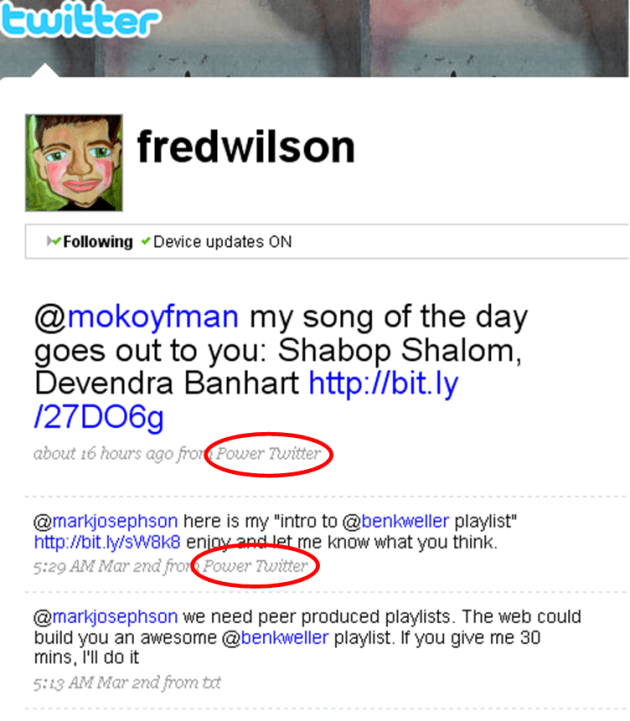
fred-wilson-power-twitter

A few days back, I noticed something in Fred Wilson’s tweets. He was using some sort of app called Power Twitter. Now Fred is the highly visible Union Square Ventures VC behind Twitter. When he uses an application to engage with Twitter, I’m curious why. So I checked it out.

Power Twitter is a Firefox add-on built by Narendra Rocherolle. Power Twitter, as its name implies, supercharges the web -based interface of Twitter for Firefox browser users. The added features are those that a lot of Twitter users want. As John Tropea tweeted:

@bhc3 twitter should have this inhouse, just like what happened with replies, and what also should happen with hashtags

Power Twitter got good coverage on TechCrunch in January of this year. On February 26, a slew of new features were released. These new features have made Power Twitter even better, and perhaps give a glimpse of what Twitter could do in the future.

Packed with Valuable Features

Here’s a screen shot of the Twitter page with Power Twitter installed:

power-twitter-home-page

Let’s talk about the numbered features.

#1 – Post Photo: Have a picture you want to tweet out? Use the handy Post Photo link. When you click it, you’ll be presented with a familiar dialogue box asking you to upload a picture. Once you select your picture, it is automatically posted to TwitPic. Your TwitPic picture will have its own URL, which is automatically pasted into the “What are you doing?” box. Then you type out whatever you want to accompany the picture. This is new with the Feb. 26 release.

#2 – Shorten Link: Sharing links is a prevalent activity on Twitter. According to Ginx, 20% of tweets are sharing links. With the Shorten Link feature, you paste a long URL into an input box, and Power Twitter automatically shortens it using bit.ly (see previous bit.ly coverage here). You then type whatever message you want. One downside is that it doesn’t associate the bit.ly URL to your bit.ly account. But for most people, that’s not an issue. This is new with the Feb. 26 release.

#3 – Retweet: The retweet is emerging as the new thing to do on Twitter. As Robert Scoble wrote in a comment in a FriendFeed discussion: “I judge myself off of how many times I get retweeted. That demonstrates readership, credibility, engagement, interest, etc.” Power Twitter now makes it easier to retweet those tweets you like. Every entry has a little “RT” to the side. When you click the “RT”, the entire tweet is copied to your “What are you doing?” box, along with “RT @[person]”. Very easy. This is new with the Feb. 26 release.

#4 – Expand Shortened URLS: One problem with the shortened URLs is that you don’t know where they go before clicking them. Power Twitter automatically expands the shortened URLs so you see the full URL. This is something that was implemented on FriendFeed a while back, and it’s great for fully extra secure before clicking those links.

#5 – Search and Saved Searches: Search is another aspect of Twitter that is emerging as hugely important. Twitter bought the third party search service Summize to provide search to its members. However, they have maintained search as a separate URL from the Twitter home page, although they are testing the addition of search to the homepage currently. With Power Twitter, you don’t have to wait. Search is embedded right on your home page. When you run a search, Power Twitter runs it against the Twitter search engine and presents the results right on your homepage.

Power Twitter also links # hashtags to a Twitter search. When you see a hashtag, click on it. Power Twitter returns a set of results including the hashtag. Power Twitter retains a list of your previous searches if you want to run them again. The saved search history is new with the Feb. 26 release.

#6 – @Mentions: Twitter added the @replies tab a while back, which shows those tweets that begin with your Twitter handle (e.g. @bhc3 lorem ipsum…). Power Twitter also includes @mentions, where your handle is included elsewhere inside the tweet (e.g. RT @bhc3 lorem ipsum…). A quick way to see if someone retweeted you or otherwise mentioned you in a tweet.

#7 – Facebook: You can view the status updates of your friends on Facebook, right from the Twitter page. I assume this leverages the new Facebook status updates API. For me, this is a hugely valuable addition. I don’t log in to Facebook too often, meaning I don’t see the updates of my connections there. Now, I regularly check the Facebook tab in Twitter to see what my friends are up to. Really, really helpful.

In-Line Media

This isn’t new, but merits mention. Power Twitter displays the media associated to links to several different services including:

  • TwitPic
  • Flickr
  • YouTube
  • Google Maps
  • Song.ly
  • Others

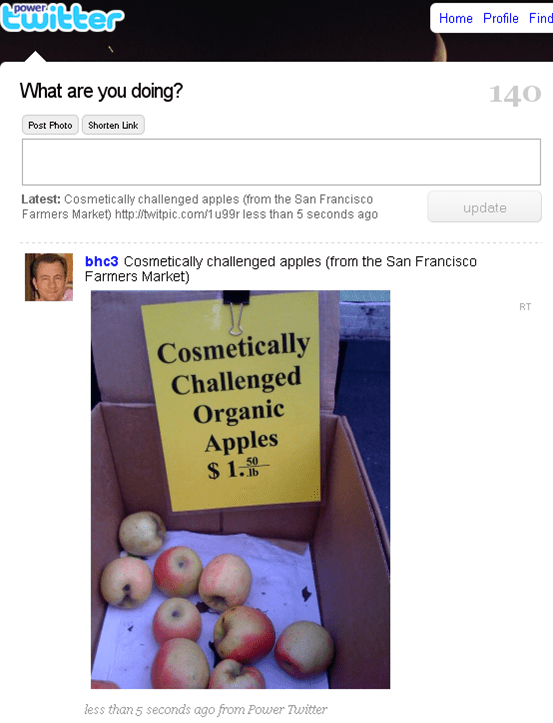
The song.ly links include a simple player to hear the song that was tweeted. Very nice. Here’s an example of what a TwitPic looks like as it hits your Twitter stream:

power-twitter-twitpic-inline

That tweet only had a link to a TwitPic URL. But Power Twitter found the TwitPic URL, and pulled the actual picture into the tweet.

Some people may not like the inclusion of media in their Twitter stream, preferring text only. If that’s the case, Power Twitter lets you turn off the inclusion of rich media in tweets.

But one thing that occurred to me is that this resembles somewhat the experience you have with FriendFeed, which does a great job with including media inline on its pages.

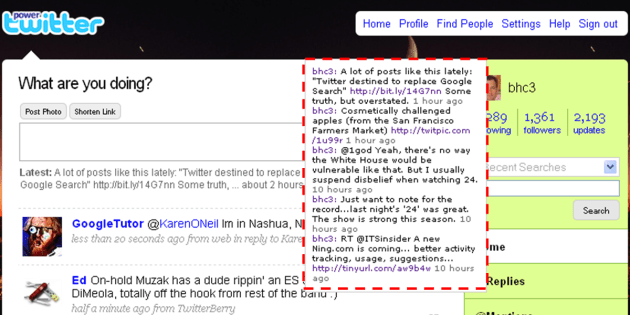
Quick View of People’s Last 5 Tweets

Power Twitter also lets you see the last five tweets of people. When you move your cursor over someone’s picture, a hover box appears. The hover box shows the last 5 tweets of that person. Here’s what it looks like (I added the red dotted line to highlight):

power-twitter-last-5-tweets

A very nice way to get a quick look at what someone is up to.

Continual Innovation

Power Twitter isn’t done innovating either. One of the items listed with the latest release is:

added foundations for new upcoming features

Looking forward to new features in the future. If you want to get more from Twitter, I recommend installing Power Twitter.

*****

See this post on FriendFeed: http://friendfeed.com/search?required=q&q=%22Power+Twitter+Gets+More+Powerful+with+Latest+Release%22