FriendFeed Tags Make Your Stuff Findable

A theme I come back to repeatedly here is that FriendFeed will be a terrific platform for research and discovery. In fact, for this purpose, FriendFeed gets better the more people use it. That’s a contrast from the information overload meme that has emerged, in which too many friend updates overwhelm people.

Another way to put it: “Research” FriendFeed versus “Friends’ Updates” FriendFeed.

A good point of comparison for Research FriendFeed is Google. Google is the first stop for most people when they want to find information on something.

A key difference between FriendFeed and Google is that Google indexes all the content on each page. A Google search will go deep into a web page’s content. FriendFeed has only limited information in each update:

  • Blog or article title (blog post, del.icio.us, Google Reader, Reddit, etc.)
  • 140-character message from Twitter
  • Name of the Flickr photo
  • Etc.

This puts a lot of pressure on the title of the article to well-represent its content. Many times it does. But more often than not, the article is richer in information than the title can convey. Also, contorting your writing – including the title – to maximize search effectiveness is just a bad move. Bad for writing, bad for reading, bad for authenticity.

These two dynamics – lack of full content, incomplete information in the title – call for innovation within the FriendFeed world.

Where will that innovation be? FriendFeed comments.

Comments are free-form, and easy to add. And they’re part of the FriendFeed search index. If a good conversation erupts around an activity feed, those comments can be helpful for searches. But the conversation may not hit the mark either. And the majority of updates do not have a rich conversation around them.

As the author of a blog post, you may want to take a more active role in whether your content shows up in searches on selected terms. May I suggest tagging as an answer here?

In a comment, simply type ‘tag:’, followed by any tags you’d normally use. Using the “tag” prefix lets everyone know that it’s not a conversational comment. It’s a metadata comment.

Here’s an example. I recently wrote a post called, “Innovation Requires Conversations, Gestation, Pruning“. The article can apply to any general environment where innovation occurs. However, the focus of the post is really on employees inside companies. Internal blogs can be powerful centers for incubating innovation.

The post has a strong Enterprise 2.0 theme. Yet the title of the post doesn’t tell you that. So I went into the comments section for the FriendFeed blog post update, and added this:

tag: enterprise 2.0

Sure enough, the post now shows up in a search for ‘enterprise 2.0’. It also showed up in my RSS feed of ‘enterprise 2.0′ updates from FriendFeed.

Not everyone will bother with tags, of course. But tags are mighty useful things. If you create content and want to make sure it’s findable, tags are a good strategy to make sure it’s “findable”.

And this idea extends to adding your own tags to others’ content. You could create your own tags to associate to content you like and want to track.

And tags help others understand the context of the content.

This post may be a bit early. But it is something to think about in a future where FriendFeed is the third leg of research: Google, Wikipedia, FriendFeed.

*****

See this item on FriendFeed: http://friendfeed.com/search?q=%22FriendFeed+Tags+Make+Your+Stuff+Findable%22&who=everyone

New Kid on the Shortened URL Block: is.gd

Quick post. I’m seeing more long URLs shorted with the service is.gd. I, like most people, use tinyurl.com to shorten URLs. It’s great. But if you’re posting a URL on Twitter, those extra few characters in a TinyURL eat into your 140-character limit.

is.gd goes even further. Here’s an example comparing the two services:

Blog post: FriendFeed RSS Is a Fantastic Discovery Tool

Full URL: https://bhc3.wordpress.com/2008/04/05/friendfeed-rss-is-a-fantastic-discovery-tool/

  • 82 characters

TinyURL: http://tinyurl.com/6qhk4n

  • 25 characters

is.gd: http://is.gd/7oc

  • 16 characters

So there’s a pick-up of 9 characters via is.gd. Can be quite valuable on Twitter, eh?

It doesn’t have a toolbar button, which makes converting URLs really easy with TinyURL. That’d be a nice addition.`

For a nice read on several different URL shorteners, check out Carlo Maglinao’s post on TechBays.

*****

See this item on FriendFeed: http://friendfeed.com/search?q=%22New+Kid+on+the+Shortened+URL+Block%3A+is.gd%22&public=1

Social Media Overload: Be Smart About It!

Complaints about social media information overload remind me of alcoholics griping about all the drinks they’re being served. It’s not the bartender! It’s you!

For instance, TechCrunch’s Erick Schonfeld writes today about information overload. The post got a lot of play. And it’s instructive that Erick’s post was an outcome of using the desktop client Twhirl to manage all his Twitter and FriendFeed updates. Apparently Twhirl and AlertThingy are in some sort of desktop feed arms race (Sarah Perez coverage, RWW). Yup – you can always be “plugged in”.

So what’s the answer for information overload? Here’s what I’m doing for FriendFeed.

Prudently Add FriendFeed Subscriptions

I’m still adding people to my FriendFeed subscriptions. It’s still early, and I’m enjoying the flow of updates. Before I add a subscription, I take a look at each person’s activity streams. If the streams look like something I’d like to follow, I subscribe. If not, I hold off. Pretty basic, unoriginal policy eh? Yet it does cut back on the stuff you don’t want.

Strategy: subscribe to that which will interest you to reduce the noise factor

Serendipity

There aren’t enough hours in the day to constantly monitor the flow of activity through FriendFeed. I’ve got a day job plus kids that keep me plenty busy. So I check in on FriendFeed only occasionally.

This means I’m missing plenty of updates. But I do enjoy what I can see. I call this serendipity. The discovery of information at a given moment in time. That’s still a pretty good experience with FriendFeed.

Strategy: embrace serendipity, recognize you can’t possibly consume all updates

Focus on a Few Specific People

When I do have time, I will look at the activity stream for specific people to whom I subscribe. I’ll go to their profile and catch up on things I missed. I couldn’t possibly do this for everyone I follow, but I can do it for a few.

Strategy: closely follow the updates of only a few select people

Create an RSS Feed for Updates Matching Your Interests

FriendFeed is a fantastic research and discovery application. With a bit of a hack, you can create RSS feeds of FriendFeed updates that match pre-selected search criteria. For instance, I follow FriendFeed activity streams with the term “enterprise 2.0”.

This way, I stay on top of updates that interest me without having to monitor everything. And RSS is persistent, centralized, and easily viewable.

Strategy: use RSS to follow updates on topics of interest to you

Careful with AlertThingy and Twhirl

Installing AlertThingy or Twhirl as desktop clients makes FriendFeed streams constantly visible. If you’re already suffering from information overload, this is the equivalent of an alcoholic strapping on a CamelBak filled with bourbon. Access is just a sip away.

These apps remind me of the Bloomberg machines used by equity traders. Traders need to be constantly on top of the news. Missing key information by just one minute can cost them big dollars as the market moves quickly.

Are activity streams that important? No – unless you’re one of the big-time professional bloggers who needs to break, or react to, a story quickly. Otherwise they’re just too distracting and contribute to the information overload. As Mark ‘Rizzn’ Hopkins of Mashable writes (about Twitter, but also applies to FriendFeed), That’s Why It’s Called Work. If They Called It Twitter, They Wouldn’t Pay You.

Strategy: don’t install or at least occasionally turn off AlertThingy or Twhirl

That’s what I’m doing. What are your strategies for managing the social media information deluge?

*****

See this item on FriendFeed: http://friendfeed.com/e/e4953d64-e268-dc82-cb25-094ba338b49d

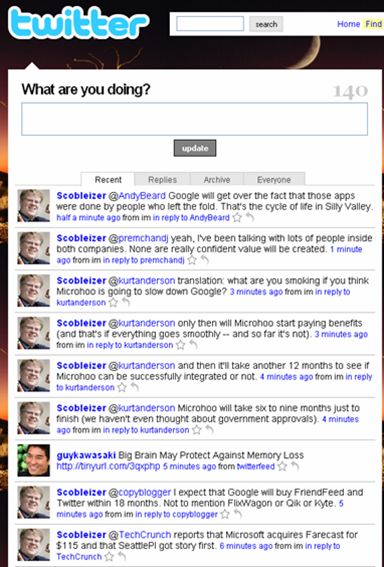
Scoble the Twittering Machine

TechCrunch post:

Even Robert Scoble, the biggest Twitter whore on the planet who follows 21,000 people and receives one Tweet per second, can’t deal with it anymore.

My Twitter web page a few minutes ago:

*****

See this item on FriendFeed: http://friendfeed.com/e/202b3509-f2d5-e945-5cc7-eb427992c7f2

Social Media: Lighter Beats Heavier Every Time

www.waystupid.com

Interesting tweet from Stanislav Shalunov regarding SocialThing:

Asking for my passwords makes SocialThing sound like a phisher. Won’t use for now. http://tinyurl.com/4dquxn

His tweet expressed something that I’ve been noticing for some time. I am gravitating more and more to the “lighter” interaction social media apps.

What is “lighter”? It’s the flick of a wrist. Enter text + submit. One-click subscriptions. Here are three comparisons, including the controversial one of aggregator comments versus direct blog comments.

Twitter vs Facebook

Facebook is heavy. To build out your network, you have to:

  • Invite others
  • Request a connection and wait for the response

These processes make a lot of sense for what Facebook is about – true relationships. When your friend invite shows up in the other person’s inbox, what’s their reaction? That’s the key to maintaining the integrity of true relationships there. I have turned down friend requests there from complete strangers. It’s why I’m comfortable blogging about my kids there but less so elsewhere.

And it inhibits using Facebook for me.

Twitter’s model makes social network set-up a breeze. Find someone you’re interested in, click “follow”. Done. But Twitter does support Facebook-like controls:

  • You can block specific individuals
  • You can set your updates to be private, only available to those you approve

Most people just leave their subscriptions wide open on Twitter. Which is great for the user experience. I have made connections on Twitter that I would never have made on Facebook.

The other thing that’s easier – communications. I’m a voyeur a Twitter, jumping in when I want. I just use the @sign to respond to someone, or the occasional direct message . Facebook’s status updates post to the newsfeed and a few are shown on your home page. But those aren’t really conversations. To talk with someone, you use the Facebook message system. Again, that’s really cool – you don’t need to remember email addresses. But it also is heavier.

No surprise Twitter’s been growing like a weed.

FriendFeed vs SocialThing

FriendFeed and SocialThing have a lot in common in that they show the activity streams of friends across different services. But there are key differences, which are well summarized by Mark Krynsky at the Lifestream Blog.

Creating your network: FriendFeed has the lightweight Twitter model. Find someone, subscribe. Done. SocialThing imports the friends you’ve made on each of the services. This is also light. But you can’t add new users directly inside SocialThing. You’ve got to go to the individual service, add the friend and then SocialThing is updated. This is heavier than FriendFeed.

Importing your services: FriendFeed asks for your login ID for a service (Twitter ID, Flickr ID, del.icio.us ID, etc.). enter it. Done. Your updates start flowing. SocialThing wants your ID and password. This enables SocialThing to send updates back down to each service. But as Stanislav expressed above, getting passwords is heavy.

Interaction on the originating services: SocialThing lets you respond to a friend directly back on the originating service, like Twitter. FriendFeed is adding this capability for Twitter, and perhaps others. But if you want to comment directly on the originating service, for the most part you have to leave FriendFeed and go to that service. Socialthing’s support for direct comments is the lighter experience.

It’s still early. But FriendFeed has the edge in the “lightness wins” battle right now.

Friendfeed Comments vs Blog Comments

Man, do I really want to write this? Well, here goes. Comments on FriendFeed are a lot lighter than those on blogs. Which means it’s an easier experience.

Blog comments have these qualities:

  • You want to be pithy in your comment. The blog post addressed a weighty topic, and you want to comment in keeping with that.
  • You enter your name, email and website each time
  • You might encounter a captcha
  • The blogger may hold comments in reserve until they’re reviewed
  • If you mess up, you can’t change your comment

Meanwhile, on FriendFeed, comments have these qualities:

  • You can comment pithily
  • You can write more of a meta-comment about the post
  • You can talk with others via comments
  • You can click ‘Like’ to provide a quick, simple comment about the blog post
  • Comments are easy. Click Comment. Enter text. Click Post. Done.
  • You can edit or delete your comments

This doesn’t mean commenting on blogs isn’t worthwhile or valuable. Reaching out to the writer is an important part of the participatory ethos of blogging. Your comment also breaks the ice on a post, making it easier for others to join in.

But there’s no denying the lightness of comments on FriendFeed. Expect their volume to increase.

I’ll predict that FriendFeed comments are those that bloggers never would have gotten on their blogs in the first place.

So the lightness of FriendFeed comments won’t steal from bloggers’ on-site comments. They’ll add to them. And that’s a good thing for the conversation.

What do you think?

*****

See this item on FriendFeed: http://friendfeed.com/e/92524b04-4b9d-c0db-e09e-931c4f3e5084

The Eight People You Meet in Blogging

A couple big unrelated Techmemes of this past weekend are actually two sides of the same coin.

First, there was the heavy discussion around Shyftr and the loss of a blogger’s comments. The comments exist elsewhere, and bloggers lose connection with their readers. Second, there were a lot of opinions about Andrew Baron’s sale of his Twitter account, and its 1500 subscribers. The blogger is not bemoaning the loss of connecting with his readers; indeed he’s actively encouraging it!

Here’s what these two stories made me ask: Just why are you blogging?

Blogging is a quite personal pursuit, and we all have our own reasons for doing it. Feeling a little ambitious, I sat down and came up with eight different reasons that people blog. The eight people you meet blogging. Here they are, and they are not mutually exclusive.

1. It’s a numbers game

There are a lot of ways to get readership. For some, increasing this number is the be-all, end-all. Blogging numbers are the point, not an outcome of some other reason. Case in point: Faisal Anwar. He writes about his efforts to maximize StumbleUpon traffic to his site. He figured out that funny pictures drive StumbleUpon positive reviews, leading to more StumbleUpon visits. So he loaded his blog posts with funny pictures, to the point of losing sight of his blog’s focus:

Unfortunately for me, I pumped in too much picture to my site almost every day until it became a humor site (that not my original intention).

2. One-way communication

Blogging is a forum for mass dissemination of information and opinion. Probably the best way to think of this type of blog is as a marketing vehicle. Yeah, some response back to you is OK. But that’s not the real purpose now, is it? The larger the number of followers, the harder it is to maintain connections with them.

Andrew Baron’s sale of his Twitter account…what do you think the purpose of his Twitter micro-blog was?

3. Provide valuable information to others

This is probably the most altruistic of blogs. The American Cancer Society maintains Dr. Len’s Cancer Blog. Consumer Reports maintains a safety blog. These blogs can be a bit freer and more opinionated about information, making them more engaging than just static articles.

4. Make money

A time-honored pursuit, making money. Ad money, to be specific. Engadget, TechCrunch, ReadWriteWeb, Mashable. Check out their ads – they have a lot of them. Eric Berlin even notices that Mashable has a lot of ads. These blogs put a premium on speed, frequency and exclusives. And a good dollop of opinion sure to drive page views.

5. Establish your reputation

A perhaps overlooked aspect of blogs is that they can establish your reputation out in the world. Seth Godin asks Why bother having a resume? He argues that instead of a resume, you should have “a blog that is so compelling and insightful that they have no choice but to follow up.”

A friend of mine at a law firm told me about a 3rd year associate who blogs. His intellectual property law blog is read by a number of industry folks, and some senior partners in New York have reached out to him with questions. Talk about establishing your reputation!

6. Influence your industry

Michael Arrington. Robert Scoble.

7. Learn by doing

This is why I started this blog. I’d been primarily at the lowest level of the Web 2.0 Jedi ranks. I then took a job working on enterprise 2.0 product marketing, and knew I had plenty to learn. So this blog is a two-fer. Blogging itself has been a tremendous experience that I really enjoy. And I blog about a lot of Web 2.0 topics. This has forced me to really grok these concepts.

8. Learn by connecting

The interactions on your blog posts can be incredibly valuable and rewarding. You learn so much about how others think. The loss of this connection robs the blogger of feedback about his or her thinking, and that of others. And thus loses an opportunity to grow. This last reason may have been the biggest one to fuel the Shyftr debate over the weekend.

What do you think? Fair assessment? Did I miss any other reasons?

*****

See this item on FriendFeed: http://friendfeed.com/e/111f0439-bdf0-d88b-9082-c561b48215a1

Bitchmeme Recap: What Happens on Shyftr, Stays on Shyftr

Background: Shyftr is a service that pulls the entire feed of a blog into its site, and lets users comment on the post within its site. The comments never make it back to the original blog. What happens on Shyftr, stays on Shyftr.

The spark: Louis Gray (who else?) wrote about Eric Berlin’s concern over the comments that had accrued on Shyftr, not his own site. A legitimate beef, and one that clearly generated some heat.

The bitchmeme: Some liked the idea of posts and comments being anywhere. Some didn’t. Some liked it. Some didn’t. Some…uh, well…you get the picture. I will note that Tony Hung of Deep Jive Interests became the poster boy for anti-Shyftr sentiment.

The Scoble Factor: The preeminent blogger of our time, Robert Scoble, weighs in with the post, Era of blogger’s control is over. He’s gung-ho about Shyftr and all ways by which his content is distro’d. Now based on Scoble’s preferred use of social networks, this ain’t surprising. He sets up our man Tony Hung as the old-school thinker about controlling content.

Tony Hung: Comes out swinging against Shyftr. Says the aggregation of comments away from the originating blog is wrong. To make his point, Tony proceeds to single-handedly post a comment on every single blog that weighed in on the issue. Tony, that must have taken forever. Next time just put up a comment on one of those aggregator services…

The scorecard: On the question of whether Shyftr has stepped over the comment line or not…

  1. Eric Berlin = yes
  2. Louis Gray = no
  3. Robert Scoble = no
  4. Tony Hung = no
  5. Pauk Glazowski (Mashable) = no
  6. James Robertson (Smalltalk Tidbits) = no
  7. Mark Evans = no
  8. Mathew Ingram = yes
  9. Ross Dawson = yes
  10. Alexander van Elsa = no
  11. John McCrea = no
  12. Frederic (Last Podcast) = no
  13. Mia Dand = no

So that makes the vote…two + three…carry the one….

Shyftr sucks = 3

Shyftr is OK = 10

Denouement: Shyftr announces that it will no longer carry the full feed for any blog post that has conversations “outside the reader”. I think they’re saying no more full feeds? Frankly, it’s a little unclear to me what they’re saying, but I’m not active on Shyftr. Louis Gray gives his opinion on this change here. I’ll probably have to check Shyftr out in more depth sometime.

The final word: Dave Winer provides a helpful definition of “bitchmeme”:

A Bitchmeme is something that happens on weekends when new stories are in short supply so ideas that otherwise would be buried on Techmeme rise to the top. Usually they’re people complaining about something or other which is why they’re called Bitchmemes and not Happymemes or Sarcasticmemes.

*****

See this item on FriendFeed: http://friendfeed.com/e/676399dd-b448-8c93-4970-a9b2b0ac46e1

Becoming a Web 2.0 Jedi

Thinking about the ever deeper levels of involvement one can have with Web 2.0 apps and the Web 2.0 ethos. Came up with this chart.

Thoughts?

*****

See this item on FriendFeed: http://friendfeed.com/search?q=%22Becoming+a+Web+2.0+Jedi%22&public=1

Imagining an Email Social Network

Email has been proposed as a nearly ready-to-go social network. Just how would that work?

In September 2007, Om Malik asked Is Email The Ultimate Social Environment? And in November, Saul Hansell wrote, Inbox 2.0: Yahoo and Google to Turn E-Mail Into a Social Network. Both looked at the idea that email providers have most of what was needed to build their own social networks. There is potential there, but it’s not a slam dunk.

The Social Network Stack

If an email system is to become social, it needs to address the social network stack. To keep things simple, let’s assume there are three parts to the social network stack:

  1. Self-Expression = who you are, what you like, what you’re doing
  2. Relationships = people connections, of all different types
  3. Interactions = how you engage your network

Within each part, there are components that define the experience of the social network. This diagram describes those:

Self Expression: Email Needs a Profile Page

There isn’t a profile page in email systems. You log in, and you see your email. Adding a profile page really shouldn’t be too hard for Google or Yahoo. Even issues of privacy for the profile page are quite manageable for the two Web giants.

Apps on the profile page? Google’s got iGoogle widgets and OpenSocial. Not a problem.

Yahoo has demonstrated with its durable portal that it can pull together information from different sources. Wouldn’t be too much of an issue for them either. According to the New York Times’ article, Yahoo’s Brad Garlinghouse already has an idea for the profile page:

In this vision, people have two pages: a profile they show to others and a personal page on which they see information from their friends as well as anything else they want, like weather or headlines.

Relationships: They’re in the Emails, But Handle with Care

This is the biggest advantage the email providers have: they know your relationships. They’re sitting on a mountain of information about people’s connections to others. As the New York Times’ Saul Hansell wrote:

Web-based e-mail systems already contain much of what Facebook calls the social graph – the connections between people.

This is the killer advantage Yahoo and Google have over other social networks. They know your connections right off the bat. And that’s not all. They know how often you email those contacts.

Imagine how this could work:

  • Email frequency is used to set your initial relationship level with someone else. Lots of recent back-n-forth means strong bond. Lots of one-way emails to you means it’s a company. Few two-way emails means you have a weak relationship.
  • Your address book categories – personal, work – can become relationship definition metadata.
  • If you don’t have your email address book organized by relationship types, the email provider analyzes the words to categorize the relationship. Romantic, friendship, professional. Yes, this is Big Brother scary, but Gmail already does this to display ads. Still, if not done right, this might backfire big time.

I do wonder how much value this really has though. Email address books are used to kick start your enrollment into social networks like Facebook. It’s not hard to import these.

The assessment of your email connections – strength and type of relationship – is cool, but don’t you know that already? Arguably, such analysis really is a way to save time on making your own decisions about these relationships. But if you’re engaged with your network, you’re probably going to take control of this.

Subscribe or Dual Opt-In: Twitter or Facebook? FriendFeed or LinkedIn? The recent stars on the social apps scene have a subscribe model. Your can read the updates of people on Twitter and FriendFeed, just by declaring that you want to. Pretty wide open. But a key factor here: when you join Twitter or FriendFeed, you do so knowing that anyone can read your updates. People with whom you email never had that expectation. So every user either needs to opt-in to having their updates read by their email contacts, or you must send a friend request to whomever you want in your social network.

Type of Relationship: Friend, common interest, professional? This is another one that requires thought. I’ve argued previously that different social networks are good for different types of relationships. Being a one size-fits-all is not easy. It requires a decent amount of management for the user: do I share my kids’ pictures with my colleagues and the people in my Barack Obama 08 group? Dedicated purpose social networks make managing the different aspects of your life easier. Otherwise, all your co-workers will know your political preferences, party pictures and relationship status. Email providers have all of your email contacts; they need to either pick a focus for their social networks or let users create their own types.

Interactions: Watch Those Activity Streams

Most of the Interaction stack is well within the range of Google and Yahoo. Yahoo’s been in the groups business for a long time. Google relaunched the JotSpot wiki as Google Sites. A wiki can be a good group site.

Apps were already discussed under self-expression. Messages? Of course – this is email.

Activity updates are an interesting concept. The biggest current activity in email apps is…email. But I’m not sure those qualify as updates you want broadcasted:

Should emails be shared?

Emails are pretty private, aren’t they? Not really something people will want to broadcast out to their social network…

Google and Yahoo could integrate activity streams from other parts of their social networks pretty easily.

So What Are Email’s Advantages as a Social Network?

I’m not sure there are intrinsic advantages email enjoys that make it superior as a potential social network. Rather, it has these two user-oriented advantages:

  • People wouldn’t have to go to a lot of trouble to set them up. Just present them with the opportunity when they log in to their, with very few clicks or decisions initially.
  • We tend to check our email daily, hourly. So recurring engagement with your social network is a lot easier than with destination social networks.

That being said, Facebook, MySpace, LinkedIn, Bebo, Ning and FriendFeed have a tremendous head start and brand. They also have clearly defined, different experiences.

If they choose to roll out their own social networks, Google and Yahoo will start ahead of the game. But success won’t be because of the email. It’ll require a differentiated social network experience. Just like anyone else entering the space.

When Your Blog Is LouisGrayCrunched…

Start-ups can go through the Slashdot Effect, the Digg Effect or be TechCrunched. Well, five blogs were LouisGrayCrunched on yesterday.

Louis Gray is a top blogger in the tech world. He covers a lot of good tech topics, perhaps best known for his early and bullish coverage of FriendFeed. Which has borne out quite well. But it’s not like he just plopped some cool blog posts and the world beat down his door. He was like most of us little bloggers! See his post here for background. Money quote: In early 2007,

Writing for my seeming one-person audience was at times frustrating.

Through perseverance, skill, finding his blog’s voice, and a bit of Scoble intervention, he slowly emerged over time to the big time blogger he is now. Basically, he figured it out.

So it’s no surprise he took the trouble to recognize 5 blogs yesterday in his post Five More Blogs You Should Be Reading, But Aren’t. See, he’s been there: “Not being one of the Silicon Valley elite, I’ve always had a soft spot for ‘the little guy’.” This attitude extends not only to promising start-ups, but to bloggers as well. He’s giving back to the blogger community.

The five blogs he recommended in his post:

  1. Charlie Anzman / SEO and Tech Daily (anzman.blogspot.com)
  2. Hutch Carpenter [uh..me] / I’m Not Actually a Geek (bhc3.wordpress.com)
  3. Eric Berlin / Online Media Cultist ( onlinemediacultist.com)
  4. Mia Dand / Marketing Mystic (marketingmystic.typepad.com)
  5. Carlo Maglinao / TechBays (techbays.com)

I didn’t know any of these folks before his post (see! even us little guys don’t do a good job of finding our peers!). But after being listed with them in his post, I suddenly feel some fraternity with them. The Louis Gray April 2008 Five.

I’m now a subscriber to my four other cohorts, via Toluu of course.

Some other notes from being LouisGrayCrunched…

Direct Site Hits. This blog hot six times its usual volume. It got 161 hits for the day directly from Louis’s site. Just as interesting to me were the FriendFeed hits – 41 of them. People are checking out Louis’s FriendFeed for discovery of new stuff. And there was nice discussion around his various activity streams. The blog also got a push from being one of the 7 fastest growing blogs on WordPress for several hours. 79 hits actually. Didn’t realize folks checked out that category so much.

Syndicated Site Views. WordPress doesn’t keep stats of RSS subscribers to your blog. But it does track syndicated views for each post. My top blog post for the day was The Best Blogs You’re Not Reading? Toluu Knows. Half of the post’s 250 hits were via syndication. I assume some of that syndication is through an RSS reader. A blog post about subscribing to new blogs ends up being viewed by a lot of new subscribers…coincidence?

The Rush. I won’t deny it. There was a rush to today’s action. I imagine big-time bloggers – like Michael Arrington, Robert Scoble – are interested in the mass traffic they get, but do not get a daily rush from seeing it. But if your little blog gets a one-day explosion of traffic, then yeah, you’re thrilled.

The Expectations. I do feel a bit different now than I did yesterday. A vague sense of responsibility to keep up the standards here. Louis actually expressed a similar sentiment in a blog post. It’s not a problem. I’m sure I’ll have some posts that folks will really like and a few duds too . Stick with me – it’ll be worth it.

Blogging Karma. In a post from a few days ago, The First 20 Blog Posts Are the Easiest, I talked about blogging karma:

Share the blogging love. Add new blogs to your RSS reader. Add links to interesting posts on other blogs. Post on others’ blogs. Add others’ posts to LinkRiver, del.icio.us, StumbleUpon, etc. And do it for the smaller bloggers, not just the A-list. This is something I need to improve on.

Thanks for sharing the love Louis.

<div style=”display:none;”>1548549564</div>

The Best Blogs You’re Not Reading? Toluu Knows

Toluu has entered the ever-growing recommendation space with something different: blog recommendations. And the service does a good job of finding blogs you’ll like.

I love the RSS experience of reading various blogs, loading up my reader with a lot of them and checking updates several times a day. So I was happy to have the chance to try this out. The service is new, launching in mid or late March. Louis Gray has a good post detailing its initial launch. Here’s a description of how it works from the Toluu site:

  • After joining, you will be prompted to import your feeds. We have many methods of importing your feeds such as OPML import, URL input, and a nifty bookmarklet.
  • Toluu will do some crazy math to find others in the system who have similar tastes as you.

One thing founder Caleb stressed on his blog: “Toluu is not another social network. I repeat Toluu is not another social network.”

So with that intro, let’s look at the user experience and how Toluu rates versus competitors. First, a brief discussion of recommendations.

Quick Note on Recommendations

The recommendations space is a hot area right now. For instance, Loomia, which recommends web content based on what your friends read, just raised $5 million. Amazon.com has been a real pioneer here with its “customers who bought this item also bought…” recommendations.

Ideally, recommendations are exactly matched to your interests. That’s pretty much impossible, but recommendations engines will employ proxies to get a bunch of recommendations that are close to your interests. And hopefully one or more click with you.

There are myriad ways to approximate your interests, and the world of recommendation engines is full of different methodologies. The key thing for most of them is (i) the amount and quality of information about your preferences, and (ii) the amount of population data available to build out recommendations. Toluu uses your OPML file of feeds, which is a very good source of data about your preferences. And Toluu improves as more people participate.

Finally, I’d want a recommendation service to mix highly popular items that I may be missing, as well as less popular items that are relevant to me. That latter category is the real jewel of a recommendation engine, and its the hardest to get right.

Toluu’s Organizing Principle: Match Percentage

Toluu’s primary organizing basis is its Match %. As Caleb mentioned above, this is their “crazy math” secret sauce. After you log in, you click on matches. A list of 5 people are displayed, sorted according to the Match %. The first 5 people you see are your highest matches. Each subsequent page shows the next 5 highest rated people. Each person has 5 feeds listed beside them. These “feeds you might like” are the top 5 recommendations per person.

I had 60 people in my list of matches. My highest match was at 91%. The bottom of the list was guy with whom I matched at 31%.

As I looked through the people that I matched, I noticed a trend. The best Match %’s were with people who had fewer blogs. The lower Match %’s seemed to be with people that had large numbers of blogs. I pulled together some numbers for 30 people to see if this was true. My top 10 matches, 10 people that fell just below the 50% Match %, and my bottom 10 matches. I then graphed it:


Sure enough, the higher the number of feeds for a given user (red line), the lower the Match % (blue line). I’m not quite sure what to make of that. It may be an outcome of the math – the match percentage is lower just because a user has so many feeds there’s no way to match. Or maybe I don’t match up well with the hard-core RSS addicts. I dunno.

One effect is that people who go deeper in their blog interests will fall lower in my matches. Assuming users don’t go too far down in viewing their matches, this could reduce the chance for finding those golden nuggets of less popular, but valuable blogs.

Top Toluu Recommendations Can Be Limited

I cruised through my people matches, and read the 5 “feeds you might like” for each one. There is a high degree of commonality on the recommendations. The 5 recommendations seem to use popularity as an primary input. And that makes sense. You’re providing a service, and popularity means somethings been deemed worthy by the public at large. Start with that!

Again, I looked at the top 5 recommendations for the 30 people I analyzed above. That meant I was looking at my top matches, my mid-tier matches, and my lowest matches.

There wasn’t a lot of variation in the top 5 recommendations for people in the different groups. Micro Persuasion, Engadget, Lifehacker, a couple Google company blogs and Boing Boing consistently showed up, regardless of the Match %.

This narrowness in the recommendations was something that Allen Stern at CenterNetworks wrote about. If you see a recommendation once, you’ll tend to see it repeatedly.

The Rubber Meets the Road: Toluu vs. Google Reader vs. NewsGator

So all that’s well and good. But how does the service perform? I decided to see how Toluu worked relative to two big established market players: Google Reader and NewsGator.

Google Reader has a Discover function. Here’s how it’s described: “Recommendations for new feeds are generated by comparing your interests with the feeds of users similar to you.” Sounds like Toluu, doesn’t it?

NewsGator has a Recommended for Me function: “NewsGator has analyzed your current subscriptions and post ratings, and recommended these new feeds for you.” Doesn’t say how that’s done.

I compared the top dozen recommendations for each of the three services. To assemble my top 12 for Toluu, I calculated the number of times the different blogs appeared in the 30 people I analyzed above. For instance, the blog Micro Persuasion appeared in 19 of the 30 matched users, making it #1. The table below shows those top 12 for each service:

One thing that immediately was apparent. No blog appeared more than once! Three different sets of recommendations and no overlap among Toluu, Google and NewsGator. Incredible!

I then checked out the 36 different sites. After a quick scan of each one, I decided whether it was one I would add to my RSS feeds. Those are highlighted in yellow above. NewsGator’s recommendations fell flat with me. They were too hard-core tech. Several had blog posts with lines of code on them.

Google Reader’s recommendations were the most relevant for me, with 5 that I liked. I subscribe to a number of Enterprise 2.0 blogs, so blogs like Intranet Benchmarking Forum and Portals and KM were good.

But Toluu did well here. The crowd was right – I like Micro Persuasion. Webware.com and Web Worker Daily are also interesting. There are a lot of Google blogs that show up in the recommendations. Maybe a bunch of Google employees are trying out the service?

More people joining Toluu will probably improve this some. At least push the Google blogs off the top recommendations. But there will be some reinforcing behavior as people join. Sites like Engadget and Lifehacker have large followings, and I’d expect a number of new folks joining Toluu to have those already.

Serendipity: Looking at My Top Matches’ Other Blogs

For each person in your match list, you see all the blogs they have that you don’t. It’s here where some of those golden nuggets, and even better known blogs, can be found. It takes work. You need to click each person, and then click each blog. There’s a limit to how much of this I wanted to do.

So I only looked at the feeds of my top 3 matches. And, I did find more blogs I’m going to add to my Google Reader:

  • Marshall Kirkpatrick
  • Adam Ostrow
  • BubbleGeneration
  • SocialTimes.com
  • mathewingram.com/work

Toluu Assessment = These Guys Are Doing It Right

I picked up 8 new blogs to follow courtesy of Toluu. That’s no small accomplishment. And considering they’re just getting underway and don’t have a ton of users yet, they compete quite well against Google.

I haven’t touched on other features of Toluu has. You can favorite a blog in your collection. I assume this helps the matching algorithm? You can track the activities of others to see what blogs and contacts they’re adding. But remember…this is not a social network!!!

Things I’d Like to See

I’d like to have an easier experience seeing the feeds for my top matches. Since there’s such a commonality in the top 5 for each of them, it would help me discover other blogs if I could see several of my matches’ unique blogs at once.

Show the top ten blogs recommended for me based on my top 10 matches. Criteria = frequency of a blog’s recommendations, with overall popularity as a tie breaker.

I’d like to get a little more info about some of these blogs in a summary fashion, without having to click each one. Maybe the headlines for the most recent 3 posts, or top tags of the blog?

But all in all, a very nice start for Toluu. Thumbs up here. Now I’ve got to go scan my RSS feeds.

FriendFeed RSS Is a Fantastic Discovery Tool

FriendFeed will be one of the best research & discovery tools there is. I don’t say that lightly. Here’s why.

Jeremiah Owyang has a post up today, My Essential Twitter Tools. He lists seven things he uses to get the most out of Twitter. Among the items are these:

  • Search: Use Tweetscan to see who’s talking about you, your brand, or a topic you’re interested in. For example, I may not just search on “jowyang” but also on “owyang” as some don’t use the full name.
  • Aggregation: Friendfeed puts all of our RSS content onto one page, making it easy to see from one glance (rather than going to different properties) and you can even reply from friendfeed to different tools. It’s smarter to organize around people, rather than tools.

Tweetscan is a great resource for finding out information on a topic. You see what others are talking about and passing along for a given topic.

Well, FriendFeed is even better. On FriendFeed, people share their Twitter posts, the same content that Tweetscan searches. But they share many other application there as well.

  • Micro posts: Twitter, Jaiku, Pownce, Google Talk,
  • Websites, blogs: new blog posts, StumbleUpon, shared items on Google Reader, del.icio.us, ma.gnolia, Digg, Reddit
  • Presentations: Slideshare
  • And lots of other sources

All of these content sources are searchable. And they all have an aspect lacking in many search and discovery mechanisms: human filtering.

When someone takes the trouble to save or distribute content, that content has already passed an initial test. Does it have value to someone? If you save something to del.icio.us, that is your endorsement of its value. Add it to LinkRiver? Means you found the web page interesting. Sharing a blog post on Google Reader means the blog post held value. Recommend a book on Goodread? You get the picture.

The conversations that are captured are also incredibly valuable. They give insight into people’s thinking around a subject. They hold data that is useful. Many times, the micro posts include a reference to content that someone found valuable, even if that person didn’t bother to bookmark it to del.icio.us or share it on their Google Reader.

The implicit endorsements of content – via different services or conversations – are a tremendous benefit to someone doing research.

There’s also plenty of original source content that’s findable. Slideshare presentations. New blog posts. Videos. Photos.

Finally, from the recommendations, conversations and content, you can find people who share your interests. You may want to do the social thing and add them to your FriendFeed network. Or you can check out what other sites, content and conversations they have in their FriendFeed to potentially find other useful information. Heck, even reach out to the person to discuss a subject.

Adding RSS to this whole thing really powers it. You don’t have to go to the FriendFeed site to do a search. You can have new content delivered to your RSS feeder.

RSS? FriendFeed doesn’t have RSS?

Mark Krynsky over at Lifestream Blog has a wonderful hack that turns FriendFeed search results into an RSS feed. Click here to go his post.

I won’t stop using Google to search for a subject. But for leveraging the human filtering, I’ll use FriendFeed search. And for ongoing knowledge discovery, even when I’m not actively searching for a subject, I’ll use FriendFeed search RSS.

What do you think? Will FriendFeed become a primary research & discovery tool?

I’m @bhc3 on Twitter.