Proposal to Clean Up the FriendFeed Clutter

FriendFeed is wonderful for giving you so much interesting information. But there are times where the flow of information is excessive and redundant. This occurs when the same the link shows up multiple times for the same user:

  • Post it to your blog
  • Share it on Google Reader
  • Bookmark it to del.icio.us
  • Post it to Reddit
  • Etc…

Eric of Internet Duct Tape blogged about this. And a really good discussion about the clutter occurred here…on FriendFeed. A couple different perspectives:

FF could make this easier and ‘collapse’ multiple items into one i.e. if I share something from Google Reader and bookmark it on delicious, only one item should appear in FF. I wonder if FF is too focused on where we doing things rather than what we’re doing? – Andy Davies

what I’m saying is that, if you add the same links to 2 different services, there’s no need to add both services to FF. Just one would be enough. Of course, if there are things that are unique for each one of them, it’s understandable. – Alejandro S.

Andy wants a technical solution, Alejandro is looking for a change in behavior. I lean toward the technical solution because there is information in the service that the person uses. A save to del.icio.us means the person has a personal interest in it. A save to Reddit means the person is explicitly putting the page “in play” for others to pick up interest. I don’t want to lose that.

I propose two alternatives for reducing the clutter of same-link feeds:

  1. Person-centric: if a user has the same feed more than once, the same-link feeds are aggregated together under a common link for the user
  2. Link-centric: all same-link feeds for all friends appear under a common link

The two alternatives are really different. #1 amounts to a small clean-up mechanism. #2 is more radical. It changes the FriendFeed experience. But perhaps in an interesting way.

Is it more important to track action around the link or the person?

Person-Centric: A Lightweight Cleanup

The “parent” consists of the user + web page title . All user actions that relate to the parent URL are aggregated, as shown below:

Each time a new feed with the same URL is posted by the same user, it’s just added to the list. Note that Tweets with the link are added as well (even with a URL shortener).

This would clean up the feed, but retain the current person-centric nature of FriendFeed.

Link-Centric: Centralized Comments,FriendFeedmeme,

In this scenario, the web page is the “parent” All user actions fall under a common web page link:
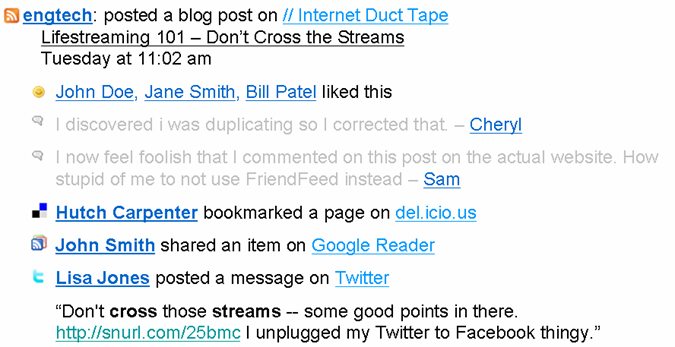
A couple things happen with this approach:

  1. For a given item, all comments are centralized in a single place. This makes the conversation easier to follow. Comments can still be attached to a particular person’s action to retain specific conversational preferences.
  2. The combining of all actions for a single item creates a visual meme, showing how much activity surrounds the item.

These are all feeds and comments you’d see under your ‘friends’ tab. They’re just aggregated.

Person-Centric or Link-Centric?

Is it more important that John found a bunch of different links interesting (person-centric)? Or that John, Susan, Mike, and Cheri found a single link interesting (link-centric)?

What better defines the experience of FriendFeed?

*****

See this item on FriendFeed: http://friendfeed.com/e/f08cbf30-129c-11dd-b613-003048343a40

Video Blog Comments (Ironically) Aren’t Conversational

TechCrunch has added video comments to its blogs, courtesy of Seesmic. Oh lordy. Think you’re feeling overwhelmed by social media? Try following video comments.

Online video has gotten traction as a one-way communication and entertainment vehicle. Is it ready to add “conversation” to its portfolio of uses?

Where Has Online Video Worked?

YouTube is undeniably the success story of online video. And what has been so successful there? Entertainment. Selected hits from amateurs have become mega hits, like the guy playing Pachelbel’s Canon on his electric guitar. The most popular videos on YouTube are professionally produced music videos, as reported by Michael Learmonth at Silicon Valley Insider. My 4 year old is a huge fan of Feist.

This entertainment is very much a one-way experience. They play. You watch.

Online video has also been useful as a communication tool. Google has been particularly active on this front, such as with this video explaining Google Apps.

The training video, again, is a one-way communication.

Seesmic’s Mission: Make Online Video a Conversation

Seesmic wants to turns these one-way communications into conversations among two, three, heck even dozens of people. You post a video, someone posts a video in reply and you post back. Kind of an asynchronous conversation. From the Seesmic site:

Until now, online communication has lacked personality as it’s been limited to text (IM, SMS, email). Now, Seesmic brings conversation alive through video. See and hear people share their experiences straight from their webcams, join in live conversations, and engage in real interactions with real people.

The concept is pretty innovative. As always, the question is whether it makes sense in real world usage.

My Rant About Online Video

I personally do not watch videos online much. If I land on a page that has video instead of text, I usually hit the browser’s ‘Back’ button pretty quickly.

Why? I don’t have time to wait on whether the video will be interesting. After the video loads, you then sit through its latency to see what the person is saying. It’s a crap shoot as to whether the time was worth it. Thus, the Silicon Valley Inside story about professionally produced videos YouTube dominating doesn’t surprise me. You know what you’re getting ahead of time.

Which brings us back to online video comments.

The Blog Video Comment Experience

The implementation on TechCrunch seems to be well-done, based on the video comments of several people. Kudos to Seesmic for making that happen. This is an innovative idea.

Three issues make video comments less conversational overall than basic text comments:

  1. You have no idea what you’re getting when you click a video
  2. It’s hard to reference someone’s comment
  3. It takes too much time

Video comment quality: Variance in comment quality is a well-known dynamic on blogs. It will apply to these video comments as well. This comments here and here on TechCrunch intrigued me…

The big difference is that with text, you can pretty quickly size up the quality with a quick scan. You have to endure much of the online video before realizing it won’t serve up nuggets of insight.

This is a turn off, and it undermines the participative quality of comments. If people aren’t watching your video comment, then you’re not really participating in the conversation.

Referencing comments: Say someone leaves a 60-second commentary on a post. You’re going to have to remember that interesting thing that was said 27 seconds into it. And then you’ll have to rewrite the interesting thing to properly reference it in your text comment. Or in your video reply.

The burden of tracking an audio commentary for response purposes hurts the conversational aspect of video comments.

Too much time: Keeping up with the entire thread of a conversation may require viewing several videos. On the TechCrunch post, I found the time for each of 43 video comments. Average run time = 29 seconds. Median = 24 seconds. The typical text comment doesn’t take 25 seconds to read. So your time investment just went up to stay on top of videos.

And that detracts from the conversation.

Final Word

I’ll admit to sticking through several of the 43 video comments on the blog. There is something to the idea of watching a person speak their comments. The hard part is to know which ones will be worth it. I assume over time, some people would just have a flair for the medium. Regular blog visitors will consistently click their videos.

But the majority of video comments will just be time sucks. There’s probably a real opportunity to implement some sort of rating system on comments, and on people who comment that will help filter out the video noise.

Still, I prefer text comments for the conversation. Learning on my time, not the video creator’s.

*****

See this item on FriendFeed: http://friendfeed.com/e/11b7e37d-c97f-e35c-b7fe-9f1588e3876a

Web 2.0 Inside the Enterprise? Forrester, AIIM Weigh In

Forrester produced a well-covered report this week announcing that Enterprise 2.0 will be a $4.6 billion business by 2013. In my RSS feed of FriendFeed updates containing the term Enterprise 2.0, there were probably a couple hundred related to this report – Google Reader shares, bookmarks, Twitters, etc. Sarah Perez of ReadWriteWeb has a great post about the Forrester report, with dollar figures.

About a month ago, AIIM came out with its own report on the market for enterprise 2.0. It was a work produced in conjunction with the likes of Stowe Boyd and Andrew McAfee.

After reading both of these reports, it’s clear there is a common perspective out there, but some differences worth noting as well. It’s instructive to look at both.

Forrester: Projections Focus

Forrester is paid for its expertise and forecasting. Their reports are well-regarded in this regard. Based on surveys of over 2,200 companies, this report is a forecast of the dominant technologies of Enterprise 2.0. Grounded in the market, fueled by its analysts’ views.

Forrester’s report strongly cleaves the Enterprise world into internal facing and external facing uses.

AIIM: State of the Market Focus

AIIM’s goal seems to be more of an Enterprise 2.0 temperature check of companies today. Surveying 441 company representative, AIIM didn’t try to forecast the future so much as see where companies’ heads are today.

AIIM’s report addresses both internal and external uses, but generally blurs the discussion between the two.

No Unanimous View of Top Technologies

Forrester’s report considers seven different technologies for the Enterprise 2.0 space. AIIM’s report goes much deeper. AIIM’s respondents came up with a much larger set when asked the question, what technologies make up your definition of Enterprise 2.0? To compare the two analysts, I selected the top seven participant responses from the AIIM report. Here’s how Forrester and AIIM show the leading technologies of Enterprise 2.0:

Five technologies showed up consistently between the analyst reports:

  • Social networking
  • Wikis
  • RSS
  • Blogs
  • Mashups

It’s interesting to note the differences between the two reports. Forrester included podcasting as a leading area of spend for Enterprise 2.0. AIIM’s report includes podcasting as well, but survey participants didn’t include it very often in their current definitions of an Enterprise 2.0 platform.

Forrester’s report did not include social bookmarking and tagging, but AIIM did. The Forrester omission probably says something about their view of the dollars to be spent on it.

Forrester included widgets, which is a nod to their strong focus on external uses of Enterprise 2.0. AIIM’s respondents like collaborative filtering, which is the basis for recommendation engines.

A Few Thoughts

Social networking comes in strong on both analyst reports. Forrester has spending here running away from all others by 2013. Call this the Facebook effect (MySpace didn’t seem to inspire the same trend to the enterprise). Generally, Facebook controls its “borders” and has a handle on everything that’s going on. Relationships, groups and activities all occur within the walled garden. Enterprises share a lot of these characteristics. Social networks will become the next generation intranet.

Also, note the disparity here. Companies are just coming to terms with the idea of social networks for employees, while the blogosphere seems to have left the mainstream social networks behind. Call that difference between the easy freedom of thinking and conversations, and the hard decisions of where to spend money and sweating your stock price.

Wikis come in surprisingly low on the Forrester side of things. I say that because some of the best known uses of Web 2.0 technologies inside companies are wikis. In fact, wikis are the #1 thing that respondents consider to be Enterprise 2.0 in the AIIM survey. Perhaps they have a lower cost, so that the same number of implementations will result in lower dollars spent.

RSS comes in strong for both reports. That is great to see! RSS holds so much potential. Just look at the growth of FriendFeed to see how RSS can create really new and interesting applications. RSS inside the enterprise will increase information awareness, and can be a basis for research and discovery the way FriendFeed is on the consumer web.

Blogs are ranked highly in both reports. Very nice to see. There’s still a mountain to climb before employees get comfortable with them. For companies that do have adoption of employee blogs, I expect there will be a boost in innovation.

Company blogs are interesting animals. The worst way to roll those out is treat blogs as glorified press release vehicles. That would be a waste of time. But what do you put on a blog that would be interesting? A couple of companies serve as examples. Google’s blog has a very conversational style of its products, general technology issues and other geeky stuff. Cafepress’s blog talks a lot about their products, which could be boring as hell. But Cafepress manages to relate products to larger issues, which makes it a bit more interesting.

Mashups are in the lower end of the top 7 currently, although Forrester projects spend on mashup technology to be the second highest after social networks. Here’s where I think Enterprise 2.0 will lead Web 2.0: mashup adoption. There are so many existing “big iron” software systems inside companies, that rip-and-replace is an expensive undertaking when you want to add new functionality. Mashups extend the life of these systems. In the consumer web, we’re experimenting with mashups a la Yahoo Pipes and Microsoft Popfly. I’m not sure the average consumer is going to bother with those. However, the average IT professional very much wants to look at mashups.

Those are some general thoughts. What do you think about Enterprise 2.0?

*****

See this item on FriendFeed: http://friendfeed.com/search?q=%22Web+2.0+Inside+the+Enterprise%3F+Forrester%2C+AIIM+Weigh+In%22&public=1

Twitter’s Downtime…Remember AOL’s Access Problems?

Twitter’s current issues may remind the older crowd of the issues that America Online faced in the late 1990s. AOL had been humming along in growth, and then they hit an inflection point. They changed their offering to a low-cost, flat-rate fee for Internet access. Eventually, so many people signed up and used AOL that many people couldn’t actually get online. As Wikipedia relates it:

Originally, AOL charged its users an hourly fee, but in 1996 this changed and a flat rate of $19.99 a month was charged. Within three years, AOL’s userbase grew to 10 million people. During this time, AOL connections would be flooded with users trying to get on, and many canceled their accounts due to constant busy signals (this was often joked “AOL” standing for “Always Off-Line”).

I remember the news stories, and threats of government investigations related to AOL’s inability to deliver the service they promised. Of course, we know how that tale ended. AOL emerged as a dominant player in its day, eventually acquiring Time Warner.

The service disruptions and the noise they created turned out to be signals about how important the service had become.

Twitter’s taking a lot of heat in the blogosphere right now. But I think TechCrunch’s Michael Arrington has it right today when he says:

I now need Twitter more than Twitter needs me.

*****

See this item on FriendFeed: http://friendfeed.com/search?q=%22Twitter%E2%80%99s+Downtime%E2%80%A6Remember+AOL%E2%80%99s+Access+Problems%3F%22&public=1

FriendFeed Tags Make Your Stuff Findable

A theme I come back to repeatedly here is that FriendFeed will be a terrific platform for research and discovery. In fact, for this purpose, FriendFeed gets better the more people use it. That’s a contrast from the information overload meme that has emerged, in which too many friend updates overwhelm people.

Another way to put it: “Research” FriendFeed versus “Friends’ Updates” FriendFeed.

A good point of comparison for Research FriendFeed is Google. Google is the first stop for most people when they want to find information on something.

A key difference between FriendFeed and Google is that Google indexes all the content on each page. A Google search will go deep into a web page’s content. FriendFeed has only limited information in each update:

  • Blog or article title (blog post, del.icio.us, Google Reader, Reddit, etc.)
  • 140-character message from Twitter
  • Name of the Flickr photo
  • Etc.

This puts a lot of pressure on the title of the article to well-represent its content. Many times it does. But more often than not, the article is richer in information than the title can convey. Also, contorting your writing – including the title – to maximize search effectiveness is just a bad move. Bad for writing, bad for reading, bad for authenticity.

These two dynamics – lack of full content, incomplete information in the title – call for innovation within the FriendFeed world.

Where will that innovation be? FriendFeed comments.

Comments are free-form, and easy to add. And they’re part of the FriendFeed search index. If a good conversation erupts around an activity feed, those comments can be helpful for searches. But the conversation may not hit the mark either. And the majority of updates do not have a rich conversation around them.

As the author of a blog post, you may want to take a more active role in whether your content shows up in searches on selected terms. May I suggest tagging as an answer here?

In a comment, simply type ‘tag:’, followed by any tags you’d normally use. Using the “tag” prefix lets everyone know that it’s not a conversational comment. It’s a metadata comment.

Here’s an example. I recently wrote a post called, “Innovation Requires Conversations, Gestation, Pruning“. The article can apply to any general environment where innovation occurs. However, the focus of the post is really on employees inside companies. Internal blogs can be powerful centers for incubating innovation.

The post has a strong Enterprise 2.0 theme. Yet the title of the post doesn’t tell you that. So I went into the comments section for the FriendFeed blog post update, and added this:

tag: enterprise 2.0

Sure enough, the post now shows up in a search for ‘enterprise 2.0’. It also showed up in my RSS feed of ‘enterprise 2.0′ updates from FriendFeed.

Not everyone will bother with tags, of course. But tags are mighty useful things. If you create content and want to make sure it’s findable, tags are a good strategy to make sure it’s “findable”.

And this idea extends to adding your own tags to others’ content. You could create your own tags to associate to content you like and want to track.

And tags help others understand the context of the content.

This post may be a bit early. But it is something to think about in a future where FriendFeed is the third leg of research: Google, Wikipedia, FriendFeed.

*****

See this item on FriendFeed: http://friendfeed.com/search?q=%22FriendFeed+Tags+Make+Your+Stuff+Findable%22&who=everyone

New Kid on the Shortened URL Block: is.gd

Quick post. I’m seeing more long URLs shorted with the service is.gd. I, like most people, use tinyurl.com to shorten URLs. It’s great. But if you’re posting a URL on Twitter, those extra few characters in a TinyURL eat into your 140-character limit.

is.gd goes even further. Here’s an example comparing the two services:

Blog post: FriendFeed RSS Is a Fantastic Discovery Tool

Full URL: https://bhc3.wordpress.com/2008/04/05/friendfeed-rss-is-a-fantastic-discovery-tool/

  • 82 characters

TinyURL: http://tinyurl.com/6qhk4n

  • 25 characters

is.gd: http://is.gd/7oc

  • 16 characters

So there’s a pick-up of 9 characters via is.gd. Can be quite valuable on Twitter, eh?

It doesn’t have a toolbar button, which makes converting URLs really easy with TinyURL. That’d be a nice addition.`

For a nice read on several different URL shorteners, check out Carlo Maglinao’s post on TechBays.

*****

See this item on FriendFeed: http://friendfeed.com/search?q=%22New+Kid+on+the+Shortened+URL+Block%3A+is.gd%22&public=1

Social Media Overload: Be Smart About It!

Complaints about social media information overload remind me of alcoholics griping about all the drinks they’re being served. It’s not the bartender! It’s you!

For instance, TechCrunch’s Erick Schonfeld writes today about information overload. The post got a lot of play. And it’s instructive that Erick’s post was an outcome of using the desktop client Twhirl to manage all his Twitter and FriendFeed updates. Apparently Twhirl and AlertThingy are in some sort of desktop feed arms race (Sarah Perez coverage, RWW). Yup – you can always be “plugged in”.

So what’s the answer for information overload? Here’s what I’m doing for FriendFeed.

Prudently Add FriendFeed Subscriptions

I’m still adding people to my FriendFeed subscriptions. It’s still early, and I’m enjoying the flow of updates. Before I add a subscription, I take a look at each person’s activity streams. If the streams look like something I’d like to follow, I subscribe. If not, I hold off. Pretty basic, unoriginal policy eh? Yet it does cut back on the stuff you don’t want.

Strategy: subscribe to that which will interest you to reduce the noise factor

Serendipity

There aren’t enough hours in the day to constantly monitor the flow of activity through FriendFeed. I’ve got a day job plus kids that keep me plenty busy. So I check in on FriendFeed only occasionally.

This means I’m missing plenty of updates. But I do enjoy what I can see. I call this serendipity. The discovery of information at a given moment in time. That’s still a pretty good experience with FriendFeed.

Strategy: embrace serendipity, recognize you can’t possibly consume all updates

Focus on a Few Specific People

When I do have time, I will look at the activity stream for specific people to whom I subscribe. I’ll go to their profile and catch up on things I missed. I couldn’t possibly do this for everyone I follow, but I can do it for a few.

Strategy: closely follow the updates of only a few select people

Create an RSS Feed for Updates Matching Your Interests

FriendFeed is a fantastic research and discovery application. With a bit of a hack, you can create RSS feeds of FriendFeed updates that match pre-selected search criteria. For instance, I follow FriendFeed activity streams with the term “enterprise 2.0”.

This way, I stay on top of updates that interest me without having to monitor everything. And RSS is persistent, centralized, and easily viewable.

Strategy: use RSS to follow updates on topics of interest to you

Careful with AlertThingy and Twhirl

Installing AlertThingy or Twhirl as desktop clients makes FriendFeed streams constantly visible. If you’re already suffering from information overload, this is the equivalent of an alcoholic strapping on a CamelBak filled with bourbon. Access is just a sip away.

These apps remind me of the Bloomberg machines used by equity traders. Traders need to be constantly on top of the news. Missing key information by just one minute can cost them big dollars as the market moves quickly.

Are activity streams that important? No – unless you’re one of the big-time professional bloggers who needs to break, or react to, a story quickly. Otherwise they’re just too distracting and contribute to the information overload. As Mark ‘Rizzn’ Hopkins of Mashable writes (about Twitter, but also applies to FriendFeed), That’s Why It’s Called Work. If They Called It Twitter, They Wouldn’t Pay You.

Strategy: don’t install or at least occasionally turn off AlertThingy or Twhirl

That’s what I’m doing. What are your strategies for managing the social media information deluge?

*****

See this item on FriendFeed: http://friendfeed.com/e/e4953d64-e268-dc82-cb25-094ba338b49d

Scoble the Twittering Machine

TechCrunch post:

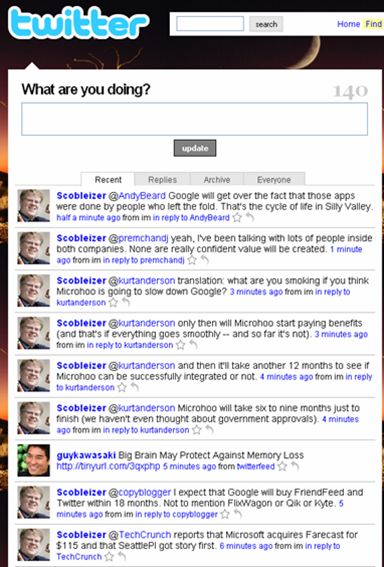
Even Robert Scoble, the biggest Twitter whore on the planet who follows 21,000 people and receives one Tweet per second, can’t deal with it anymore.

My Twitter web page a few minutes ago:

*****

See this item on FriendFeed: http://friendfeed.com/e/202b3509-f2d5-e945-5cc7-eb427992c7f2

Social Media: Lighter Beats Heavier Every Time

www.waystupid.com

Interesting tweet from Stanislav Shalunov regarding SocialThing:

Asking for my passwords makes SocialThing sound like a phisher. Won’t use for now. http://tinyurl.com/4dquxn

His tweet expressed something that I’ve been noticing for some time. I am gravitating more and more to the “lighter” interaction social media apps.

What is “lighter”? It’s the flick of a wrist. Enter text + submit. One-click subscriptions. Here are three comparisons, including the controversial one of aggregator comments versus direct blog comments.

Twitter vs Facebook

Facebook is heavy. To build out your network, you have to:

  • Invite others
  • Request a connection and wait for the response

These processes make a lot of sense for what Facebook is about – true relationships. When your friend invite shows up in the other person’s inbox, what’s their reaction? That’s the key to maintaining the integrity of true relationships there. I have turned down friend requests there from complete strangers. It’s why I’m comfortable blogging about my kids there but less so elsewhere.

And it inhibits using Facebook for me.

Twitter’s model makes social network set-up a breeze. Find someone you’re interested in, click “follow”. Done. But Twitter does support Facebook-like controls:

  • You can block specific individuals
  • You can set your updates to be private, only available to those you approve

Most people just leave their subscriptions wide open on Twitter. Which is great for the user experience. I have made connections on Twitter that I would never have made on Facebook.

The other thing that’s easier – communications. I’m a voyeur a Twitter, jumping in when I want. I just use the @sign to respond to someone, or the occasional direct message . Facebook’s status updates post to the newsfeed and a few are shown on your home page. But those aren’t really conversations. To talk with someone, you use the Facebook message system. Again, that’s really cool – you don’t need to remember email addresses. But it also is heavier.

No surprise Twitter’s been growing like a weed.

FriendFeed vs SocialThing

FriendFeed and SocialThing have a lot in common in that they show the activity streams of friends across different services. But there are key differences, which are well summarized by Mark Krynsky at the Lifestream Blog.

Creating your network: FriendFeed has the lightweight Twitter model. Find someone, subscribe. Done. SocialThing imports the friends you’ve made on each of the services. This is also light. But you can’t add new users directly inside SocialThing. You’ve got to go to the individual service, add the friend and then SocialThing is updated. This is heavier than FriendFeed.

Importing your services: FriendFeed asks for your login ID for a service (Twitter ID, Flickr ID, del.icio.us ID, etc.). enter it. Done. Your updates start flowing. SocialThing wants your ID and password. This enables SocialThing to send updates back down to each service. But as Stanislav expressed above, getting passwords is heavy.

Interaction on the originating services: SocialThing lets you respond to a friend directly back on the originating service, like Twitter. FriendFeed is adding this capability for Twitter, and perhaps others. But if you want to comment directly on the originating service, for the most part you have to leave FriendFeed and go to that service. Socialthing’s support for direct comments is the lighter experience.

It’s still early. But FriendFeed has the edge in the “lightness wins” battle right now.

Friendfeed Comments vs Blog Comments

Man, do I really want to write this? Well, here goes. Comments on FriendFeed are a lot lighter than those on blogs. Which means it’s an easier experience.

Blog comments have these qualities:

  • You want to be pithy in your comment. The blog post addressed a weighty topic, and you want to comment in keeping with that.
  • You enter your name, email and website each time
  • You might encounter a captcha
  • The blogger may hold comments in reserve until they’re reviewed
  • If you mess up, you can’t change your comment

Meanwhile, on FriendFeed, comments have these qualities:

  • You can comment pithily
  • You can write more of a meta-comment about the post
  • You can talk with others via comments
  • You can click ‘Like’ to provide a quick, simple comment about the blog post
  • Comments are easy. Click Comment. Enter text. Click Post. Done.
  • You can edit or delete your comments

This doesn’t mean commenting on blogs isn’t worthwhile or valuable. Reaching out to the writer is an important part of the participatory ethos of blogging. Your comment also breaks the ice on a post, making it easier for others to join in.

But there’s no denying the lightness of comments on FriendFeed. Expect their volume to increase.

I’ll predict that FriendFeed comments are those that bloggers never would have gotten on their blogs in the first place.

So the lightness of FriendFeed comments won’t steal from bloggers’ on-site comments. They’ll add to them. And that’s a good thing for the conversation.

What do you think?

*****

See this item on FriendFeed: http://friendfeed.com/e/92524b04-4b9d-c0db-e09e-931c4f3e5084

Innovation Requires Conversations, Gestation, Pruning

The day-in, day-out work of employees is tough on innovation. You have to get done what your managers, and the company needs today. Now there’s nothing intrinsically wrong with getting the near0term stuff done. Companies would be chaos if everyone did their own thing. But the typical work day is not conducive to maximizing innovations.

Which is where employee blogs come in. Enterprise 2.0, if you will.

Current Workplace Environment

Several things limit the amount of innovation coming out of larger companies.

General Busyness. Andrew McAfee has a nice post on this one. We’re all very busy. It feels that way, doesn’t it? And it’s not just any busyness. Your hours must have an immediate, measurable outcome. That leaves little time for the longer term, R&D-oriented type of thinking that can result in breakthrough ideas. Google’s 20% of time for personal interests stands out as an example of a company fighting this dynamic.

Existing Processes Are Hard to Change. The current products, internal practices, meetings, sales efforts, etc. are all geared to what is going on today. Much of this infrastructure is decreed from the top. New ideas which require these same corporate resources get a tough reception. It’s like you’re adding new work to everyone’s day.

Proximity Drives Relationships. We tend to share our thoughts with those we work with regularly. It’s natural. These form our relationships. So if you have a new idea, you’ll naturally bounce off these folks. But it’s crap shoot as whether you’ll get far this way. Your colleagues may not be interested or are too busy. A good idea can suffer a premature death.

Ideas Go to the Email Inbox to Die. Email is a tough medium for idea exchange. You can send your idea to someone else. If the recipient doesn’t have an immediate response, the email just sits there. And sits there. And sits there. Before long, your email is six feet under. Never to be read again. Email also suffers from limited distribution, unless you spam the corporation with your idea.

Now it’s not like innovation is failing to occur. But do companies’ internal pendulums swing so far toward busyness that they’re not maximizing their vital innovations?

Conversations, Gestation, Pruning

You ever have an idea that you really thought had legs? Well, if you just keep it to yourself, it won’t go far. Your butterfly wing flap needs to be picked up by others. The process of talking out your idea is important for validating it, refining it, seeing if it has potential.

These conversations are hard to have based on the usual workplace dynamics described above. Sure, some will happen. In a company of 10,000 people working 40 hours a week, 50 weeks a year, there are 20 million hours annually. Out of these 20 million hours, some innovation conversations will happen. But enough?

New ideas also challenge the status quo. They need time to sink in. Colleagues know the existing processes, products and services well. How does your idea affect that? How will it improve it? It’s hard to rush people to grok your idea.

This gestation also lets the idea play out more fully. It can be refined, altered, researched. Others pick up the idea and discuss it. It gets socialized. Others can become advocates, including those with a say on corporate resources.

As a result of these conversations and gestation time, some ideas will emerge as real opportunities. Many won’t. In fact, most probably won’t. But that’s OK. Real innovation is hard to achieve; if it wasn’t, we’d all be enjoying our start-up IPOs, right? This pruning is healthy and necessary.

Blogging Is a Natural Channel for Employee Innovation

In my brief blogging experience, my eyes have opened to the power of blogging. You put an idea out there, and see what others think. You make connections. You read other blogs for different perspectives.

A lot of this makes sense for addressing the hurdles to employee innovation:

  • General busyness: Blog posts need not take a lot of time. Ideas can be entered in 10 minutes.
  • Existing processes are hard to change: A blogged idea does not put someone in the awkward position of considering how it will increase their workload and change their routine.
  • Proximity drives relationships: Blogs are location neutral. Anyone can find them. Forget the guy in the cubicle next to you. The employee in Asia might grok your idea.
  • Ideas go to the email inbox to die: Blog posts live on. They’re RSS-able. They’re shareable. They’re searchable. They’re taggable. And they can be accessed by everyone.

Blogs let the conversation continue in an asynchronous fashion. You can comment on a post. Share it with a colleague. Link to it. You can build on someone else’s post. Recruit others to your cause.

All of these factors contribute to the gestation period needed for the new idea to take hold. And they help prune ideas so the ones with the most potential survive.

And a Couple Nice Benefits Also Happen

An interesting thing occurs from this: new employee social networks emerge as connections among bloggers. There are the people you work close to. Those whom you collaborate on projects. And now new connections are made based on knowledge and innovation. Those last ones may be the strongest of all.

Employees can also raise their profile and reputation with their blogging. Here’s a nice example. EMC is deploying web 2.0 technologies inside the enterprise, an effort that is being blogged by Chuck Hollis, EMC VP Technology Alliances. In a recent post, he describes how several internal employee bloggers are “graduating” to be external bloggers. That’s right – they now will engage the market on behalf of EMC.

All in all, blogging holds tremendous benefit for companies. While many employees won’t do it, those that do can become real drivers of innovation.

*****

See this item on FriendFeed: http://friendfeed.com/e/5303300f-3e4c-e5d9-b1ed-96c6d94988cf

Twitter Just Grows and Grows…

Dion Hinchcliffe is an enterprise 2.0 guru, with a blog on ZDNet.com. I guess he runs ads for conferences he puts on, among other things. He’s currently running a Google AdWords campaign. He used all manner of Web 2.0 key words for his ad campaign. So it’s an interesting survey of interest in the different apps of Web 2.0.

He tweeted this today:

Interesting tidbit. I’m running a Google ad campaign with every single 2.0 phrase imaginable. The #2 searched for keyword? “Twitter”

Which made me check out the visitor stats for Twitter on compete.com:

Look at that sharp rise in March 2008. The Twitter train just keeps on rollin’.

*****

See this item on FriendFeed: http://friendfeed.com/e/a2054173-1d1f-cebf-1a95-a578f2479ce8

The Eight People You Meet in Blogging

A couple big unrelated Techmemes of this past weekend are actually two sides of the same coin.

First, there was the heavy discussion around Shyftr and the loss of a blogger’s comments. The comments exist elsewhere, and bloggers lose connection with their readers. Second, there were a lot of opinions about Andrew Baron’s sale of his Twitter account, and its 1500 subscribers. The blogger is not bemoaning the loss of connecting with his readers; indeed he’s actively encouraging it!

Here’s what these two stories made me ask: Just why are you blogging?

Blogging is a quite personal pursuit, and we all have our own reasons for doing it. Feeling a little ambitious, I sat down and came up with eight different reasons that people blog. The eight people you meet blogging. Here they are, and they are not mutually exclusive.

1. It’s a numbers game

There are a lot of ways to get readership. For some, increasing this number is the be-all, end-all. Blogging numbers are the point, not an outcome of some other reason. Case in point: Faisal Anwar. He writes about his efforts to maximize StumbleUpon traffic to his site. He figured out that funny pictures drive StumbleUpon positive reviews, leading to more StumbleUpon visits. So he loaded his blog posts with funny pictures, to the point of losing sight of his blog’s focus:

Unfortunately for me, I pumped in too much picture to my site almost every day until it became a humor site (that not my original intention).

2. One-way communication

Blogging is a forum for mass dissemination of information and opinion. Probably the best way to think of this type of blog is as a marketing vehicle. Yeah, some response back to you is OK. But that’s not the real purpose now, is it? The larger the number of followers, the harder it is to maintain connections with them.

Andrew Baron’s sale of his Twitter account…what do you think the purpose of his Twitter micro-blog was?

3. Provide valuable information to others

This is probably the most altruistic of blogs. The American Cancer Society maintains Dr. Len’s Cancer Blog. Consumer Reports maintains a safety blog. These blogs can be a bit freer and more opinionated about information, making them more engaging than just static articles.

4. Make money

A time-honored pursuit, making money. Ad money, to be specific. Engadget, TechCrunch, ReadWriteWeb, Mashable. Check out their ads – they have a lot of them. Eric Berlin even notices that Mashable has a lot of ads. These blogs put a premium on speed, frequency and exclusives. And a good dollop of opinion sure to drive page views.

5. Establish your reputation

A perhaps overlooked aspect of blogs is that they can establish your reputation out in the world. Seth Godin asks Why bother having a resume? He argues that instead of a resume, you should have “a blog that is so compelling and insightful that they have no choice but to follow up.”

A friend of mine at a law firm told me about a 3rd year associate who blogs. His intellectual property law blog is read by a number of industry folks, and some senior partners in New York have reached out to him with questions. Talk about establishing your reputation!

6. Influence your industry

Michael Arrington. Robert Scoble.

7. Learn by doing

This is why I started this blog. I’d been primarily at the lowest level of the Web 2.0 Jedi ranks. I then took a job working on enterprise 2.0 product marketing, and knew I had plenty to learn. So this blog is a two-fer. Blogging itself has been a tremendous experience that I really enjoy. And I blog about a lot of Web 2.0 topics. This has forced me to really grok these concepts.

8. Learn by connecting

The interactions on your blog posts can be incredibly valuable and rewarding. You learn so much about how others think. The loss of this connection robs the blogger of feedback about his or her thinking, and that of others. And thus loses an opportunity to grow. This last reason may have been the biggest one to fuel the Shyftr debate over the weekend.

What do you think? Fair assessment? Did I miss any other reasons?

*****

See this item on FriendFeed: http://friendfeed.com/e/111f0439-bdf0-d88b-9082-c561b48215a1