Microblogging Will Marginalize Corporate Email

In case you missed it last week, Google CEO Eric Schmidt had this to say about the microblogging service Twitter:

Speaking as a computer scientist, I view all of these as sort of poor man’s email systems. In other words, they have aspects of an email system, but they don’t have a full offering. To me, the question about companies like Twitter is: Do they fundamentally evolve as sort of a note phenomenon, or do they fundamentally evolve to have storage, revocation, identity, and all the other aspects that traditional email systems have? Or do email systems themselves broaden what they do to take on some of that characteristic?

At first blush, this seemed like an example of Google not ‘getting it’ when it comes to Twitter (see the comments to the linked blog post above). But I think he’s actually on to something. It is a new way of posting notes about what you’re doing, but it also has a lot of communications usage via @replies and direct messages (DMs).

Reflecting both on Schmidt’s statement, and my own use of Yammer at my company, I’m seeing that microblogging is slowly replacing a lot of my email activity.

As more companies take up microblogging with services like Yammer, Socialcast, Present.ly and SocialText Signals, employee communications amongst employees will both increase and divert away from email. Something like this:

microblogging-marginalizes-email

Socialcast’s Tim Young said this about email:

Email is dead. If your company is relying on email for communication and collaboration, your company is walking dead in this new economy.

Being the CEO of Socialcast, that’s not a surprising statement. But I think he’s more right than wrong.

The shift I describe applies regardless of the microblogging application used. Since I’m actually familiar with Yammer as a user, I’ll talk about its features in the context of this shift.

Yammer Follows the Innovator’s Dilemma Path

A useful context for thinking about Yammer versus corporate email is Clayton Christensen’s Innovator’s Dilemma. Generally, the premise is that incumbent companies need to grow and increase the functionality of their products. This increases the products’ complexity and cost, but also increases margins. But as the incumbents are doing this, it opens an opportunity at the lower end of functionality for new companies to come in and attack the incumbents’ base. From Wikipedia, here’s a graphic that demonstrates the concept:

innovators-dilemma-disruption-graph

A useful way to think about the Innovator’s Dilemma in the enterprise software space comes from this blog post, Enterprise Software Innovator’s Dilemma. Existing vendors expand the functionality of their products, heavily relying on the requests of large customers. Over time, this has the effect of creating a robust, highly functional and more expensive offering. This trend is what opens the door for new vendors to come in.

Let’s consider Yammer in this context. Simple microblogging runs along the “low quality use” in some ways. At least in terms of the feature set. But it certainly takes “use case share” away from email.

If all you could do was make public notes, that’s the end of the story. Microblogging does not replace email. But these guys are advancing their product, and are rising up the performance axis.

Here is what Yammer now offers:

  • Behind the firewall installation
  • Public notes
  • @replies
  • DMs
  • Groups
  • Private groups
  • File attachments
  • Favorites (a form of bookmarking)
  • Tagging
  • Conversation threading
  • Unlimited character length (i.e. not limited to 140 characters)
  • Search

Look at that list. When you think about your own internal email usage, what ‘s missing? Folders or the Gmail equivalent of tags seem to be something for the down the road. I’m not an IT manager, so I’m sure there are some heavy duty infrastructure aspects of Microsoft Exchange/Outlook and Lotus Notes that are not there. Thus, Yammer still has the insurgent, disruptor profile relative to corporate email.

But don’t underestimate that. There’s what IT knows is needed behind the scenes. and then there’s what the users actually do when given the different applications.

Expanding Communications, Marginalizing Email

Microblogging’s premise is that public proclamations of what you’re doing and information that you find are a new activity for people, and they have value. Information is shared much more easily and in-the-flow of what we’re all doing anyway. In an office setting, I continue to find the way Dave Winer describes it quite useful: narrating your work.

This use case is what promises to dramatically increase communications among employees. As we’re seeing with Twitter’s explosive growth, it takes time for people to grok why they should microblog. But once they “get it”, it takes off.

So services like Yammer have your attention as you post updates and read what others post. In reaction to what someone posts, you hit the Reply button. You’re having a conversation that others can see, and join in if they want. You decide to have separate conversation with someone in this context. Do you open up your email? Or just click “Private Message” to someone? I’m willing to bet you’ll do the latter.

Which starts the marginalization of corporate email. Why? Because a lot of what’s going to generate interactions is occurring right on that microblogging app you’re looking at. It’s the most natural thing to act in-the-flow and use that application in lieu of email. Well-designed microblogging applications are also quite seductive in terms of ease-of-use.

As I’ve written before, email’s role changes in this scenario. The logical end use cases are:

  • Notifications
  • External communications

This isn’t something that’s imminent. Email is quite entrenched in daily workflow, older generations aren’t likely to stop using it and internal microblogging is still nascent.

But no one said the Innovator’s Dilemma plays out over the course of a couple years. It will take time. But watch the trends.

I’m @bhc3 on Twitter.

How I Address the Question of Enterprise 2.0 ROI

Photo credit: cambodia4kidsorg

Photo credit: cambodia4kidsorg

Establishing a solid ROI for enterprise social software is an ongoing discussion for the sector. It is generally a requirement for most technology decisions made by companies. At a high level, there are two sides to this argument:

  1. Measuring Enterprise 2.0 ROI is like trying to measure the ROI of email, it can’t be done
  2. Inability to measure ROI is a cop-out or evidence of the lack of value for social software

Martin Koser has a really thoughtful piece along these lines.  It is something that I’ve met head-on in my work at Connectbeam. We have several large, blue chip enterprises with whom we’re engaging. And the need for some sort of ROI justification is a recurring request.

I want to share how I’m approaching this request. Before that, I want to describe my experience in providing ROI for enterprise software, of the non-social kind. It’s useful as a point of comparison.

The ROI of Re-engineering the Credit Approval Process

I worked for a company named eFinance from 2000  – 2005. eFinance provided a hosted application that let enterprises run automatic credit evaluations on their commercial customers. This is an activity in most large corporations badly in need of improvement. I had the privilege of designing the scorecards for Hertz Equipment Rental Corp., using basic statistical analysis of actual customer payments and defaults.

For purposes of understanding what’s important in the world of back-office credit, here’s all you need to know:

  • Businesses have credit records with D&B and Experian, which enterprises access for credit applicants
  • New credit applications are manually reviewed by a remote credit office
  • Initial credit decisions = Approved, Further Review, Declined
  • Further Reviews can be either Approved or Declined

Turns out, there are some inefficiencies in the process. Inefficiencies which enterprise credit software can solve. The table below shows them.

efinance-improvements-to-credit-process

For the “R” part of ROI, the benefits are clear. The data costs were reduced with our credit system. Easy to apply the cost differential against the number of credit reports to arrive at a dollar savings. The credit reviews were another easy area for which to calculate the benefits. Each Further Review takes an average amount of time, which for a given volume means you needed N people. Reduce the percentage of Further Reviews, and fewer people are needed for a given volume of credit applications. Meaning headcount reductions.

The third benefit was faster response time to contractors seeking to rent equipment. While they didn’t have stats for lost business due to delays in responding to customers, feedback from the field was that this was an issue.Indeed, this third benefit was considered the most valuable.

From the eFinance work with Hertz, what characteristics are of relevance in considering Enterprise 2.0 ROI?

  • Ability to measure ROI was directly related to the ability to measure the underlying activity
  • The tangible dollar savings justified the project costs, while the intangible benefit of customer response time was the most exciting
  • The software was applied to a very specific activity

With that in mind, let’s turn to the question of ROI for social software.

The ROI of Enterprise 2.0

The challenge with social software is that it addresses unpredictable, unmeasurable activities. And Enterprise 2.0 addresses a range of activities, not just a single process inside companies.

The graphic below is part of my ROI presentation for Connectbeam:

bases-of-roi-connectbeam

My X axis measures the predictability of the benefit. “Predictability” in this instance referring to the ability to know ahead of time how the benefits will manifest themselves. Reflect on this measure for the eFinance work for Hertz. Predictability was high for:

  • Usage of cheaper D&B data reports with less data
  • Reduction in FTE hours for processing Further Review applications

My Y axis measures the amount of value for the different benefits. “Value” defined in terms of revenue impact and dollar savings. In the eFinance example, the benefit of faster response time to customers, while not readily calculable based on existing data, was perceived to be a strong value proposition.

For Connectbeam, I put the benefits into three buckets:

  1. Time savings (see this IBM article for how much)
  2. Increased connections between need & knowledge (see this Connectbeam blog post for an example)
  3. Stronger more diverse employee social graphs (see my earlier post for an empirical study of this)

I plotted them as having increasing value, but decreasing predictability. I won’t go into detail on how I describe these buckets, but the links above touch on it.

Essentially, the time savings are real, but are the lowest return to the enterprise. I look at those as the easiest to predict, with defined dollar benefits. In the ROI presentation, I can show how these alone offer payback on Connectbeam.

It’s the higher-value benefits where the ROI story is harder to present. After considering my previous success in identifying and articulating an ROI story for non-social enterprise software,

The ability to have predictable ROI for software is directly correlated to the predictability of the underlying activity that uses the software

Think about that. With the credit software, there was a standard process with known unit volumes. Each step in the process could be measured in time. Frederick Winslow Taylor would have loved it for its predictability, standardization and amenity to quantification.

What underlying activities does social software address?

  • Collaboration
  • Better decisions through improved access to relevant knowledge and content
  • Tapping the little bits of knowledge employees have en masse to provide better direction
  • More agile enterprise through improved connections and ambient awareness

All of those activities include elements of being unplanned, ad hoc, and creative. In short, they’re unpredictable and unmeasurable. The benefits also apply across a wide range of activities within the organization. Maybe Finance as a better handle on a new accounting issue that’s cropping up. Sales is up-to-speed on a customer’s hot buttons faster. R&D connects with the right field person to talk through a new innovation.

Like the feeling that faster response time to customers will result in higher sales and more satisfied customers in the eFinance example, the activities and problems addressed by Enterprise 2.0 are known to anyone inside a company. But no existing measures for the problems associated to these activities exist. Nor is there a good way to systematically measure their improvement.

That’s why anecdotes from the front line are so important. They show that improvements are happening with social software, even though you couldn’t pinpoint where at the start of the project.

Dennis Howlett is one my personal favorites out there in the world of enterprise software. He has an accounting background, so he’s pretty hard on soft, fuzzy feelings about the value of Enterprise 2.0. I did find it interesting  that this was his perspective on where ROI comes from:

In my argument, breakthrough ROI comes from seeing these technology through the lens of collaboration, which in turn implies process and context. I am mindful that huge amounts of value continue to be locked up in supply chains. AMR quoted a number of $3 trillion in 2005. Has that materially changed? Simply being able to communicate across supply chains in a meaningful manner could do wonders to lubricate those rusty wheels.

Note what he’s saying there:

  • Apply social software to a specific area (supply chain management)
  • Lack of communication among various parties is causing enterprises to tie up too much cost, capital in the supply chain
  • Even here, the benefit is one step removed from a hard, tangible ROI. Improved communication begets the benfit, although how it does so is on the intangible side of things.

To wrap it up, my approach is to push forward with the ways in which Enterprise 2.0 delivers ROI. We cannot escape this duty in the industry. But I also am working to set expectations for how predictable this ROI will be going in to a project. After all…

Software ROI is only as predictable as the activity for which it is used

*****

See this post on FriendFeed: http://friendfeed.com/search?required=q&q=%22How+I+Address+the+Question+of+Enterprise+2.0+ROI%22

My Ten Favorite Tweets – Week Ending 030609

From the home office in Damascus, Syria….

#1: Twitter has another huge growth month in February, per compete.com: http://bit.ly/aJ0p

#2: It always cracks me up when people say Twitter is nothing more than glorified IRC (http://bit.ly/KD3H6). Most people I know never used IRC

#3: A lot of posts like this lately: “Twitter destined to replace Google Search” http://bit.ly/14G7nn Some truth, but overstated.

#4: On Enterprise 2.0: “There is a big difference between an integrated user experience and a suite.” ReadWriteWeb http://bit.ly/6Njb

#5: Flashes of insight cannot be willed, they are spontaneous – Willam Duggan, Strategic Intuition

#6: Visa commercial uses Smashing Pumpkins “Today” as its theme. Visa gains some cool points.

#7 Anyone remember the Nestea Plunge? I have this game with my 4 y.o. son where I catch him falling backwards. Call it the Nestea Plunge.

#8: Just want to note for the record…last night’s ’24’ was great. The show is strong this season.

#9: I miss the plastic bags we’d get from grocery stores here in SF. They were perfect for the little trash cans around the house. #ecoprogress

#10: My 4 y.o. son Harrison is a huge fan of the PBD Kids website http://pbskids.org/ Well done, incl. games with his fave PBS characters.

The 10/20/30 Presentation Approach Fails in Social Media

Photo credit: Presentaiton Helper

Photo credit: Presentation Helper

Guy Kawasaki has a well known blog post from 2005, The 10/20/30 Rule of PowerPoint, in which he articulates why less-is-more when it comes to presentations. This post is really good for in-person presentations, and continues to be well-received as seen by the blog links to the post and Google search results.

The tenets of Guy’s post include:

  • Only 10 slides, because the audience will only be able to follow that many
  • Target 20 minutes of talking
  • Font size no smaller than 30 point

The post is part of a larger canon regarding presentations. For maximum effect, keep each slide simple, with few words and no bullet points. Graphics are a better way to present concepts, with the presenter narrating heavily. These principles have vastly improved presentations in-person or on a conference call.

But they’re terrible when it comes to social media. At best, they force readers of the presentation to guess what the presentation is saying. At worst, they cause people to come away with the wrong impression of what is being said. This week saw an example of that.

Fred Wilson and Twitter’s Search Plans

Fred Wilson, the Union Square Ventures venture capitalist behind Twitter, gave a presentation titled Startup culture, the Internet, and Television. Included in that presentation was this slide:

fred-wilson-slide-twitter-search

Now Twitter is the subject of much speculation. And this slide seems to show something about their future. Search + matching users + featured user. Of course, all we have to go on is this slide. This comment on Fred’s blog foreshadows what would happen next:

Good example of the Great Deck Paradox. Given a great deck should provide context and visual cues rather than the contents of the talk itself, a great deck by itself is pretty unintelligible without the talk. Still, the key point came across: guidelines for success in TV = guidelines for success on the net.

Fred’s slide was picked up in a post by Eric Berlin on Louis Gray’s blog.

A Case of Misunderstanding

In the post, Eric does a nice job of breaking down the implications of what’s seen in the screenshot from that slide. There were no notes that accompanied the slide on SlideShare. The slides were an aid to the true content of the presentation, Fred’s talk. Unfortunately, there was no audio included. So without notes or audio, the slide has to stand on its own in venues like SlideShare.

It turns out the analysis that Eric did ob the slide was wrong. Not so much on the analysis itself – that was top-notch. But on the premise behind the analysis. Namely, that the slide was showing the future direction of Twitter.

In a follow-up post, Fred wrote that bloggers were getting the wrong impression of the slide, which was some alpha version floating around Twitter. Here’s what he said about Eric’s post:

But it gets even more nutty. Today I saw a story on louisgray.com that assumes the title of slide 22 “Where We Are Going” implies that the search results page I showed was about where Twitter is going. And then it goes on to evaluate the business model implications of the page I showed. Well the post is pretty interesting, but it’s based on a false assumption. The “We” in “Where We Are Going” means TV users and the TV business, not Twitter.

Let’s trace this:

Incomplete information on slide -> Blog post based on incorrect assumption -> Fred Wilson refuting posts

Could Fred have added some content on the slide or a note to mitigate the possibility of misunderstanding? Yeah, probably.

Recognize Two Separate Audiences for Your Presentations

In How to Integrate Social Media in Product Marketing, I noted this issue about presentations put up on services like SlideShare and Scribd:

When people are viewing your PowerPoint, they will not have the advantage of your voiceover. You can’t provide a spare slide with just a picture and hope everyone gets what you’re saying. In the webinar, you’ll have a nice narration for the slide. In SlideShare and Scribd, each slide has to stand on its own.

In terms of product marketing, this is important for making sure you effectively get your point across. Here’s an example of what I mean, from the presentation How to Double the Value of Your Social Software:

example-of-self-explanatory-slide

The left graphic is a good visual aid. My voiceover is shown on the right. If you want to combine in-person slides with social media-ready slides, the little talk bubble on the right can be a custom animation that doesn’t appear during your narration of the slide until the end. You get the minimalist approach during the presentation, readers get the context afterwards.

That’s from a product marketing perspective. But as this incident with Fred Wilson shows, it’s a lesson that applies to any presentation you put up on social media sites. Perhaps Guy will update his 10/20/30 Rule to reflect the ways in which people consume information in 2009.

I’m @bhc3 on Twitter.

Power Twitter Gets More Powerful with Latest Release

fred-wilson-power-twitter

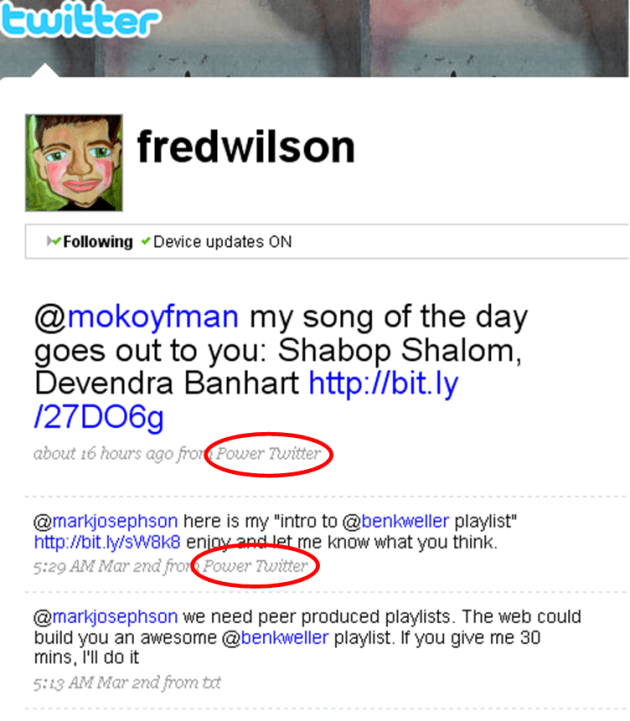
A few days back, I noticed something in Fred Wilson’s tweets. He was using some sort of app called Power Twitter. Now Fred is the highly visible Union Square Ventures VC behind Twitter. When he uses an application to engage with Twitter, I’m curious why. So I checked it out.

Power Twitter is a Firefox add-on built by Narendra Rocherolle. Power Twitter, as its name implies, supercharges the web -based interface of Twitter for Firefox browser users. The added features are those that a lot of Twitter users want. As John Tropea tweeted:

@bhc3 twitter should have this inhouse, just like what happened with replies, and what also should happen with hashtags

Power Twitter got good coverage on TechCrunch in January of this year. On February 26, a slew of new features were released. These new features have made Power Twitter even better, and perhaps give a glimpse of what Twitter could do in the future.

Packed with Valuable Features

Here’s a screen shot of the Twitter page with Power Twitter installed:

power-twitter-home-page

Let’s talk about the numbered features.

#1 – Post Photo: Have a picture you want to tweet out? Use the handy Post Photo link. When you click it, you’ll be presented with a familiar dialogue box asking you to upload a picture. Once you select your picture, it is automatically posted to TwitPic. Your TwitPic picture will have its own URL, which is automatically pasted into the “What are you doing?” box. Then you type out whatever you want to accompany the picture. This is new with the Feb. 26 release.

#2 – Shorten Link: Sharing links is a prevalent activity on Twitter. According to Ginx, 20% of tweets are sharing links. With the Shorten Link feature, you paste a long URL into an input box, and Power Twitter automatically shortens it using bit.ly (see previous bit.ly coverage here). You then type whatever message you want. One downside is that it doesn’t associate the bit.ly URL to your bit.ly account. But for most people, that’s not an issue. This is new with the Feb. 26 release.

#3 – Retweet: The retweet is emerging as the new thing to do on Twitter. As Robert Scoble wrote in a comment in a FriendFeed discussion: “I judge myself off of how many times I get retweeted. That demonstrates readership, credibility, engagement, interest, etc.” Power Twitter now makes it easier to retweet those tweets you like. Every entry has a little “RT” to the side. When you click the “RT”, the entire tweet is copied to your “What are you doing?” box, along with “RT @[person]”. Very easy. This is new with the Feb. 26 release.

#4 – Expand Shortened URLS: One problem with the shortened URLs is that you don’t know where they go before clicking them. Power Twitter automatically expands the shortened URLs so you see the full URL. This is something that was implemented on FriendFeed a while back, and it’s great for fully extra secure before clicking those links.

#5 – Search and Saved Searches: Search is another aspect of Twitter that is emerging as hugely important. Twitter bought the third party search service Summize to provide search to its members. However, they have maintained search as a separate URL from the Twitter home page, although they are testing the addition of search to the homepage currently. With Power Twitter, you don’t have to wait. Search is embedded right on your home page. When you run a search, Power Twitter runs it against the Twitter search engine and presents the results right on your homepage.

Power Twitter also links # hashtags to a Twitter search. When you see a hashtag, click on it. Power Twitter returns a set of results including the hashtag. Power Twitter retains a list of your previous searches if you want to run them again. The saved search history is new with the Feb. 26 release.

#6 – @Mentions: Twitter added the @replies tab a while back, which shows those tweets that begin with your Twitter handle (e.g. @bhc3 lorem ipsum…). Power Twitter also includes @mentions, where your handle is included elsewhere inside the tweet (e.g. RT @bhc3 lorem ipsum…). A quick way to see if someone retweeted you or otherwise mentioned you in a tweet.

#7 – Facebook: You can view the status updates of your friends on Facebook, right from the Twitter page. I assume this leverages the new Facebook status updates API. For me, this is a hugely valuable addition. I don’t log in to Facebook too often, meaning I don’t see the updates of my connections there. Now, I regularly check the Facebook tab in Twitter to see what my friends are up to. Really, really helpful.

In-Line Media

This isn’t new, but merits mention. Power Twitter displays the media associated to links to several different services including:

  • TwitPic
  • Flickr
  • YouTube
  • Google Maps
  • Song.ly
  • Others

The song.ly links include a simple player to hear the song that was tweeted. Very nice. Here’s an example of what a TwitPic looks like as it hits your Twitter stream:

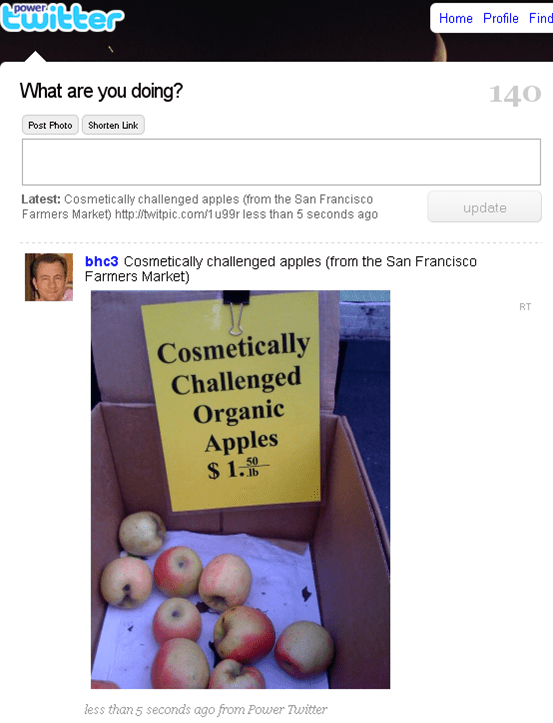
power-twitter-twitpic-inline

That tweet only had a link to a TwitPic URL. But Power Twitter found the TwitPic URL, and pulled the actual picture into the tweet.

Some people may not like the inclusion of media in their Twitter stream, preferring text only. If that’s the case, Power Twitter lets you turn off the inclusion of rich media in tweets.

But one thing that occurred to me is that this resembles somewhat the experience you have with FriendFeed, which does a great job with including media inline on its pages.

Quick View of People’s Last 5 Tweets

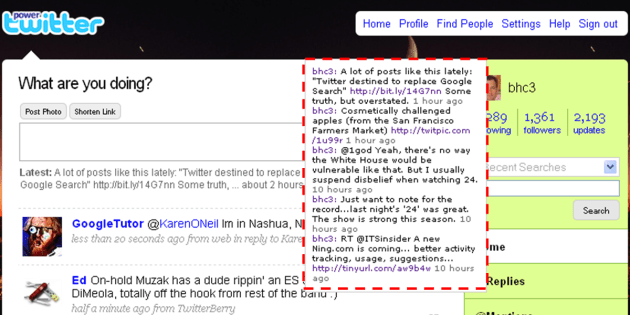
Power Twitter also lets you see the last five tweets of people. When you move your cursor over someone’s picture, a hover box appears. The hover box shows the last 5 tweets of that person. Here’s what it looks like (I added the red dotted line to highlight):

power-twitter-last-5-tweets

A very nice way to get a quick look at what someone is up to.

Continual Innovation

Power Twitter isn’t done innovating either. One of the items listed with the latest release is:

added foundations for new upcoming features

Looking forward to new features in the future. If you want to get more from Twitter, I recommend installing Power Twitter.

*****

See this post on FriendFeed: http://friendfeed.com/search?required=q&q=%22Power+Twitter+Gets+More+Powerful+with+Latest+Release%22

How Much Scale Is Needed in Enterprise 2.0 Employee Adoption?

A couple recent items caught my eye with regard to the issue of employee adoption of social software.

In Reversing the Enterprise 2.0 Pricing Model, Julien le Nestour argues that pricing per user for social software should increase as more employees use it, because the network effects of higher participation make the software more valuable. It’s a great theoretical piece, tying pricing to value received. But in the harsh budgeting realities of the enterprise and in the comparison against other software pricing models, it’s not likely we’ll see anything like this.

Atlassian, maker of the Confluence wiki and developers tools, recently passed the cumulative revenue mark of $100 million. In the post announcing this milestone, Atlassian blogger notes that the company has no sales force. People just download the app. I know some of the Atlassian guys, and this kind of viral, bottom-up adoption is core to their philosophy. They don’t sell to upper management, adoption occurs at the departmental level. That being said, I am aware from my work at Connectbeam of some large-scale rollouts of the Confluence wiki by Fortune 500 companies.

What connects these two items? The first post describes the nature of Enterprise 2.0 apps and how their value increases as more employees use them. The second post points to the value that departments have received from Atlassian’s Confluence wiki, even without broad adoption. In other words, network effects are not a critical aspect of the Confluence value proposition.

From these posts, other readings and direct customer experience, the following occurred to me:

You don’t need a high level of adoption to get value from some Enterprise 2.0 apps. Others require broad participation.

In some ways, that may seem obvious. Yet I don’t tend to hear this distinction being made. Usually, all social software is lumped together under ‘Enterprise 2.0’ and there is a collective view that wide-scale adoption by employees is a necessity. It’s actually more nuanced than that.

Varying Adoption Levels Required

The graphic below depicts the relative levels of participation required for different apps to “deliver value”:

enterprise-20-employee-adoption-to-derive-value

Here’s a quick summary of the graph:

  • Employee participation is defined as contributions and engagement (views, edits, comments, etc.)
  • Moving from left to right, the percentage of employees involved gets higher

This graph has a couple of implications for Enterprise 2.0 vendors. Before that, here’s an explanation for why I put the different applications where I did.

Consider the Purposes of the E2.0 Applications

Before discussing these applications, I want to note this. All social software applications get better with higher adoption. There is no disputing that. The distinction I want to make is that some apps require increased participation before they deliver value.

Blogs: The nature of a blog is a single person’s thoughts, observations and ideas. Inside companies, these applications can be tools for the ongoing recording of things that fall outside the deadlines and process-oriented activities that make up the day. Making them public is a great way to share these contributions with other employees and establish your record of what’s happening. If only a few key people blogged inside a company, there will be value in that.

Wikis: Wikis actually have two purposes: (1) knowledge repositories, and (2) projects and collaboration. It’s that second purpose that makes wikis particularly valuable even with small participation. I’ll use Confluence as an example. We use it as our low home for putting up documents accessible to anyone else, and for free-form contributions on all manner of things. It is very much a utilitarian use case for us. If we weren’t using Confluence for this purpose, we’d share documents via email. In larger organizations, Confluence may replace usage of SharePoint or the company portal.

Using wikis as knowledge repositories, such as [Company Name]-ipedia type of implementations, requires a larger percentage involvement. Sparsely populated company versions of Wikipedia are of little use. As are wikis that are not updated regularly with new information. I’d put wikis-as-knowledge-repositories up there around prediction markets in terms of required participation.

Forums: The old man of Enterprise 2.0…forums. These are the place where topics can be posted, and a scrum of conversation occurs. To really get value out of these, it helps to have larger participation. Blogs are solo voices with interesting content. Wikis can have a very specific collaboration purpose among a few employees. Conversations around a topic require a wider variety of voices. Otherwise they fail to give people a sense of what others are thinking. Nothing sadder than forum post with no comments.

Social bookmarking: Bookmarking sites you find useful has value by itself. So in that sense, “social” bookmarking can work for very few employees. But it’s not really “social”, it’s simply a replacement for your browser bookmarks. You get value by finding those gems your colleagues deem interesting. The odds that any single bookmark will be useful to you are small, so you need a healthy amount of bookmarks to increase the chances of finding links that will help you. And to get a healthy amount of bookmarks, you need broader participation.

Microblogging: In some ways, microblogging could be compared to forums. Both are public places to serve up topics. But they’re fundamentally different. And that’s why broader participation is more important here. Forums have a distinct purpose – the discussion of a particular topic. You need participation by those who know something around the topic.  Microblogging is a more free-form, personal activity. You don’t need a distinct purpose to post something. You post all the things that occur to you during the day. Some of which will have value, although it can be hard to predict for whom. It also helps to know that people are seeing these posts, because there is a conversational aspect to microblogging. The free-form, who-knows-what-might-be-interesting, conversational aspect of microblogging require larger participation than forums do.

Prediction markets: Prediction markets thrive on having a variety of ideas, events and initiatives. They also require the different perspectives of employees, leveraging different perspectives, knowledge and experiences. This is true wisdom of crowds work. Limited participation limits the value of prediction markets. These benefit from broad employee involvement.

Social networks: I put these at the top of the chart in terms of employee involvement. Perhaps one of the best use cases for social networks is finding colleagues with the knowledge or interest in projects you’re working on. This requires large-scale participation. If a social network only is used at the departmental level, it doesn’t provide value. In terms of expertise location, you’re probably already aware of what others in your deparmtent know. It’s breaking out of that traditional sphere of contacts where social networks shine. I know I’ve heard many instances of large corporations suffering from “reinventing the wheel” syndrome because employees lack visibility about what others know. Broad participation addresses this issue.

Implications

Three implications of this view about required involvement come to mind.

Greater required participation correlates to greater impact on a company’s value: Generally, you could change the metric in the chart above from percentage of employee involvement to impact on company value. The increased participation means the associated application will also have a larger effect on the company’s strategies and operations. It’s not an tight correlation, but a general trendline. Exceptions will abound.

Top-down vs. bottom-up: General observation is that broader participation requires a greater amount of senior management support. That’s the way things work inside companies. Employees will listen when the executives of the company push something. For applications that need lower participation, the name of the game is to provide a compelling application with a low entry cost. Departmental budgets and the green-light from employees at lower levels of the organization are all that are needed.

Time for application to gain traction: With applications that require low levels of participation, there is plenty of time for the application to grow virally. It serves its purpose for a select few, and over time others will see the value and elect to participate. These apps can be resident inside companies for long periods of time. Those that require higher participation to see value will need to show results sooner. They are on senior management’s radar, generally cost more and have a greater number of employees who will be watching to see the results.

So it matters what type of application we’re talking about when it comes to Enterprise 2.0. It matters for companies and vendors. It impacts the skills required for everyone’s success.

A nice post that complements this one is Adina Levin’s Scale effects in enterprise social software.

*****

See this post on FriendFeed: http://friendfeed.com/search?required=q&q=%22How+Much+Scale+Is+Needed+in+Enterprise+2.0+Employee+Adoption%22

My Ten Favorite Tweets – Week Ending 022709

From the home office in Denver, Colorado…

#1: Please, I don’t want your automated DMs after I follow you. This practice needs to stop. I never click your links, it’s just spam.

#2: To all you social media whales doing the mass unfollow routine, I say: “Go ahead, make my day.” Got my unfollow trigger finger ready.

#3: Reading @loic post about the realities of following thousands http://bit.ly/CR6A9 Future = Dunbar’s Number + @replies + keyword tracking?

#4: Yammer rolls out new features: lifestreaming a la FriendFeed, and DM like Twitter. VentureBeat: http://bit.ly/qamnq

#5: “Discovering problems actually requires as much creativity as discovering solutions” The Myths of Innovation, Scott Berkun

#6: Innovation myth inside companies: “if the idea were any good, the people at the top would have thought of it already.” http://bit.ly/CfPgl

#7: FriendFeed guys have created the FriendFeed Therapy Room, featuring Eliza http://bit.ly/LseaI See if you can get past her therapist tenacity

#8: Do you suppose accident rates are down in California now that we’ve banned cell phones in the car? Do you feel safer?

#9: My favorite Jelly Belly beans: 1. coffee 2. watermelon. My 4.y.o. son Harrison: smelly skunk (betcha didn’t know about that one). You?

#10: Driving down 101, behind this car. Smelled an odd sweet odor that I recognized. Pass the car minutes later, sure enough dude had a fat one.

In Praise of Grunt Work

broken-glass

Photo credit: Vieux Bandit

An experience I had that comes back to me from time to time is work I used to do way back in the early 1990s. I was an Assistant Buyer for Hecht’s Department Store in Washington D.C. My department? Stationery and Frames.

The picture frames could get handled roughly, both by customers and in transit. Which meant broken glass. A lot of it.

The store department managers would box up these frames of broken glass, and ship ’em back to the Hecht’s warehouse in Maryland. Boxes of these frames would show up each week, stored in the specially designated Frames area. I’m guessing the warehouse crew thought that was sort of amusing.

So you’ve got a bunch of frames, but no glass. What do you do? Ship ’em back to the different manufacturers?

No, you send the Assistant Buyer to the warehouse to replace the glass.

We’d order a bunch of different pieces of glass, and I’d rebuild these poor little specimens on the Island of Misfit Frames. It sucked. I mean, I wore gloves but would inevitably get cuts on my hands. It was hot in that warehouse. Sitting there for hours doing this work was b o r i n g. I was a college grad, dammit!

But something happened over the hours, days and weeks I did this work. I learned those picture frames. I knew all the Burnes styles cold. It happened in spite of my dislike of the glass replacement work in the warehouse.

How did it help?

  • Sales numbers on a report were matched to a style I knew, making the data much more informative
  • Ad layouts – I knew the colors and styles to put into each ad
  • Store merchandising – I could go into any store and quickly size up the shelves for presentation and inventory
  • Product selection – I could compare new styles to what we already carried

All from the hours of grunt work in the warehouse. This is a lesson I like to remember from time to time.

*****

See this post on FriendFeed: http://friendfeed.com/search?required=q&q=%22In+Praise+of+Grunt+Work%22

The Serendipity of Attention

In the recent post Forget Dunbar’s Number, Our Future Is in Scoble’s Number, commenter Adam Metz wrote:

H-Dog,

Maybe I’m missing something, but where’s your definition of Attention? Can you add it in to the second or third paragraph? Good idea, but a little rough around the edges.

Calling me “H-Dog” is one way to get my attention. 😉 But back to the definition of attention. Putting it simply:

Attention = time + interest

Time being a real-world constraint. There are only but so many hours in a day, so attention is bound by that dimension. If I’m tied up with work or playing with the kids, I’m not going to give anything my attention. The second aspect is interest. Say, I do have some time. If I’m viewing something on the foraging habits of the scaup bird, my interest is quite low and I’m likely not to pay attention even though I have the time. I’ll find something else.

I will observe though, that while time is a concrete and unyielding dimension, interest is fluid and dynamic. Our moods, activities, friends and life events  affect what is interesting at any given point in time. It’s not like it’s totally random – there is a baseline of things that consistently interest us. While time is rigid, interest is a flexible dimension of attention.

Next question is how we find things that are of interest to us when we do have the time.

The Reducing Bands of Attention

I think I can make this statement with certainty:

You will miss the vast majority of information which would fit both your interests and time available to read

Anyone disagree? That’s probably a frustrating aspect of our information age. Am I finding the things I should know? How do I improve that? How can I be both more efficient and systematic in finding what interests me?

Technology is making it easier to be more efficient and systematic, but we’re nowhere near perfecting that. And we can’t get too perfect, because as I mentioned before, our “interests” are fluid and I don’t think we could possibly catalog all of what interests us.

Honestly, we have to accept a certain serendipity of attention. And realize we’ve got a much better system of discovery than we did just ten years ago. I’ve thought about my own experience. What’s my personal system for attention?  It’s a mix of ways, as the graphic below shows:

bands-of-managing-reduced-attention

Let me describe the bands.

Dunbar’s Number: This is the theoretical limit on the number of individuals whom you can follow closely. The number is pegged at 150, a number of people which even Robert Scoble uses for his core basis of attention. My Dunbar’s number includes the 70 or so people I’m following each day on my Enterprise 2.0 List on FriendFeed. It then includes some other folks who fall outside Enterprise 2.0 but interest me in other ways.

With people in your Dunbar’s Number, you read what they create, share and talk about. My guess is that this is the core use case of Facebook members. Note that you expand the number of people you track via this group when they share content or talk with someone outside your core 150. The expansion is temporary though – based on what someone you follow has engaged with.

@replies: I use the Twitter @replies function as shorthand for the ways in which people reach out directly to you. This includes the @replies, the DMs, the Facebook messages, email itself,  etc. Now I’m not inundated with these, so they still get my attention. As you rise in the social media pecking order, apparently you get bombarded with these directed messages. Then they probably move to an outer band of attention for you.

Keyword tracking: This is how people, information and conversations outside my Dunbar’s Number most often get my attention. I track content that includes keywords in which I’m interested. This is the most systematic way I have for improving the efficiency and coverage of things that interest me. As I often write here, I use the Enterprise 2.0 Room on FriendFeed for this. Another good option is Filtrbox. I’m sure there are others.

Other groups: OK, you’ve got the core group of people you follow in your Dunbar’s Number. But there are others you like to keep up with as well. This is where the group functions come in to play. You can group people based on some characteristic, and check on those groups as attention allows. On FriendFeed, these are Lists. TweetDeck lets you group people.

Groups are great for when you’ve already seen your Dunbar’s List and @replies. And sometimes you just need a break from the usual topics and people on which you’ve put focus.

Random views: I do this as well. For some, it may be dipping into the public timeline of Twitter. Or FriendFeed’s everyone tab. Once you’re following a large number of people, checking out the tweets or FriendFeed entries of everyone you follow becomes a form of random views. Because you can’t possibly take in the full river of content all the time. You’d get nothing else done. But it is worth it to dip in occasionally.

Scoble’s Number Requires a System

In the graphic, I categorize all the bands outside Dunbar’s Number as the province of Scoble’s Number. To track people well outside your core 150, you need a way that aids the goals of better efficiency and more systematic coverage, while preserving the serendipity that accompanies the fluidity of our interests.

That’s where I am these days when it comes to attention. How about you?

*****

See this post on FriendFeed: http://friendfeed.com/search?required=q&q=%22The+Serendipity+of+Attention%22

Data Privacy, Data Ownership and Who You Trust

facebook-google-safeway-chase

In the recent imbroglio over what exactly Facebook was saying in its (now-reversed) updated Terms of Service (TOS), I found myself on the opposite side of a lot of smart people in terms of what it meant. There was a lot of concern that Facebook was essentially claiming the right to commercialize any content its members uploaded to the social network. As I said in a couple posts, it didn’t strike me that way.

In other words, I didn’t think the terms or the intent matched the hyperbole I was seeing.

So I ask why was I so sanguine while others were so worried? Jeremiah Owyang asked readers whether they had deleted their Facebook accounts. The most common response seems to be that they removed their photos, although I don’t expect that reaction to be the norm. Personally, I’ll keep uploading photos without concern.

Why? It’s not about the terms. It’s about trust. I trust Facebook.

We All Trust Companies of Some Type

In order to live in society, we have to trust companies. If you didn’t, you’d never buy anything, or you’d spend a lot of time carefully inspecting everything you purchase. We don’t do that of course.

Quickly, here’s why I trust Facebook, no matter the interpretation of their TOS:

  • Established company with an imperfect, but acceptable rack record
  • Companies that want to be profitable and go public don’t trash their relationship with 175 million members
  • In the event Facebook ever started unilaterally using and selling its members’ content, the backlash would be 1,000,000 times greater than the Motrin Moms episode

I have no reason to distrust Facebook. Others apparently do. I sort of understand that, although no one who expressed their suspicions of Facebook could give an actual example of how the social network has done them harm. I think for a lot of people, this Facebook TOS story was a vehicle to vent their general concerns about social networks and the tension of making our personal info public. People like to participate in social media, but there’s always this dark side of concern in the back of their minds of what people will do with that info. Or it’s front of mind for a vocal minority.

In a previous job at biometric company Pay By Touch, I remember these concerns well. There was an understandable concern about some private company holding your biometric, personal and financial information. And yet plenty of people did participate.

Clearly, Facebook does have some work to continue building out people’s trust in the site. But as people watch Facebook, I thought it’d be instructive to look at the the terms of service for some other popular products and services that people use.

The idea here is to ask whether you are skeptical of Facebook but using other services that seem to have as much potential for violating data privacy and data ownership. If you’re not questioning these other services, why not?

Google’s TOS

Let me start with this comparison of Google’s TOS and Facebook’s TOS (initial updated version from The Consumerist):

google-facebook-tos-comparison

Notice the similarities in those clauses. Facebook’s TOS looks like it used Google’s TOS  as a starter. The Facebook TOS story started on the news that the site had dropped two lines saying they no longer had such a license when you quit Facebook. By dropping those lines, it appeared they were claiming a license to your IP forever.

Yet the controversy I saw was less on that issue, and more on concerns that Facebook intended to grab all users’ content and start commercializing it. Let me put it another way. It wasn’t like bloggers said, “As long as you’re a member of Facebook, you’re fine letting them commercialize your content without your permission. Only consider that an issue when you quit Facebook.” No, it became an intellectual property issue, regardless of whether you are a current member or have quit.

Google has similar terms. Yet Google doesn’t face the same issue for having essentially the same terms as Facebook. Why?

Safeway Club Card

You may have a loyalty card with your local grocer. I do – the Safeway Club Card. If you don’t use a Club Card, you pay a higher shelf price for many products. Gotta get that discount!

So Safeway is collecting name, address info and purchase history for its shoppers – via the Club Card and online. Let’s see what Safeway’s privacy terms look like:

safeway-terms-of-svc

Really, not too bad, eh? Sure, your private information may end up in the hands of third parties, but it doesn’t appear to be to commercialize it. But check out that second-to-last paragraph. Safeway will hang on to your private information for as long as it deems necessary. Sort of like Facebook.

Safeway also reserves the right to update its privacy policy at any time, without informing you. Which is one of those fears people have about Facebook.

If you wanted to stir it up with Safeway, you’d blog something like: “What’s to stop Safeway from sharing your purchase history with insurance companies? Buy too many fatty snack foods? We’re raising your insurance rates!”

Yet we continue to shop at Safeway, and no one raises its TOS as an issue. Why?

Chase Credit Card

I love my Chase credit card. I get 5% back on groceries and gas. Great program. And most people have at least one credit card.

You ever look at the terms of service there? Here is Chase’s privacy policy:

chase-credit-card-privacy-policy

Chase will share information about you with outside companies. In other words, you do not have complete control over your own transaction information. Even if you indicate a preference for your information not to be shared, it still will be made available to others. Kudos to Chase for its notification policy though, if they “broaden their information sharing practices.”

Still, aren’t you worried about this? All those purchases you’ve made that maybe you don’t want to the world to know about? They could end up sold to the highest bidder! Well, no, that won’t happen.

But certainly Chase’s policy contains elements that should scare people the way Facebook’s TOS did. Yet we continue to use our credit cards. Why?

Who Are You Trusting Right Now?

I had an energetic discussion about this with several people in a FriendFeed thread. After that, I’ve come to this conclusion:

If you trust a company, it doesn’t matter what their terms of service are.

If you don’t trust a company, it doesn’t matter what their terms of service are.

So why the ongoing distrust of Facebook. That’s a topic worthy of exploration. I’ve seen two plausible explanations out there.

Alexander Van Elsas says that the lack of clarity about Facebook’s ultimate revenue model injects uncertainty into its relationship with its members. In other words, it’s hard to be certain the company won’t lurch into some egregious territory with members’ content. I think there’s some truth in that, particularly for those tracking the industry closely.

In her interview with Facebook’s Chief Privacy Officer, Sarah Lacy asks whether Facebook is bumping into issues caused by its being at the leading edge of social networking. I think there’s truth here too. Grocery loyalty cards that track your spending are not without some controversy. Credit cards are not immune either. I imagine when these programs were first introduced, there was a lot of concern about privacy and data ownership.

How about you? Who are you trusting today with your personal information?

*****

See this post on FriendFeed: http://friendfeed.com/search?required=q&q=%22Data+Privacy%22+%22Data+Ownership%22+%22Who+You+Trust%22

My Ten Favorite Tweets – Week Ending 022009

From the home office in Hollywood, CA…

#1: RT @THE_REAL_SHAQ To all twitterers , if u c me n public come say hi, we r not the same we r from twitteronia, we connect

#2: It’s not teams that get things done inside companies, it’s networks. #uvasna

#3: @jowyang writes about the bankruptcy of “social media” PR firms and vendors who fail to practice what they preach http://bit.ly/IcIG7

#4: Gonna tweet this one more time: Oasys raises $10M for low cost water desalination technology http://bit.ly/siwMG Much needed!

#5: Holy smoke! Just installed Power Twitter Firefox add-on http://bit.ly/yiy4W . Search on the home page, tab for Facebook updates, more. Whoa.

#6: Ma.gnolia throws in the towel, says it cannot recover its members’ bookmarks http://bit.ly/Qwcba

#7: Reading case studies about enterprise social networks and their impact by University of Virginia professor Rob Cross: http://bit.ly/sL4HL

#8: For the record, according to Typealizer, my blog screams a Myer-Briggs personality of INTJ. That’s about right, actually. Nicely done.

#9: My post about integrating social media into product marketing is up on Social Computing Magazine: http://bit.ly/sNMBl

#10: Watching Sally Field on TV in Brothers & Sisters. Is she seriously 62? Looks a lot younger. Must be that Boniva.

LinkedIn Matches Twitter, Facebook by Elevating Status Updates

Checking in with LinkedIn, I noticed this new look on my home page:

linkedin-status-update

“What are you working on?” By putting it so prominently on the home page, you can’t help but be reminded to update it. LinkedIn is upping the importance of these real-time updates on what has historically been a fairly static social network.

I like this, because it’s a chance to put some work-oriented updates out to your network. So LinkedIn now joins Twitter and Facebook in the status update arms race.

*****

See this post on FriendFeed: http://friendfeed.com/search?q=LinkedIn+Matches+Twitter+Facebook+by+Elevating+Status+Updates