Weekly Recap 072508: Twittering into the Mainstream

Twitter got some big play this week: 2 good, 1 bad…let’s start with good…

USA Today had a nice feature on Twitter, Twitter took off from simple to ‘tweet’ success…this quote from the article really gets it right about Twitter these days…

Twitter has become so popular, so fast, that keeping up with its fast-growing user base is a real issue. So many people now use Twitter to update friends that the system often crashes.

The outages are the markers of a company that is experiencing success beyond its expectations…

The New York Times ran a story about how companies use Twitter, blogs and other social media to keep up with customer issues and questions…

If you’re scoring at home, that’s two mainstream, huge-circulation newspapers writing positive stories about Twitter this week…if you wonder a couple years from now how Twitter became so mainstream, remember weeks like this…

But not all was well with Twitter this week…the company inexplicably chopped off subscribers from every user…there were a lot of pissed Twitterers…people threatened to leave Twitter…but when the followers were restored?…

Temporary retraction .. comes back up 50 more followers ? I can’t help it … it’s sticky”

Twitter’s je ne sais quoi

*****

I’ve never said jailbreaking

*****

SmugMug seems to have figured out FriendFeed’s visual dynamics…SmugMug pictures come thorugh big, bright and beautiful on FriendFeed, especially compared to Flickr pictures…

SmugMug pix on FriendFeed, courtesy of Dave Cohen:

Dave Cohen SmugMug Pictures

Dave Cohen SmugMug Pictures

Same pix, this time Flickr on FriendFeed:

Dave Cohen Flickr Pictures

Dave Cohen Flickr Pictures

Great advertisement for SmugMug…and the little guy is cute regardless of the photo service…

*****

Noticed a change in my Google Reader shares these days…I’m tending to share blog posts that I haven’t already seen a few times on FriendFeed…that means fewer TechCrunch shares…more emphasis on those nuggets that haven’t seen wide circulation yet…

Figured people were seeing the big blogs enough already…

*****

I got to do a guest post on Louis Gray’s blog this week…really good reactions out there in the blogosphere, which was great…blogger Barry Schwartz thought enough of the post that he wrote his own post in response, Am I Losing the Connection?

Unfortunately, Barry got the author wrong…he overlooked the “guest post” announcement at the start of the post, and naturally figured Louis wrote it…from Barry’s post…

  • Louis Gray wrote a blog post named Bloggers’ Interactions With Readers Decrease With Prominence
  • Louis Gray documents what are “interactions:”
  • “It’s these two dynamics that cause some bloggers to head onto the next stage,” explains Louis.

Sigh…I am happy the post resonated, but it’d be nice to get a little recognition…so I left a comment on Barry’s post a few days ago:

Barry – glad you liked the post. One small correction – I actually wrote that particular post. Louis was kind enough to let me guest post on his blog.

As for losing your connection to the industry. Look to people like Fred Wilson and Louis Gray as examples. I don’t think any blogger should feel the need to connect with every reader. Just like connecting anywhere else – pick your spots, right?

Despite the comment, Barry hasn’t updated his blog…Barry – you’re losing touch with your readers!…

Well, I’m not alone…Rob Diana wrote a piece on Louis’s blog, Can Microblogs Just Talk to Each Other?…Dave Winer thought it was Louis’s post…such are the benefits and perils of guest blogging…

*****

According to Allen Stern, Mahalo employees are busily writing articles for Google Knol…Unsure of Google Knol’s future impact on his company Mahalo, Jason Calacanis is making sure they have plenty of articles with links pointing to Mahalo pages…

*****

Plan to buy an iPhone this week, if they have inventory

*****

See this post on FriendFeed: http://friendfeed.com/search?q=%22Weekly+Recap+072508%3A+Twittering+into+the+Mainstream%22&public=1

Google Knol: A Massive Blogging Platform

Google opened up its Knol service on Wednesday July 23. From the Google blog:

The web contains vast amounts of information, but not everything worth knowing is on the web. An enormous amount of information resides in people’s heads: millions of people know useful things and billions more could benefit from that knowledge. Knol will encourage these people to contribute their knowledge online and make it accessible to everyone.

Allow millions of people to freely write up their own thoughts and contribute knowledge. Where have I heard that before? Oh yeah…

You know what Knol is? It’s a blogging platform. A hosted, multi-author blogging platform

As Mathew Ingram notes, Knol is compared to Wikipedia and Mahalo. Here’s how I’d break down the three services.

  • Wikipedia is a wiki
  • Mahalo is an editor-controlled links aggregation site
  • Knol is a giant blogging site

Wikipedia is a collaborative effort toward creating a single information page. Mahalo is handpicked information created in a top-down fashion by experts. Knol is a bunch of separate blog posts on a given subject.

I Wrote My First Google Knol

To find out more about Google Knol, I decided to write up a knol. My knol is Using FriendFeed to Increase Blog Readership. I took my old post Ten FriendFeed Visitors Beats 1,000 StumbleUpons Any Day, and got rid of the comparisons to StumbleUpon and Digg. The knol focuses on how FriendFeed is actually good for bloggers.

I figured that post was a good one to start with. It got Likes from FriendFeed co-founders Paul Buchheit and Bret Taylor:

The post was also (ironically) quite popular with Stumblers. So I cleaned up the references to other sites and added some things around attention optimization.

Yup, I was ready to rock-n-knol.

Knol = Blogging

The process of creating a knol was really easy:

  1. Go to knol.google.com
  2. Click on “Write a knol”
  3. Sign in with your Google account
  4. Start writing

I thought there might be some sort of test to prove my expertise, or some approval period while someone checked my credentials. Nope.  It was just another Google Accounts sign-up.

The process reminded me of signing up for wordpress.com and starting to write. Here’s the knol blogging interface:

Once I got in there, it was just like blogging. I wrote my paragraphs. Created section titles. Added graphics.

I did assume a somewhat more professorial tone in the knol than I do here.

Knols Allow Some Wiki-Like Collaboration on Blog Posts

The overall Knol site is not itself a wiki. But there are wiki elements available for individual knols. Three collaboration options are available, set by th author:

  1. Wide open editing by anyone who is signed in
  2. Moderated editing – all edits must be approved by the author
  3. No editing – no one except the author can make changes

So there could be knols that are set up as true community build-out efforts (#1 option above). That’s pretty much Wikipedia. The difference is that there may be several knols on a given subject – some by solo authors, some by a group of collaborators. Wikipedia has only a single page per subject.

Knols Allow Comments – Just Like Blogs

People can make comments on your knol. A good discussion can occur around a subject. This is just like a blog.

Knols Allow Ads – Just Like Blogs

An author can elect to allow ads to appear beside the knol. I did this, signing up for Google AdSense for the first time in my life. I don’t expect to earn a penny, but I want to see what ads run there.

Blogs, of course, can also have ads.

Knol Includes an Author Profile – Just Like Blogs

When you create your first knol, Google automatically creates a second one for you: your profile page (link to mine). A really nice feature that, again, is a hallmark of blogs (the About page).

Aside from a  bio, the profile page includes a listing of the knols that someone has written.

What’s the Difference Between Google Knols and WordPress.com?

Really, there’s no reason the content of knols will differ that much from blogs. I searched for “back pain” on Google Knol and WordPress.com. Here are two results:

The knol is the more scholarly of the two. But the wordpress.com blog holds its own in terms of information.

There are two key differences from what I can see:

  1. Brand. Knol is branded as an expert/knowledge site. Blogs are that, but also include a lot of opinion and first-person experiences.
  2. Ranking. Readers can rate a knol on a 1-5 star scale. These rankings will help the best content emerge at the top of search results.

Google knols may also have better “Google juice” than most blogs. Search Engine Land suspects knols will inherit a Google page rank advantage in search results.

Try Writing a Knol!

For me, writing a knol was a lot less pressure than adding to a Wikipedia entry. It was just like writing a blog post. Now I am conscious of the purpose of knol, and don’t expect to fill it with my blog posts. But perhaps over time people will be less wary of adding opinion to knols. From the Google blog post introducing Knol:

The key principle behind Knol is authorship. Every knol will have an author (or group of authors) who put their name behind their content. It’s their knol, their voice, their opinion. We expect that there will be multiple knols on the same subject, and we think that is good.

Note the inclusion of opinion in there. Once you open that up, you’ve fundamentally got blogging. Knol might be good for people who don’t want to maintain a full blog, but would love to write a few articles providing knowledge and opinion.

Go take a look at the knol I wrote (link). Please rate it. Comment on it. I’m curious what all that interaction looks like.

And then go blog your own knol. If you do, leave a link in the comments so I can check it out.

*****

See this post on FriendFeed: http://friendfeed.com/search?q=%22Google+Knol%3A+A+Massive+Blogging+Platform%22&public=1

Weekly Recap 070408: Identi.ca Nearly Identical

Plenty of buzz about the new microblogging service Identi.ca. Send out public messages of up to 140 characters, and subscribe to others to make sure you see their messages…

Twitter…

Well, a lot like Twitter, but apparently needs some other stuff…@replies seems to be a big one for Twitter phreaks…also Direct Messaging…Corvida’s post seems to lay things out pretty well…

Meanwhile, check out this post by Russell Beatie that predicts scalability issues for Identi.ca given its current architecture…

Finally, check out Erick Schonfeld’s post, The Problem with Identi.ca Is That It Is Not Twitter…money quote…

The bigger problem with Identi.ca is simply that it is not Twitter. However annoying Twitter’s erratic outages may be, it still has the advantage of having many more users than any other competing service.

Another case of Twitter’s Je Ne Sais Quoi

*****

I’ve never said w00t, FTW or pwned

*****

True statement?…

geek > nerd > dork > dweeb > goober

*****

Some interesting discussions around the future of email…Alex Iskold at ReadWriteWeb kicked things off with a post asking if email is in danger…Zoli Erdos said no…Corvida said no

I see the role of email changing…we’ll communicate with others on the various social media platforms, and get notifications of new messages and replies via email….

****

Zemanta suggestions come through as pingback links…comment #7 in this blog post is a pingback from the site “all-digital-moves”…turns out the link love is thanks to Zemanta, the recommendation widget bloggers can add to their sites…

So the pingback wasn’t something the blogger did, it was an automated recommendation…probably not in keeping with the philosophy of the pingback, but good to know where your blog posts are recommended out there…

Duncan Riley has a nice write-up of Zemanta…

*****

My son’s summer camp teacher just quit the San Francisco JCC to go work in Google’s child development for its employees’ kids…I imagine the comp is better, especially after seeing this New York Times article about the rates for Google day care going up…

*****

Good question: “Why is Gmail still in beta? A friend of mine quipped that ‘Google Beta’ was like a spinoff company.”…

*****

See this post on FriendFeed: http://friendfeed.com/search?q=%22Weekly+Recap+070408%3A+Identi.ca+Nearly+Identical%22&public=1

Hey Yahoo! Forget MSFT, GOOG. Change the Search Rules.

These I wish I knew the moment I was turned off on Yahoo and what the root cause may be, but I no longer use anything Yahoo (except my Flickr account if you want to count that).

Vince DeGeorge, on FriendFeed

I was doing the same thing until I started using delicious as a search tool. Finally realized how powerful it was, and have been using it since.

Shaun McLane, on FriendFeed

I have previously written that Delicious search is one of the best ways of searching for things when a standard search doesn’t pull up what you are looking for. After Google, it is my favorite “search engine.”

Michael Arrington, TechCrunch, Delicious Integrated Into Yahoo Search Results

The latest news is that Microsoft is reaching out to Yahoo again. In fact, a couple reports (here, here) say that Microsoft wants to buy Yahoo’s search business.

Before any such transaction occurs, it seems worthwhile to think about what Yahoo could do with its existing assets. The three comments above are insightful. Yahoo is slowly losing share of mind, although it’s existing base of users will be around for a while. At the same time, there are nuggets in the Yahoo empire.

Search via del.icio.us ranks as one of those nuggets. Another nugget? Yahoo! Buzz. According to ReadWriteWeb, Yahoo! Buzz has surpassed Digg in terms of traffic, and its demographics better reflect web users.

Yet, Yahoo struggles against Google in the highly lucrative search market. Google increased to 67.9% of searches in April 2008, compared to Yahoo’s decline to 20.3% of searches.

What should Yahoo do? Stop playing Google’s game. Rewrite the search rules by embracing the social web fully, leveraging the social media assets it has.

And in doing so, demonstrate an aggressive path to make Yahoo a social media titan.

A Proposal for “Socializing” Yahoo Search

In January 2008, TechCrunch ran a post with a preview of del.icio.us integrated with regular Yahoo search results. Included in the search result links would be stats that tell a user:

  • Number of del.icio.us users who bookmarked the page
  • The top tags they used on the page

Both of those stats appear to be clickable. By clicking on the number of users stat, I assume a user would be taken to the del.icio.us page showing the users who bookmarked the page. If one clicked a tag, you’d land on the del.icio.us page for all web pages with that tag.

That’s a good start. But Yahoo can do better. Below is a diagram that shows how Yahoo can use its existing assets, combined with a good dose of the new social media experience, to radically change search:

Here’s a breakdown of what’s going on with the proposal.

Search Rankings

From what I’ve read, Yahoo has pretty much caught up to Google in terms of search performance. That means the use of links and clicks to rank websites is pretty common across the two search engines. However, Google does have the advantage of three times the traffic, which makes its insight into what’s relevant better than Yahoo.

But Yahoo has its own in-house advantages: del.icio.us and Yahoo! Buzz. Both address shortcomings in the links and clicks rankings for search engines:

  • Links require a media site or blogger to take the time to link. These links are insightful, but lack the broader reach of what Web users find relevant.
  • Clicks occur before a searcher knows whether the landing site is valuable. They don’t describe its usefulness after someone has clicked onto the site.

With del.icio.us and Yahoo! Buzz, Yahoo can tap into users sentiments about websites in a way that Google cannot. These insights can be used to influence the ranking of search results.

Search Results – Your Friends or Everyone

Here’s where it can really interesting. Notice I keep the general search results outside the influence of what your friends think. I think that’s important. A person should see results outside their own social circle. Otherwise, it will be hard to find new content.

But there is real power in seeing what your friends find valuable (e.g. see FriendFeed). So Yahoo should let you easily subscribe to other people for content discovery. Yahoo already has a head start on letting you set up your subscriptions:

  • Yahoo Mail
  • Yahoo Instant Messenger

In addition to that, you should be able to easily subscribe to anyone who publicly shares content they find interesting. Both del.icio.us and Yahoo! Buzz have public-facing lists for every user of what they bookmark or ‘buzz’. After viewing those lists, I should be able to easily subscribe to these users.

Once your network is developed, it becomes a powerful basis for improving information discovery.

Search Results – Associated Tags

Whenever tags are available from del.icio.us, they should be visible for each web site shown in the search results. This is what TechCrunch previewed. What do tags tell a user?

  • A way to discover other sites that might be relevant
  • Context for the web site
  • That someone thought enough of the web page to actually tag it

Tags should come in two flavors: everyone and your network. Clicking on a tag should display the top 10 associated sites right on the search results page. For more sites associated to the tag, the user is taken to del.icio.us.

Keeping the top sites on the search results page is important to make people use the functionality. Leaving the search results page just to see the sites associated to a tag will cause adoption to drop signficantly.

Search Results – Associated People

Each web page in the search results will show the number of people who have (i) bookmarked the site; or (ii) Yahoo! Buzzed the site. These numbers give a direct indication of how many people, not websites, found the web page valuable.

Clicking these numbers displays a list of the people, along with their most recent activity. This gives users a sense of whether they want to subscribe to a given user or not.

Search Agent

Once users perform a search, they will be able to subscribe to new content matching their search results. These subscriptions can be based on different criteria:

  • Any new content matching the search term (Google does this via Google Alerts) or a tag
  • Any new content matching the search term/tag and bookmarked by someone to whom the user subscribes
  • Any new content matching the search term/tag and Yahoo! Buzzed by someone to whom the user subscribes
  • Any new bookmarks or Yahoo! Buzzes by someone to whom the user subscribes

New content notifications occur via email or RSS. RSS can be anywhere, including on the user’s My Yahoo page. Again, FriendFeed has shown the power of these content streams.

Final Thoughts

My little post here isn’t the only idea someone could float. But it does at least address taking Yahoo much more deeply into the social media world, where users drive the value.

Yahoo revealed details of a proposed del.icio.us integration back in mid-January. And then nothing. Yahoo previewed Yahoo Mash, a new social network in September 2007. And then…nothing. The last post on the Yahoo Mash blog was January 11, 2008.

Yahoo has so many amazing assets. Search, email, portal home page. Several beloved social media apps (Flickr, del.icio.us, Upcoming). Yet they have not put them together into a cohesive strategy and experience.

And now, talk of selling the search business? C’mon Yahoo. You’ve got too much going on to give up yet. Stop playing by others’ rules. Make your own rules with the amazing assets you have.

*****

See this item on FriendFeed: http://friendfeed.com/e/1b07226a-b51b-f386-fbb8-bdaece83e9fe

Did You Notice a Change in Your Google PageRank?

Something changed the past few days in the Google PageRank of this blog. Posts that were getting a predictable average number of hits each weekday are suddenly zooming up in terms of views. I don’t know what my PageRank was before (being a blogger n00bie and all), but it’s a 5 now. Perhaps a new round of the Google dance?

I’m not alone in seeing this. Here are a few others who have noticed the change recently:

Frederic of the Last Podcast tweeted:

just noticed that my pagerank must have increased from 4 to 5 in the last few days – nice 🙂

Mark O’Neill of Better Than Therapy wrote:

I got a pleasant surprise today when I noticed that my Google pagerank has been increased by one. I am now a 6 which is nice.

And on Search Engine Land, Barry Schwartz noted:

Over the past few days, many webmasters and SEOs have been noticing an update to the PageRank score found in the Google Toolbar. Usually PageRank updates aren’t that noteworthy, but it seems something is different about this PageRank update.

I’m no expert on search engine optimization, but it is interesting to hear Barry say that something is different about this PageRank update. Click here for a post on Court’s Internet Marketing School discussing the PageRank changes, along with a ton of reader comments.

One Example: Farewell Email Post

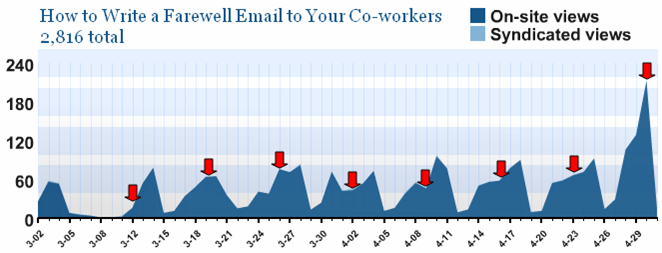
I have a post on this blog that’s been up for nearly two months now. How to Write a Farewell Email to Your Co-Workers provides a humorous look at that ritual of leaving companies, the farewell email. Given that people tend to leave on Fridays, the page views of this post follow a predictable path, increasing each day to a weekly high on Friday.

This Wednesday’s views were the highest ever for a single day, and we’re not even at Friday yet. The chart below shows the daily views for the post, with the Wednesdays highlighted by arrows.

I normally wouldn’t note the increase in views, as it risks coming across as some sort of bragging. But the magnitude of the change is pretty significant. And here’s why it’s happening. The post has now risen to the #2 position in a Google search on ‘farewell email’. It wasn’t that way before. I’d check on how the post ranked periodically, and it tended to be around the 10th or 12th result. So a jump of 8 or 10 places in search results is worth 3 times the hits. Now I see the SEO industry in a whole new light!

Of course, this blog isn’t about ad revenue. And the blog’s heavy Web 2.0 content may not appeal to the search engine visitors. But, I decided to add a message for my farewell email visitors:

Welcome to the blog. I know you’re here for tips on writing farewell emails. If you’re at all interested in Web 2.0, I invite you to look around the blog a bit. Use the tag cloud below, or the recent posts on the left-hand side to find info. Also, let’s connect on Twitter and FriendFeed: twitter.com/bhc
friendfeed.com/bhc3

From an advertising perspective, there’s a mismatch between the farewell email post and most of the blog’s other content. So I’m not ‘targeting’ the right audience. But if any of those visitors decide to stick around, I hope they get enjoy the blog.

*****

See this item on FriendFeed: http://friendfeed.com/e/a8133912-d2e9-f680-6592-a66e08abb717

FriendFeed Tags Make Your Stuff Findable

A theme I come back to repeatedly here is that FriendFeed will be a terrific platform for research and discovery. In fact, for this purpose, FriendFeed gets better the more people use it. That’s a contrast from the information overload meme that has emerged, in which too many friend updates overwhelm people.

Another way to put it: “Research” FriendFeed versus “Friends’ Updates” FriendFeed.

A good point of comparison for Research FriendFeed is Google. Google is the first stop for most people when they want to find information on something.

A key difference between FriendFeed and Google is that Google indexes all the content on each page. A Google search will go deep into a web page’s content. FriendFeed has only limited information in each update:

  • Blog or article title (blog post, del.icio.us, Google Reader, Reddit, etc.)
  • 140-character message from Twitter
  • Name of the Flickr photo
  • Etc.

This puts a lot of pressure on the title of the article to well-represent its content. Many times it does. But more often than not, the article is richer in information than the title can convey. Also, contorting your writing – including the title – to maximize search effectiveness is just a bad move. Bad for writing, bad for reading, bad for authenticity.

These two dynamics – lack of full content, incomplete information in the title – call for innovation within the FriendFeed world.

Where will that innovation be? FriendFeed comments.

Comments are free-form, and easy to add. And they’re part of the FriendFeed search index. If a good conversation erupts around an activity feed, those comments can be helpful for searches. But the conversation may not hit the mark either. And the majority of updates do not have a rich conversation around them.

As the author of a blog post, you may want to take a more active role in whether your content shows up in searches on selected terms. May I suggest tagging as an answer here?

In a comment, simply type ‘tag:’, followed by any tags you’d normally use. Using the “tag” prefix lets everyone know that it’s not a conversational comment. It’s a metadata comment.

Here’s an example. I recently wrote a post called, “Innovation Requires Conversations, Gestation, Pruning“. The article can apply to any general environment where innovation occurs. However, the focus of the post is really on employees inside companies. Internal blogs can be powerful centers for incubating innovation.

The post has a strong Enterprise 2.0 theme. Yet the title of the post doesn’t tell you that. So I went into the comments section for the FriendFeed blog post update, and added this:

tag: enterprise 2.0

Sure enough, the post now shows up in a search for ‘enterprise 2.0’. It also showed up in my RSS feed of ‘enterprise 2.0′ updates from FriendFeed.

Not everyone will bother with tags, of course. But tags are mighty useful things. If you create content and want to make sure it’s findable, tags are a good strategy to make sure it’s “findable”.

And this idea extends to adding your own tags to others’ content. You could create your own tags to associate to content you like and want to track.

And tags help others understand the context of the content.

This post may be a bit early. But it is something to think about in a future where FriendFeed is the third leg of research: Google, Wikipedia, FriendFeed.

*****

See this item on FriendFeed: http://friendfeed.com/search?q=%22FriendFeed+Tags+Make+Your+Stuff+Findable%22&who=everyone

Imagining an Email Social Network

Email has been proposed as a nearly ready-to-go social network. Just how would that work?

In September 2007, Om Malik asked Is Email The Ultimate Social Environment? And in November, Saul Hansell wrote, Inbox 2.0: Yahoo and Google to Turn E-Mail Into a Social Network. Both looked at the idea that email providers have most of what was needed to build their own social networks. There is potential there, but it’s not a slam dunk.

The Social Network Stack

If an email system is to become social, it needs to address the social network stack. To keep things simple, let’s assume there are three parts to the social network stack:

  1. Self-Expression = who you are, what you like, what you’re doing
  2. Relationships = people connections, of all different types
  3. Interactions = how you engage your network

Within each part, there are components that define the experience of the social network. This diagram describes those:

Self Expression: Email Needs a Profile Page

There isn’t a profile page in email systems. You log in, and you see your email. Adding a profile page really shouldn’t be too hard for Google or Yahoo. Even issues of privacy for the profile page are quite manageable for the two Web giants.

Apps on the profile page? Google’s got iGoogle widgets and OpenSocial. Not a problem.

Yahoo has demonstrated with its durable portal that it can pull together information from different sources. Wouldn’t be too much of an issue for them either. According to the New York Times’ article, Yahoo’s Brad Garlinghouse already has an idea for the profile page:

In this vision, people have two pages: a profile they show to others and a personal page on which they see information from their friends as well as anything else they want, like weather or headlines.

Relationships: They’re in the Emails, But Handle with Care

This is the biggest advantage the email providers have: they know your relationships. They’re sitting on a mountain of information about people’s connections to others. As the New York Times’ Saul Hansell wrote:

Web-based e-mail systems already contain much of what Facebook calls the social graph – the connections between people.

This is the killer advantage Yahoo and Google have over other social networks. They know your connections right off the bat. And that’s not all. They know how often you email those contacts.

Imagine how this could work:

  • Email frequency is used to set your initial relationship level with someone else. Lots of recent back-n-forth means strong bond. Lots of one-way emails to you means it’s a company. Few two-way emails means you have a weak relationship.
  • Your address book categories – personal, work – can become relationship definition metadata.
  • If you don’t have your email address book organized by relationship types, the email provider analyzes the words to categorize the relationship. Romantic, friendship, professional. Yes, this is Big Brother scary, but Gmail already does this to display ads. Still, if not done right, this might backfire big time.

I do wonder how much value this really has though. Email address books are used to kick start your enrollment into social networks like Facebook. It’s not hard to import these.

The assessment of your email connections – strength and type of relationship – is cool, but don’t you know that already? Arguably, such analysis really is a way to save time on making your own decisions about these relationships. But if you’re engaged with your network, you’re probably going to take control of this.

Subscribe or Dual Opt-In: Twitter or Facebook? FriendFeed or LinkedIn? The recent stars on the social apps scene have a subscribe model. Your can read the updates of people on Twitter and FriendFeed, just by declaring that you want to. Pretty wide open. But a key factor here: when you join Twitter or FriendFeed, you do so knowing that anyone can read your updates. People with whom you email never had that expectation. So every user either needs to opt-in to having their updates read by their email contacts, or you must send a friend request to whomever you want in your social network.

Type of Relationship: Friend, common interest, professional? This is another one that requires thought. I’ve argued previously that different social networks are good for different types of relationships. Being a one size-fits-all is not easy. It requires a decent amount of management for the user: do I share my kids’ pictures with my colleagues and the people in my Barack Obama 08 group? Dedicated purpose social networks make managing the different aspects of your life easier. Otherwise, all your co-workers will know your political preferences, party pictures and relationship status. Email providers have all of your email contacts; they need to either pick a focus for their social networks or let users create their own types.

Interactions: Watch Those Activity Streams

Most of the Interaction stack is well within the range of Google and Yahoo. Yahoo’s been in the groups business for a long time. Google relaunched the JotSpot wiki as Google Sites. A wiki can be a good group site.

Apps were already discussed under self-expression. Messages? Of course – this is email.

Activity updates are an interesting concept. The biggest current activity in email apps is…email. But I’m not sure those qualify as updates you want broadcasted:

Should emails be shared?

Emails are pretty private, aren’t they? Not really something people will want to broadcast out to their social network…

Google and Yahoo could integrate activity streams from other parts of their social networks pretty easily.

So What Are Email’s Advantages as a Social Network?

I’m not sure there are intrinsic advantages email enjoys that make it superior as a potential social network. Rather, it has these two user-oriented advantages:

  • People wouldn’t have to go to a lot of trouble to set them up. Just present them with the opportunity when they log in to their, with very few clicks or decisions initially.
  • We tend to check our email daily, hourly. So recurring engagement with your social network is a lot easier than with destination social networks.

That being said, Facebook, MySpace, LinkedIn, Bebo, Ning and FriendFeed have a tremendous head start and brand. They also have clearly defined, different experiences.

If they choose to roll out their own social networks, Google and Yahoo will start ahead of the game. But success won’t be because of the email. It’ll require a differentiated social network experience. Just like anyone else entering the space.

The Best Blogs You’re Not Reading? Toluu Knows

Toluu has entered the ever-growing recommendation space with something different: blog recommendations. And the service does a good job of finding blogs you’ll like.

I love the RSS experience of reading various blogs, loading up my reader with a lot of them and checking updates several times a day. So I was happy to have the chance to try this out. The service is new, launching in mid or late March. Louis Gray has a good post detailing its initial launch. Here’s a description of how it works from the Toluu site:

  • After joining, you will be prompted to import your feeds. We have many methods of importing your feeds such as OPML import, URL input, and a nifty bookmarklet.
  • Toluu will do some crazy math to find others in the system who have similar tastes as you.

One thing founder Caleb stressed on his blog: “Toluu is not another social network. I repeat Toluu is not another social network.”

So with that intro, let’s look at the user experience and how Toluu rates versus competitors. First, a brief discussion of recommendations.

Quick Note on Recommendations

The recommendations space is a hot area right now. For instance, Loomia, which recommends web content based on what your friends read, just raised $5 million. Amazon.com has been a real pioneer here with its “customers who bought this item also bought…” recommendations.

Ideally, recommendations are exactly matched to your interests. That’s pretty much impossible, but recommendations engines will employ proxies to get a bunch of recommendations that are close to your interests. And hopefully one or more click with you.

There are myriad ways to approximate your interests, and the world of recommendation engines is full of different methodologies. The key thing for most of them is (i) the amount and quality of information about your preferences, and (ii) the amount of population data available to build out recommendations. Toluu uses your OPML file of feeds, which is a very good source of data about your preferences. And Toluu improves as more people participate.

Finally, I’d want a recommendation service to mix highly popular items that I may be missing, as well as less popular items that are relevant to me. That latter category is the real jewel of a recommendation engine, and its the hardest to get right.

Toluu’s Organizing Principle: Match Percentage

Toluu’s primary organizing basis is its Match %. As Caleb mentioned above, this is their “crazy math” secret sauce. After you log in, you click on matches. A list of 5 people are displayed, sorted according to the Match %. The first 5 people you see are your highest matches. Each subsequent page shows the next 5 highest rated people. Each person has 5 feeds listed beside them. These “feeds you might like” are the top 5 recommendations per person.

I had 60 people in my list of matches. My highest match was at 91%. The bottom of the list was guy with whom I matched at 31%.

As I looked through the people that I matched, I noticed a trend. The best Match %’s were with people who had fewer blogs. The lower Match %’s seemed to be with people that had large numbers of blogs. I pulled together some numbers for 30 people to see if this was true. My top 10 matches, 10 people that fell just below the 50% Match %, and my bottom 10 matches. I then graphed it:


Sure enough, the higher the number of feeds for a given user (red line), the lower the Match % (blue line). I’m not quite sure what to make of that. It may be an outcome of the math – the match percentage is lower just because a user has so many feeds there’s no way to match. Or maybe I don’t match up well with the hard-core RSS addicts. I dunno.

One effect is that people who go deeper in their blog interests will fall lower in my matches. Assuming users don’t go too far down in viewing their matches, this could reduce the chance for finding those golden nuggets of less popular, but valuable blogs.

Top Toluu Recommendations Can Be Limited

I cruised through my people matches, and read the 5 “feeds you might like” for each one. There is a high degree of commonality on the recommendations. The 5 recommendations seem to use popularity as an primary input. And that makes sense. You’re providing a service, and popularity means somethings been deemed worthy by the public at large. Start with that!

Again, I looked at the top 5 recommendations for the 30 people I analyzed above. That meant I was looking at my top matches, my mid-tier matches, and my lowest matches.

There wasn’t a lot of variation in the top 5 recommendations for people in the different groups. Micro Persuasion, Engadget, Lifehacker, a couple Google company blogs and Boing Boing consistently showed up, regardless of the Match %.

This narrowness in the recommendations was something that Allen Stern at CenterNetworks wrote about. If you see a recommendation once, you’ll tend to see it repeatedly.

The Rubber Meets the Road: Toluu vs. Google Reader vs. NewsGator

So all that’s well and good. But how does the service perform? I decided to see how Toluu worked relative to two big established market players: Google Reader and NewsGator.

Google Reader has a Discover function. Here’s how it’s described: “Recommendations for new feeds are generated by comparing your interests with the feeds of users similar to you.” Sounds like Toluu, doesn’t it?

NewsGator has a Recommended for Me function: “NewsGator has analyzed your current subscriptions and post ratings, and recommended these new feeds for you.” Doesn’t say how that’s done.

I compared the top dozen recommendations for each of the three services. To assemble my top 12 for Toluu, I calculated the number of times the different blogs appeared in the 30 people I analyzed above. For instance, the blog Micro Persuasion appeared in 19 of the 30 matched users, making it #1. The table below shows those top 12 for each service:

One thing that immediately was apparent. No blog appeared more than once! Three different sets of recommendations and no overlap among Toluu, Google and NewsGator. Incredible!

I then checked out the 36 different sites. After a quick scan of each one, I decided whether it was one I would add to my RSS feeds. Those are highlighted in yellow above. NewsGator’s recommendations fell flat with me. They were too hard-core tech. Several had blog posts with lines of code on them.

Google Reader’s recommendations were the most relevant for me, with 5 that I liked. I subscribe to a number of Enterprise 2.0 blogs, so blogs like Intranet Benchmarking Forum and Portals and KM were good.

But Toluu did well here. The crowd was right – I like Micro Persuasion. Webware.com and Web Worker Daily are also interesting. There are a lot of Google blogs that show up in the recommendations. Maybe a bunch of Google employees are trying out the service?

More people joining Toluu will probably improve this some. At least push the Google blogs off the top recommendations. But there will be some reinforcing behavior as people join. Sites like Engadget and Lifehacker have large followings, and I’d expect a number of new folks joining Toluu to have those already.

Serendipity: Looking at My Top Matches’ Other Blogs

For each person in your match list, you see all the blogs they have that you don’t. It’s here where some of those golden nuggets, and even better known blogs, can be found. It takes work. You need to click each person, and then click each blog. There’s a limit to how much of this I wanted to do.

So I only looked at the feeds of my top 3 matches. And, I did find more blogs I’m going to add to my Google Reader:

  • Marshall Kirkpatrick
  • Adam Ostrow
  • BubbleGeneration
  • SocialTimes.com
  • mathewingram.com/work

Toluu Assessment = These Guys Are Doing It Right

I picked up 8 new blogs to follow courtesy of Toluu. That’s no small accomplishment. And considering they’re just getting underway and don’t have a ton of users yet, they compete quite well against Google.

I haven’t touched on other features of Toluu has. You can favorite a blog in your collection. I assume this helps the matching algorithm? You can track the activities of others to see what blogs and contacts they’re adding. But remember…this is not a social network!!!

Things I’d Like to See

I’d like to have an easier experience seeing the feeds for my top matches. Since there’s such a commonality in the top 5 for each of them, it would help me discover other blogs if I could see several of my matches’ unique blogs at once.

Show the top ten blogs recommended for me based on my top 10 matches. Criteria = frequency of a blog’s recommendations, with overall popularity as a tie breaker.

I’d like to get a little more info about some of these blogs in a summary fashion, without having to click each one. Maybe the headlines for the most recent 3 posts, or top tags of the blog?

But all in all, a very nice start for Toluu. Thumbs up here. Now I’ve got to go scan my RSS feeds.

Improving Search and Discovery: My Explicit Is Your Implicit

Two recent posts on the implicit web provide two different takes. They provide good context for the implicit web.Richard MacManus of ReadWriteWeb asks, Aggregate Knowledge’s Content Discovery – How Good is it, Really? Aggregate Knowledge runs a large-scale wisdom of crowds application, suggesting content for readers of a given article based on what others also viewed. For instance, on the Business Week site, you might be reading an article about the Apple iPod. Next to the article are the articles that readers of the Apple iPod article also viewed. MacManus finds the Aggregate Knowledge recommendations to be not very relevant. The recommended articles had no relationship to Apple or the iPod.

Over at CenterNetworks, Allen Stern writes that Toluu Helps You Like What Your Friends Like. Toluu lets you import your RSS feeds and friends who have also uploaded their RSS feeds. It applies some secret sauce to analyze your friends’ feeds and create recommendations for you. Stern finds the service a bit boring, as all the recommendations based on his friends’ feeds were the same.

In the case of Aggregate Knowledge, the recommendations were based on too wide a pipe. The implicit actions – clicks by everybody – led to irrelevant results because you essentially the most popular items. In the case Toluu, the recommendations were based on too narrow a pipe. The common perspectives of like-minded friends meant the recommendations were too homogeneous.

Both of these companies leverage the activities of others to deliver recommendations. The actions of others are the implicit activities used to improve search and discovery. A great, familiar example of applying implicit activities is Google search. Google analyzes links among websites and clicks in response to search results. Those links and clicks are the implicit actions that fuel its search relevance.

Which leads to an important consideration about implicit activities. You need a lot of explicit activity to have implicit activity.

Huh?

That’s right. Implicit activities don’t exist in a vacuum. They start life as the explicit actions of somebody. This is a point that Harvard’s Andrew McAfee makes in a recent post.

Let’s take this thought a step further. Not all explicit actions are created equal. There are those that occur “in-the-flow” and those that occur “above-the-flow”, a smart concept described by Michael Idinopulos. In-the-flow are those actions that are part of the normal course of consumer activities, while above-the-flow takes an extra step by the user. A couple examples describe this further:

  • In-the-flow: clicks, purchases, bookmarks
  • Above-the-flow: tags, links, import of friends

Above-the-flow actions are hard to elicit from consumers. There needs to be something in it for them. Websites that require a majority of above-the-flow actions will find themselves challenged to grow quickly. They better have something really good to offer (such as Amazon.com’s purchase experience). Otherwise, the website should be able to survive on the participation of just a few users to provide value to the majority (e.g. YouTube).

So with all that in mind, let’s look at a few companies with actual or potential uses of the explicit-implicit duality:

Google Search

In an interview with VentureBeat, Google VP Marissa Mayer talks about two different forms of social search:

  1. Users label search results and share labels with friends. This labeling becomes the implicit activity that helps improve search results for others. This model is way too above-the-flow. Labeling? Sharing with friends? After experimenting with this, Mayer states that “overall the annotation model needs to evolve.” Not surprising.
  2. Google looks at your in-the-flow activity of emailing friends (via Gmail). It then marries the search histories of your most frequent email contacts to subtly alter the search result rankings. All of this implicit activity is derived from in-the-flow activities. For searches on specific topics, the more narrow implicit activity pipe of just your Gmail contacts is an interesting idea.

ThisNext

ThisNext is a platform for users to build out their own product recommendations. They find products on the web, grab an image, and rate and write about the product. Power users emerge as style mavens. The site is open to non-members for searching and browsing of products.

ThisNext probably relies a bit too heavily on above-the-flow activities. It takes a lot of work to find products, add them to your list of products and provide reviews. It also suffers from being a bit too wide a pipe in that there’s a lot of people whose recommendations I wouldn’t trust. How do I know who to trust on ThisNext?

Amazon Grapevine

Amazon, on the other hand, has a leg up in this sort of model. First, its recommendations are built on a high level of in-the-flow activities – users purchasing things they need. This is the “people who bought this also bought that” recommendation model. Rather than depend on the product whims of individuals, it uses good ol’ sales numbers (plus some secret sauce as well) for recommendations. This is a form of collaborative filtering.

Amazon Grapevine is a way of setting the pipe for implicit activities. The explicit activity is the review or rating. These activities are fed to your friends on Facebook. One possibility for Amazon down the road is to use the built-up reviews and ratings of your friends to influence the recommendations it provides on its website. Such a model would require some above-the-flow actions – add the Grapevine application, maintain your account and connections on Facebook. But these aren’t that onerous; the Facebook social network continues to be an explicit activity that has high value for individuals.

Yahoo Search

Yahoo bought the bookmarking and tag service del.icio.us back in 2005. It’s hard to know what, if anything, they’ve done with that service. But one intriguing possibility was hinted at in this TechCrunch post. The del.icio.us activity associated with a given web page is integrated into the search results. Yahoo search results would be ranked not just on links and previous clicks, but also on the number of times the web page had been bookmarked on del.icio.us. And, the tags associated to the website would be displayed, giving additional context to the site and enabling a user to click on the tags to see what other sites share similar characteristics.

This takes an above-the-flow activity performed by a relative few – bookmarking and tagging on del.icio.us – and turns it into implicit activity that helps a larger number of users. But with the Microsoft bid, who knows whether something like this could happen.

The use of implicit activity is a powerful basis to help users find content. Just don’t burden your users with too much of the wrong kind of explicit activity to get there. Two factors to consider in the use of implicit activity:

  1. How wide is the pipe of implicit activities?
  2. How much above-the-flow vs. in-the-flow activity is required?

Search Smackdown: Mahalo – del.icio.us – Google

I was reading the Crowdsourcing vs. Expertsourcing: A Misleading Comparison post over at Mashable. In it, Paul Glazowski analyzes a Newsweek article that suggests the bloom is off the Web 2.0 rose. Too much junk is enabled via everyday people logging on, and there’s a movement for more professional, expert information sourcing.

One example of expertsourcing is Mahalo. Mahalo was started to be a guide to Web content. Paid professionals own a topic, they research a number of sites related to that topic, and post the links that provide the best information. In their opinion, that is.

I’ll admit to some skepticism here. Google has been so good at revealing information and letting me see what’s out there. The idea of limiting my results to what someone deems worthy seems so incomplete. I’m afraid I’d be missing something that’d be really important to me.

But Mahalo has gotten some traction, so there’s something there.

I decided to run my own simple test of Mahalo, pitting it against two other ways to find relevant web content: del.icio.us and Google search. Quick backgrounder on those. del.icio.us is a bookmarking/tagging app that lets you save websites you like, and give them terms that have meaning to you. You can also find content on a given subject by searching tags, and seeing what others have bookmarked. Google is, of course, the preeminent Web search engine.

I tested three separate search terms, going from broad to specific:

  • Running
  • Marathon training
  • Tempo run

My scoring system is simple. For each search term, gold, silver or bronze will assigned based on my own subjective view.

SEARCH TERM #1: RUNNING

‘Running’ is a fairly broad topic. There are a lot of areas that may apply, making it a challenge to return results that are relevant . With that in mind, let’s see what the three search apps returned.

Mahalo: SILVER

The foundation of Mahalo’s search results is “The Mahalo Top 7”. These are the seven best links for a given topic. It is the Top 7 where expertsourcing proves its value.

The ‘Running’ Top 7 provide links to two running publications and wikipedia’s entry for running. Another link is to About.com’s page for running, itself a form of expertsourcing. A little uninspired, but a serviceable offering.

Mahalo also has several other sections in its running page. These include health-related topics, oddball sites, web tools and user recommendations. The web tools include MapMyRun.com, which lets you map a run or view others’ running routes. A user recommendation includes LetsRun.com, which is the best site for the competitive runner.

One other thing that’s good. All the links relate to the physical exercise running.

del.icio.us: BRONZE

This search shows both the power and the weakness of bookmark/tagging sites. On the plus side, I love the running results that are returned. Very interesting variety. The downside? A lot of sites that aren’t exercise running-related. Things like “Running a Windows Partition in VMware” and “Internet Explorer 7 running side by side with IE6”. In fact, 26 of the first 50 results were not related to exercise running.

There are interesting sites that del.icio.us users have posted related to running. MapMyRun.com is here. How to Select a Running Shoe by eHow.

Several, but not all of the Mahalo Top 7 appear in the first 50 del.icio.us results.

Google: GOLD

You can see how Mahalo picked its Top 7 websites…they’re all the top results in Google search! Google also returns the fun stuff in del.icio.us.

Then Google offers a plethora of other sites, and only 6 of the first 50 are not related to exercise running. Pretty much everything on Mahalo is there, plus other interesting sites. A site listing running movies. A company that sells the running skirt! Ultrarunning.

SEARCH TERM #2: MARATHON TRAINING

‘Marathon training’ is not nearly as wide open as ‘running’. This search is for someone who has a a goal in mind.

Mahalo: BRONZE

First, let me say that the bronze here is a very strong showing. If there was photo finish, you’d have a hard time telling Mahalo hadn’t won this test. The presented sites are all good and worty of consideration for anyone contemplating a marathon.

There are a variety of programs available here: Runners World, Running Times, marathontraining.com, etc. And to Mahalo’s credit, there’s no listing for Galloway’s training program! Editor bias there, I’ll admit.

I was disappointed that Pete Pfitzinger’s program isn’t shown. It’s my own favorite. But I liked the CrunchGear site, listing stuff marathoners would want.

del.icio.us: GOLD

One thing that immediately struck me this time is that all 50 of the del.icio.us results were related to marathon training. The greater specificity helped del.icio.us here. Also, “running” has several meanings, but “marathon” has few.

Several of the Mahalo Top 7 are in the first 50 results. Missing are the Running Times program, the AIDS national training program and the Boston Athletic Association program. But Team in Training is included (if you’re offsetting charity-related programs).

Several other valuable sites are here. For example, there’s McMillan Running, which includes running pace calculators and marathon time prediction workouts.

Unfortunately, Jeff Galloway’s site is bookmarked here. But…Pete Pfitzinger is included as well. Bonus points for that.

Google: SILVER

Google does its usual excellent job in its results. 6 of the Mahalo Top 7 are here; Running Times is missing from the first 50 results. Surprisingly, Team in Training is not in the top 50 results.

Google gets dinged for no race calculator in the first 50 results. No Pete Pfitzinger. But Jeff Galloway is there! Noooo…

SEARCH TERM #3: TEMPO RUN

A tempo run is a specific training technique in which you hold a fast pace over several miles. It’s a tough workout, but it can advance your performance dramatically. Obviously, we’re now in the technical weeds of running.

Mahalo: DISQUALIFIED

Mahalo has no entry for tempo running. We’ve gone too detailed for Mahalo here. DQ’d.

del.icio.us: SILVER

Use of the term “run” again confuses poor del.icio.us here. 34 of the first 50 results are not related to exercise running. But there are several good sites related to the tempo run. Runner’s World has Learn How To Do A Perfect Tempo Run. Running Times has A Tempo Run by Many Other Names.

And this is one of my favorites…a LetsRun.com post/discussion about Tempo run length vs. speed from 2003. One would have to go pretty deep into the LetsRun site to unearth that one. A true credit to the power of social bookmarks & tagging.

Google: GOLD

Incredibly, all of the first 50 results were related to exercise tempo runs. Very impressive. Lots of good info about the temp run. A LetsRun post/discussion, but different than the one on del.icio.us. Bloggers describing their tempo runs. Formal programs that advise on the pace of the tempo run. Just really good stuff.

Recap: Broad, Narrow, Technical

Broad search: Google, Mahalo, del.icio.us
Narrow search: del.icio.us, Google, Mahalo
Technical search: Google, del.icio.us, (Mahalo DQ’d)

Conclusions that I draw from this admittedly small, subjective test:

  • Mahalo is a good starting point for finding information on something that’s not familiar to you. It only covers broader, more popular categories. It does appear that the Mahalo expert just skims the top results from Google. But the clean interface and human filtering makes it a decent place to start your search.
  • del.icio.us is challenged by results that are not related to the search topic, which is consistent with its user-generated chaotic nature. It’s also a really good place to find hidden nuggets of valuable information not easily found elsewhere. And for a narrow topic with words that do not have multiple meanings, del.icio.us really shines.
  • Google still makes sense as the first place to look. Breadth and depth of results, and it takes on all comers. It also does an exceedingly good job of figuring out what sites relate to a search topic.

One final note in favor of Mahalo. There is research that shows consumers are actually better off with fewer choices than more. Give me 7 good choices, and I’ll be able to begin my journey to learn more about a topic. Give me 50 choices, some great, some terrible, and I’ll be flummoxed as I try to read them all.

Mahalo does have the advantage of providing a simple, limited set of good results to get beginners going. There is value to that.

In Praise of Inertia: MyYahoo Still #1

Over at TechCrunch, they’ve got a post up discussing the top six personal homepages. #1? MyYahoo. MyYahoo has been around for quite a while. 6-7 years? It’s an oldie, but still a goodie. It’s my homepage.

There are others on the list. #2 iGoogle looms as the big scary challenger. Given Google’s success over the past several years in other arenas, it’s surprising they haven’t taken the #1 spot here as well.

It’s a testament to inertia. Not inertia in any negative sense, like laziness or user ignorance. Rather, inertia as a reflection of human sensibilities and value systems. Something called the “9X problem“.

Harvard professor John Gourville put forth the idea of the 9X problem. The gist of his thesis: “a mismatch of 9 to 1 between what innovators think consumers want and what consumers actually want.” The mathematical term “9X” actually does have a little math behind it. And that math is key to understanding the 9X issue.

First part of the 9X equation is based on our comfort with what we have. Things we already know, things that we have invested time in learning and using, have a high psychological value for us. They satisfy some need. We’ve learned their strengths, and live with their weaknesses. When we compare something new to something we already have, we tend to overweight the value of what we already have by 3X. It’s a little scary to give up what you know.

Second part of the 9X equation is based on our natural skepticism about claims made for new things. This probably resonates for most of us. I know I tend to dismiss most commercials and advertisements. This is a healthy trait of people – otherwise we’d all be getting duped left and right. But it also means that we underweight the value of features for something new by a factor of 3X.

Multiplied together, this gives us the 9X factor.

This is powerful stuff. It means new things really have to deliver healthy gains in benefits. Some examples of “9X masters” come to mind. Google was such a leap forward in search relative to its competitors: very relevant results, clean interface. Apple’s iPod just blew the doors off other music players in so many ways. Honda’s reliability and fuel efficiency were miles ahead of Detroit in the 1980s and 90s.

But there are plenty of other cases where good products failed to dislodge incumbents. Supposedly, many other search engines have attained search results parity with Google. I wouldn’t know…I still use Google exclusively. And so do many others.

So there’s the 9X problem. It’s actually a really interesting concept. If you’re doing a startup, can you do in it a way that does not force someone to give up an existing “thing” they like? That way, you only have to deal with the 3X new product benefits underweighting problem?

9X is really about inertia. MyYahoo fulfills a personalized homepage need: news, email, stocks, sports, weather, etc. iGoogle, Netvibes and others have really nifty options for their pages. But have they delivered 9X the value?

The key is to hook your users. Once you get them, it’s hard to lose them. On that note, how about adding my little blog to your RSS reader? You can remove it any time you want… 😉

Super Tuesday with Twitter/Twittervision/Google

Enjoyed using the Twitter mashup for Super Tuesday. Some algorithm (Google-created?) identified Super Tuesday-related tweets. Twittervision mapped these to Google maps. So you’d see comments pop up alongside someone’s picture, with their location on the Google map. Very entertaining.

There were plenty of Europeans and Australians chiming in that night. A few Latin Americans and a decent showing of Canadians. Demonstrated for this insular American how engaged the rest of the world is in our politics.

Also, by the end of the night, there seemed to be a 43-minute lagtime between posting a tweet and seeing it show up on the map. The typical comment display plus move around the Google map may have been ~10 seconds. So that’s roughly 258 tweets at any given time waiting to post.