How Much Scale Is Needed in Enterprise 2.0 Employee Adoption?

A couple recent items caught my eye with regard to the issue of employee adoption of social software.

In Reversing the Enterprise 2.0 Pricing Model, Julien le Nestour argues that pricing per user for social software should increase as more employees use it, because the network effects of higher participation make the software more valuable. It’s a great theoretical piece, tying pricing to value received. But in the harsh budgeting realities of the enterprise and in the comparison against other software pricing models, it’s not likely we’ll see anything like this.

Atlassian, maker of the Confluence wiki and developers tools, recently passed the cumulative revenue mark of $100 million. In the post announcing this milestone, Atlassian blogger notes that the company has no sales force. People just download the app. I know some of the Atlassian guys, and this kind of viral, bottom-up adoption is core to their philosophy. They don’t sell to upper management, adoption occurs at the departmental level. That being said, I am aware from my work at Connectbeam of some large-scale rollouts of the Confluence wiki by Fortune 500 companies.

What connects these two items? The first post describes the nature of Enterprise 2.0 apps and how their value increases as more employees use them. The second post points to the value that departments have received from Atlassian’s Confluence wiki, even without broad adoption. In other words, network effects are not a critical aspect of the Confluence value proposition.

From these posts, other readings and direct customer experience, the following occurred to me:

You don’t need a high level of adoption to get value from some Enterprise 2.0 apps. Others require broad participation.

In some ways, that may seem obvious. Yet I don’t tend to hear this distinction being made. Usually, all social software is lumped together under ‘Enterprise 2.0’ and there is a collective view that wide-scale adoption by employees is a necessity. It’s actually more nuanced than that.

Varying Adoption Levels Required

The graphic below depicts the relative levels of participation required for different apps to “deliver value”:

enterprise-20-employee-adoption-to-derive-value

Here’s a quick summary of the graph:

  • Employee participation is defined as contributions and engagement (views, edits, comments, etc.)
  • Moving from left to right, the percentage of employees involved gets higher

This graph has a couple of implications for Enterprise 2.0 vendors. Before that, here’s an explanation for why I put the different applications where I did.

Consider the Purposes of the E2.0 Applications

Before discussing these applications, I want to note this. All social software applications get better with higher adoption. There is no disputing that. The distinction I want to make is that some apps require increased participation before they deliver value.

Blogs: The nature of a blog is a single person’s thoughts, observations and ideas. Inside companies, these applications can be tools for the ongoing recording of things that fall outside the deadlines and process-oriented activities that make up the day. Making them public is a great way to share these contributions with other employees and establish your record of what’s happening. If only a few key people blogged inside a company, there will be value in that.

Wikis: Wikis actually have two purposes: (1) knowledge repositories, and (2) projects and collaboration. It’s that second purpose that makes wikis particularly valuable even with small participation. I’ll use Confluence as an example. We use it as our low home for putting up documents accessible to anyone else, and for free-form contributions on all manner of things. It is very much a utilitarian use case for us. If we weren’t using Confluence for this purpose, we’d share documents via email. In larger organizations, Confluence may replace usage of SharePoint or the company portal.

Using wikis as knowledge repositories, such as [Company Name]-ipedia type of implementations, requires a larger percentage involvement. Sparsely populated company versions of Wikipedia are of little use. As are wikis that are not updated regularly with new information. I’d put wikis-as-knowledge-repositories up there around prediction markets in terms of required participation.

Forums: The old man of Enterprise 2.0…forums. These are the place where topics can be posted, and a scrum of conversation occurs. To really get value out of these, it helps to have larger participation. Blogs are solo voices with interesting content. Wikis can have a very specific collaboration purpose among a few employees. Conversations around a topic require a wider variety of voices. Otherwise they fail to give people a sense of what others are thinking. Nothing sadder than forum post with no comments.

Social bookmarking: Bookmarking sites you find useful has value by itself. So in that sense, “social” bookmarking can work for very few employees. But it’s not really “social”, it’s simply a replacement for your browser bookmarks. You get value by finding those gems your colleagues deem interesting. The odds that any single bookmark will be useful to you are small, so you need a healthy amount of bookmarks to increase the chances of finding links that will help you. And to get a healthy amount of bookmarks, you need broader participation.

Microblogging: In some ways, microblogging could be compared to forums. Both are public places to serve up topics. But they’re fundamentally different. And that’s why broader participation is more important here. Forums have a distinct purpose – the discussion of a particular topic. You need participation by those who know something around the topic.  Microblogging is a more free-form, personal activity. You don’t need a distinct purpose to post something. You post all the things that occur to you during the day. Some of which will have value, although it can be hard to predict for whom. It also helps to know that people are seeing these posts, because there is a conversational aspect to microblogging. The free-form, who-knows-what-might-be-interesting, conversational aspect of microblogging require larger participation than forums do.

Prediction markets: Prediction markets thrive on having a variety of ideas, events and initiatives. They also require the different perspectives of employees, leveraging different perspectives, knowledge and experiences. This is true wisdom of crowds work. Limited participation limits the value of prediction markets. These benefit from broad employee involvement.

Social networks: I put these at the top of the chart in terms of employee involvement. Perhaps one of the best use cases for social networks is finding colleagues with the knowledge or interest in projects you’re working on. This requires large-scale participation. If a social network only is used at the departmental level, it doesn’t provide value. In terms of expertise location, you’re probably already aware of what others in your deparmtent know. It’s breaking out of that traditional sphere of contacts where social networks shine. I know I’ve heard many instances of large corporations suffering from “reinventing the wheel” syndrome because employees lack visibility about what others know. Broad participation addresses this issue.

Implications

Three implications of this view about required involvement come to mind.

Greater required participation correlates to greater impact on a company’s value: Generally, you could change the metric in the chart above from percentage of employee involvement to impact on company value. The increased participation means the associated application will also have a larger effect on the company’s strategies and operations. It’s not an tight correlation, but a general trendline. Exceptions will abound.

Top-down vs. bottom-up: General observation is that broader participation requires a greater amount of senior management support. That’s the way things work inside companies. Employees will listen when the executives of the company push something. For applications that need lower participation, the name of the game is to provide a compelling application with a low entry cost. Departmental budgets and the green-light from employees at lower levels of the organization are all that are needed.

Time for application to gain traction: With applications that require low levels of participation, there is plenty of time for the application to grow virally. It serves its purpose for a select few, and over time others will see the value and elect to participate. These apps can be resident inside companies for long periods of time. Those that require higher participation to see value will need to show results sooner. They are on senior management’s radar, generally cost more and have a greater number of employees who will be watching to see the results.

So it matters what type of application we’re talking about when it comes to Enterprise 2.0. It matters for companies and vendors. It impacts the skills required for everyone’s success.

A nice post that complements this one is Adina Levin’s Scale effects in enterprise social software.

*****

See this post on FriendFeed: http://friendfeed.com/search?required=q&q=%22How+Much+Scale+Is+Needed+in+Enterprise+2.0+Employee+Adoption%22

In Praise of Grunt Work

broken-glass

Photo credit: Vieux Bandit

An experience I had that comes back to me from time to time is work I used to do way back in the early 1990s. I was an Assistant Buyer for Hecht’s Department Store in Washington D.C. My department? Stationery and Frames.

The picture frames could get handled roughly, both by customers and in transit. Which meant broken glass. A lot of it.

The store department managers would box up these frames of broken glass, and ship ’em back to the Hecht’s warehouse in Maryland. Boxes of these frames would show up each week, stored in the specially designated Frames area. I’m guessing the warehouse crew thought that was sort of amusing.

So you’ve got a bunch of frames, but no glass. What do you do? Ship ’em back to the different manufacturers?

No, you send the Assistant Buyer to the warehouse to replace the glass.

We’d order a bunch of different pieces of glass, and I’d rebuild these poor little specimens on the Island of Misfit Frames. It sucked. I mean, I wore gloves but would inevitably get cuts on my hands. It was hot in that warehouse. Sitting there for hours doing this work was b o r i n g. I was a college grad, dammit!

But something happened over the hours, days and weeks I did this work. I learned those picture frames. I knew all the Burnes styles cold. It happened in spite of my dislike of the glass replacement work in the warehouse.

How did it help?

  • Sales numbers on a report were matched to a style I knew, making the data much more informative
  • Ad layouts – I knew the colors and styles to put into each ad
  • Store merchandising – I could go into any store and quickly size up the shelves for presentation and inventory
  • Product selection – I could compare new styles to what we already carried

All from the hours of grunt work in the warehouse. This is a lesson I like to remember from time to time.

*****

See this post on FriendFeed: http://friendfeed.com/search?required=q&q=%22In+Praise+of+Grunt+Work%22

How to Integrate Social Media into Product Marketing

Recently, I’ve had former colleagues from a couple of my old employers ask me about social media. Specifically, how to get started in it from a professional perspective. They’re aware that social media can be powerful, but it can be daunting to figure out an entrance point and what you’re supposed to do with it.

[tweetmeme source=”bhc3″]

Now I’m no Chris Brogan, but I do have hands-on experience. Specifically, I’ve been doing product marketing for a while now, with both Connectbeam and BEA Systems.  BEA Systems was great for traditional product marketing work. Connectbeam is great for social media-oriented product marketing work. I’ve learned some things that work for me.

In that spirit, I’m going to share them here. Here’s a summary of what follows:

  1. What is product marketing? messaging, customers, market trends, market visibility
  2. Leverage the work you’re already doing
  3. The 9 social media tools I’m using
  4. Twitter – narrate your work
  5. Blog – part product, part big ideas
  6. FriendFeed – tracking the flow
  7. SlideShare, Scribd – the post-webinar bang-for-your-buck
  8. YouTube, Google Video – incremental exposure
  9. Wrapping up – feel free to contact me

OK, let’s get to it.

What Exactly Is Product Marketing?

In the graphic below, I’ve put together a rough (and incomplete) map of the different functions one finds inside companies:

map-of-company-functions

I look at product marketing as having four primary goals:

  1. Positioning and messaging of the company’s products
  2. Steady voice and knowledgeable source for customer inquiries
  3. Staying on top of evolving requirements and ideas in the market
  4. Establishing the company in the market, with coverage among sources of information used by customers

I want to distinguish product marketing from other functions. Every function can use social media for its benefit, but the use cases vary. For instance, I’d expect engineering to use social media to tap peers who can help with coding or architecture questions.

But let’s be clear what product marketing is supposed to do. It is an outward-facing function, with a number of responsibilities:

  • Articulate the value of the company’s products
  • Create messaging around the products, via website content, data sheets, white papers, presentations, etc.
  • Develop the business case for products
  • Put on webinars
  • Give customer presentations and demos
  • Do market and competitive analysis

The tools of the trade include: data sheets, white papers, newsletters, PowerPoint presentations, Camtasia demos, WebEx/GoToMeeting, trade show booths.

So how does social media play in all this?

Leverage the Work You’re Already Doing

The nice thing about traditional product marketing work is that a lot of it complements social media nicely:

product-mktg-source-for-social-media

The first bit of advice I want to impart is that if you treat social media like a foreign language, it will be. If you’re wondering where to start, look no further than the thinking and content you already do as a part of your job. That’s plenty good for starting.

There are three activities that the product marketer will engage in:

  1. Monitor: who is saying what of interest
  2. Engage: interact with customers, analysts, consultants, competitors
  3. Broadcast: create content, tweet original thoughts, post to SlideShare, etc.

In the sections that follow, you’ll see all three activities described.

Social Media: What I’m Doing

The tools: Here are the social media tools I use for product marketing:

Changes in latitude, changes in attitude: Attitude is the most important consideration. If you look at the various social media as a pain-in-the-ass part of your job, you’re likely not going to get much from it. It will be too much of a chore for you.

To excel at product marketing, you’ve got to be good at research and building persuasive arguments, along with a personality that engages customers well. It’s really not that hard to extend those traits into social media. And once you read a bit more below, I think you’ll see the value of engaging in social media.

Be a mensch: Do not spend your time running down competitors. It makes you look petty, and you’ll find yourself in entanglements with them which make no one look good. Focus on what your company is about.

Not tonight honey, I have a headache: I’m an ‘I’ introvert on the Myers Briggs test. Which means I tend to reflect on things. There are times I just don’t feel like twittering. And that’s OK. Because there are times I’m fired up. I will rattle off a series of tweets and dive into deeper conversations. Strike while the iron is hot.

Twitter

Twitter is the microblogging platform, and is my most valuable information source for tracking what’s happening in my industry. It’s really quite a simple platform, but it has a tremendously flexible set of use cases.

The basics: Here a few basics about the service:

  • 140 characters – learn the power of distinct thoughts in a limited space
  • Follow – you see the tweets of whomever you follow, and anyone following you might see your tweets
  • @Replies – the @Replies tab serves as an inbox of public tweets meant for your attention. Start a tweet with @[username] and it will end up in that inbox
  • RT – stands for retweet. When someone tweets something you like and you want your own followers to see it, you type ‘RT’ , then paste the tweet (with the @[username] included) and hit update.
  • DM – Direct Messages are essentially emails, limited to 140 characters. People use them all the time for private conversations.

Fill out your bio: Make sure you do the following with your Twitter account: use your real name, put your location, have a website of some type (your personal blog, company blog, company website), tell who your company is and what you do there, and upload a picture. This seems like basic advice, but if you don’t, a lot of people won’t follow you back. Which makes your product marketing job that much harder.

Also, before you start following people, get 3-4 tweets on your account so you don’t look like a spam bot.

Subscribe: You need to find others to follow on Twitter,  otherwise it’s a lonely place. But who? Here a three tips to get started:

  • Find prominent bloggers in your space, find their twitter account, and follow them
  • Look at who the prominent bloggers are following, and follow the same people
  • Run a search on twitter for industry jargon, see if those people are interested in your sector. Click here to go to twitter search.

A lot of those you follow will follow you back. This is how you start growing your own base of followers.

Narrate your work: Great, so you’re set up. Now what to tweet? Lunch menu? Here’s one idea. Narrate your work. Technology legend Dave Winer wrote this idea, and I like it. Tweet what it is you’re doing. But, let’s examine this a bit more.

Do not tweet, “Opening up Microsoft Word” or “Heading into a meeting”. Yes, that’s your work, but it’s nothing anyone cares about. Rather, you might be reading a good article about something relevant to your industry. You like it? Tweet it! A simple tweet like this is great:

Reading: [article name] [shortened URL] [optional – a bit of personal color]

Because of the 140 character limit, typical article URLs are too lengthy for a tweet. Use a URL shortener, like bit.ly. And if you have a pithy thought on the article, tack it on at the end of the tweet.

@reply to people: When someone you’re following tweets something of interest to you, engage them. Ask follow-up questions, agree with them, challenge them. This is the type of thing that puts you “on the map” in Twitter. Done well, you will gain new followers by doing this. Just avoid being a troll. When people @reply to you, make sure you give them the courtesy of a reply back.

Broadcast: Once you’ve established credibility and a set of followers on Twitter, don’t be afraid to broadcast updates. These may be product releases, blog posts, new white papers, conferences you’ll be attending, etc. All that is fine. Unless that’s all you’re tweeting. Then it’s not fine.

And don’t be bashful tweeting successes.

Be an information hub: One observation about @reply tweets. They are the conversational currency of Twitter. Personally, I want to make sure maybe 60% of my tweets are conversational. But I don’t want them too high. As a product marketer, you’ve got a message to impart. Nothing wrong with creating tweets that others like. What are some non-@reply tweets? Retweets, passing along links to interesting information, personal observations as you do your work, or personal life things (such as funny things about your kids).

People will be attracted to twitters who pass along valuable info.

Blog

Check any job description for product marketing, and you’ll see that good writing is a requirement. We do this for data sheets and white papers. And these papers we write are for public consumption. Of course, they do tend to have a fairly structured approach.

Which is what’s nice about blogging. You’re still writing. But the format restrictions of “official” documents are loosened. Language is less formal, you can inject personality and include pictures, videos, polls etc.

What to write: On the Spigit blog, I like to mix it up. I will cover product releases. But I won’t just re-state the data sheets or press releases. I write more of the background, the “why” for a product release or feature.

I cover larger  issues  as well. This is particularly important for smaller companies. When you’re smaller, you don’t get automatic attention the way Google, Microsoft or Oracle do. That means just writing about your product will result in people not reading your blog posts.

But what do smaller companies have? A different way of looking at the market, and the advantage of generally being more leading edge. For instance, this Spigit blog post, Eight Principles of Enterprise Innovation Management, clearly describes what the burgeoning field covers.

Bloggers love links: When you write these company blog posts, link to other bloggers. For your readers, it’s a great way to show how your thinking ties into issues others are grappling with. For yourself, it’s a good way to memorialize a post you liked. And in case you didn’t know, bloggers love links.

When you link to another blogger, they get a notification of that link. In terms of attention, this is even better than an email. It means you took the time to read their post, and built on it. See who the industry thought leaders are, subscribe to and read their blogs via Google Reader and incorporate their analysis, opinion and observations in your blog posts.

Foreshadow things that are coming up: You know your product roadmap: the features and timing. Prior to those releases, get some posts out that lay down the rationale for the releases. Not in some ham-handed fashion, but as a thoughtful look at the problems or opportunities there are. Pull in research, include excerpts from articles and other bloggers. You then have a good basis for announcing the new features.

Practice makes perfect: Don’t wait until you’ve got a sense of what the perfect blogging style is. Just get in there and do it. You’ll learn over time what subjects resonate, and how to craft an argument that gets attention.

Engage those who comment: People will leave comments on your blog. Make sure you take the time to respond to them. That’s a good way to ensure they come back, and you’ll learn something from the exchange. It also leaves a trail of commentary for others to read.

Blogs are a source of high quality traffic: The Spigit blog is a source of traffic to the Spigit website. Not the biggest, but a meaningful source. Visitors from the blog spend more time, view more pages and have a lower bounce rate than many traffic referral sources. And visitors from other blogs exhibit the same tendencies.

Make sure your company blog is indexed: The search engines can deliver great traffic. Make sure your blog is part of their search index database. For instance, here’s the Google page to submit your blog URL: http://www.google.com/addurl/?continue=/addurl

FriendFeed

FriendFeed is a lifestream aggregation service, which lets track all manner of information about other people from 59 different services. There is a good social aspect to FriendFeed, although the company is still pretty early in its lifecycle. So it’s likely that people in your industry aren’t yet active there.

But beside the social aspects, FriendFeed also has incredibly powerful information management tools. And it’s these tools that are valuable to the product marketer. I’m going to cover them below, but a more detailed description is available on this blog post.

Subscribe to people: Just like on Twitter, you can subscribe to people on FriendFeed, if they have an account there. When you do that, you’ll see there tweets, plus other useful information like Del.icio.us bookmarks, new blog posts, Google Reader shares, etc. You get a fuller picture of what is happening with those in your industry.

Subscribe to imaginary friends: Some people don’t have an account on FriendFeed, but they are active on some other site, like Twitter. But you can still stalk follow them on FriendFeed. You’re doing this not to interact with on FriendFeed, since they don’t have an account there. But I use FriendFeed as a master aggregator of people’s activity streams.

Track keywords in a Group: FriendFeed lets you create Group. Groups are containers into which you can pipe content from elsewhere. Use a Group to track keywords that relate to your industry.

For example, I’ve created the Innovation Management Group.  Into that Group, I’m piping tweets with keywords I want to track, and SlideShare presentations and Del.icio.us bookmarks with tags I want to track. One centralized place to stay on top of what’s happening in my industry.

Put it all together into a List: FriendFeed has a feature called Lists. You can categorize the people you follow into different Lists. Then you can focus specifically on the activity streams of those people. I’m currently tracking the activity streams of 61 people associated with the Enterprise 2.0 industry. You can also add your keyword notification Room to your List. So you’ll see who’s talking about your industry beyond just those people you follow. As I wrote before, Follow Everything by a Select Few, Select Content by Everyone.

Track it in real-time: Once you have your industry List set up, FriendFeed provides a nice option. You can follow the activity streams in real-time as they hit the FriendFeed database. I find this to be important for two reasons. First, there are time people you know are tweeting something you care about. There’s an opportunity to do one of those @reply engagements. You don’t want to wait until the end of the day to see that, because the moment is lost. The second reason is that stuff collects, and if you wait until the end of the day you’re less likely to catch things of interest.

As I wrote in another post, it’s really not that distracting to track activity streams this way. An alternative people use for real-time flow and user groups is Tweetdeck. It’s only for Twitter, but many swear by it.

Connecting the dots: Once you’re set-up with with your List + keyword tracking Room + real-time, something amazing happens. You will start to understand what people are buzzing about more. You’ll see recurring themes. You learn who people in your industry are paying attention to. You see the relationships that exist among industry folks, via the @reply conversations. You’ll know which conferences and trade shows are most talked about.

SlideShare, Scribd

SlideShare and Scribd are the two leading social document sharing sites. Social document sharing? Huh? What you do is upload a document to these sites, and others who are doing research can find and read them. Document types include:

  • PowerPoints
  • Word Documents
  • PDFs
  • Spreadsheets

These are great places to share the content you’re creating. Let me give you an example of how this worked for me.

In November 2008, I put on a webinar titled How to Double the Value of Your Social Software. Afterwards, I put the presentation on SlideShare. In the two months since it’s been there, the following has happened:

A more recent presentation for a Spigit webinar, Tapping Communities to Accelerate Corporate Innovation, has been viewed 1,508 times.

I recently added the social software presentation to Scribd, and it now has 586 views and two Likes.

I assure you, the after-webinar action is much greater than that which occurred with the webinar itself. The effect of all this is to get your company’s point of view into the market. You are a contributor to the industry dialogue, and your company is very relevant in the thinking about the industry’s future. As I said, this is particularly important for smaller companies, who cannot rely on a huge market presence to ensure getting people’s attention. But even the big companies benefit from this.

This  is product marketing, social media style.

Considerations for SlideShare, Scribd: As you can see, the webinar presentation can actually multiply in value when it’s on these social document sharing sites. I know Guy Kawasaki has the 10/20/30 Rule of PowerPoint. Consider that a philosophy, not a rule. What I take from his blog post is the advice not clutter up your slides with too much.

When people are viewing your PowerPoint, they will not have the advantage of your voiceover. You can’t provide a spare slide with just a picture and hope everyone gets what you’re saying. In the webinar, you’ll have a nice narration for the slide. In SlideShare and Scribd, each slide has to stand on its own. Here are my tips:

  • Minimize the times custom animation is a requirement to talk about the slide. Because customer animation doesn’t work on these sites.
  • Pictures and graphics – these break the monotony of endless bullets and text
  • Each slide should have two messages: (1) the point/data of the slide; (2) a way to provide your commentary to that point/data
  • Assuming multiple sections, recap the slides of each section – make sure the point is made

And don’t forget to tag, tag, tag your presentations. Don’t be chary with the tags. People will use them to find your documents. Of course, make sure your tags actually reflect the material in the presentation.

As you go into a webinar, think about your presentation being consumed by an audience many times bigger than the number of attendees to the webinar.

YouTube, Google Video

Videos are a popular way for people to view content. A part of your product marketing job may include producing canned demos of the product. These can be on your company website. And they can go on YouTube as well.

I’ve uploaded three demos for Connectbeam to YouTube. In total, they’ve gotten 380 views. Not quite the same as the SlideShare or blog posts. But it’s nice incremental exposure for something you’re creating anyway.

There are countless stories of videos going viral, and it’s a holy grail for marketers. But I don’t spend a lot of time on that. If you happen to have a particular strength in entertaining videos, by all means take advantage of it.

One limitation for YouTube is that videos’ running time can be no longer than 10:59. For basic product demos, this should be more than enough time. But for webinars, which can run an hour, YouTube doesn’t work.

Google Video supports much longer videos. It’s where I uploaded the recorded webinar from November.  It’s not nearly as social as YouTube, but it does come up in Google search results.

Unfortunately, Google is going to stop accepting new uploads to Google Video in a few months.

However, assuming you do get a video to Google Video or you upload shorter media to YouTube, you can embed these videos in a blog post and give them color commentary to spur viewing.

Use high quality resolution when embedding YouTube videos: The normal resolution of a YouTube video is rough. This may be something that happens when you convert a Camtasia video to a YouTube-acceptable format. But you should know about this, because it hurts the viewing quality of the video. Those web screenshots can be hard to read.

Fortunately, there is a solution to this. When you embed a YouTube video on a web page or blog post, you can alter the embed code to force the video to view in high resolution. The hack described in this blog post works. It will ensure that the video’s fidelity is much higher, making it a more enjoyable viewing experience.

Wrapping Up

A site that I think could be more valuable to engage in is LinkedIn. There are groups and questions that people pose. I haven’t been very active there, but it’s worth a look. Depending on your industry, Facebook may also have value.

I hope this post has been helpful. I seriously could triple the size of this post, but it’s long enough. If you want to talk more about this, feel free to reach out to me on email: (hutch <dot> carpenter at gmail <dot> com) or on the phone 415-377-3610.

Finally, here are a couple relevant posts as follow-up:

I encourage you to get out there and start experimenting. It’s the best way to learn.

[tweetmeme source=”bhc3″]

The Migration of Web Techniques to In-Store Retail Practices

Via ralphbijker on Flickr

Via ralphbijker on Flickr

Think about the companies doing the most technologically advanced stuff. Amazon. Google.

Grocery stores.

Say what…? The place where oranges sit in piles in the produce section. Boxes of cereal lines the aisles. The frigid ice cream aisle.

Well, they’re not in the league of Google and Amazon. But grocers are more than those aisles of food and ceilings of fluorescent lights you see. Two trends in the industry borrow heavily from the advancements on the Web:

  1. Website optimization
  2. Recommendations

I’m not talking about monitors with web pages inside stores. I mean the shopping experience has been affected by these developments. Here’s how.

Website Optimization => Store Layout and Merchandising

E-commerce sites live and die by their conversion rates. A key piece of the conversion rate puzzle is effective navigation and presentation of items to site visitors. One company that helps with that is  Tealeaf, which records and analyzes visitor behavior to help site owners optimize conversions and return visits.

In a physical space, you can’t record people’s clicks and actions. Or can you?

As reported in a recent Economist article, retailers are starting to video record shoppers’ behavior in the aisles. For instance, here’s how one supermarket used technology provided VideoMining to understand visitor behavior in its juice section:

Another study in a supermarket some 12% of people spent 90 seconds looking at juices, studying the labels but not selecting any. In supermarket decision-making time, that is forever. This implies that shoppers are very interested in juices as a healthy alternative to carbonated drinks, but are not sure which to buy. So there is a lot of scope for persuasion.

These are exactly the kind of metrics that e-commerce sites track to improve their conversion rates. Use of cameras in-store to do the same thing is analogous to tracking visitors to your website.

Personalized Recommendations

Amazon.com really led the movement to provide effective recommendations to existing customers. One report I’ve seen says that Amazon derives 35% of its sales from these recommendations. Amazon’s recommendations are generated from your shopping history, compared to others via collaborative filtering. The success of these recommendations has inspired others to build recommendation engine services, including Aggregate Knowledge, Baynote, MyBuys, RichRelevance and others.

The same thing is happening in-store as well. You know that loyalty card you present to your grocer to get discounts? It’s used to record your shopping history. Historically, grocers have done little with that information. It was more of a device to keep you coming back to the store.

But in the past few years, grocers have been getting hip to the idea that their customers’ shopping history can be used to personalize the shopping experience.

Once, I was product manager for just such a system, called SmartShop. Pay By Touch’s SmartShop used a Bayesian model to compare your purchases against those of other shoppers, and determine whether you exhibited stronger or weaker preferences for a category or product than the overall average. A set of 10 personalized item discounts were then selected for you based on your specific purchase preferences.

On a website, returning customers are presented with a set of recommendations as they shop. In-store, what’s the analog? Kiosks. Kiosks are the in-store interaction basis with customers. SmartShop notified you of discounts via a print-out from a kiosk at the front of the store. This was key – get you the discounts right at the point of decision, when you’re shopping. Not unlike e-commerce recommendations.

Prior to Pay By Touch’s demise, SmartShop was getting good traction among grocers, who were looking for ways to increase basket size, increase loyalty and differentiate themselves. And it wasn’t just SmartShop. Price Chopper and Ukrops use a recommendation system from Entry Point Communications. UK-based Tesco is the granddaddy of personalized recommendations, provided through Dunnhumby.

Teaching Old Dogs New Tricks

While e-commerce benefits from being all-digital and various identification mechanisms, grocery historically lacked these. But that’s changing. Retailer have picked up the best practices of their online brethren. Things are now much more measurable and personalization is no longer the province of the online players.

Looking forward to grocers introducing Twitter into the shopping experience…

*****

For reference, here’s a white paper I wrote about SmartShop when I was at Pay By Touch:

*****

See this post on FriendFeed: http://friendfeed.com/search?q=%22The+Migration+of+Web+Techniques+to+In-Store+Retail+Practices%22&who=everyone

The Perfect FriendFeed: Themed Channels for New Users

friendfeed-logo

On his blog, FriendFeed co-founder Paul Buchheit asks others to chime in with their own thoughts about improving the experience on FriendFeed:

If you’d like to contribute (and I hope you do), I’d love to read more of your visions of “the perfect FriendFeed”. Describe what would make FriendFeed perfect for YOU, and post it on your blog.

I’ve seen some good posts out there on the subject, many of them with suggestions for UI changes. I’m more inclined to think along the lines of Louis Gray on this one. He suggested a lite version of FriendFeed.

I’d like to suggest another approach.

FriendFeed provides pre-built lifestreams centered around different themes.

The idea is to make it easy for new users to get started.

What Is FriendFeed’s Bridge to Existing Consumer Behavior?

It’s useful to consider FriendFeed in light of the emerging success of Twitter. Twitter rides the earlier adoption cycles of email and IM although clearly it takes some mental adjustment to grasp the how and why of twittering: public declarations of activities, information finds and conversations. Run a Google search on “I don’t get Twitter” to see the past and current struggles people have.

But there is a link to prior behaviors. And with the @replies and DM, Twitter keeps that link.

FriendFeed’s models of consumer familiarity are less clear. Seeing a stream of links, pictures, tweets, etc. from someone…what’s the analog? Online forums come to mind. When I was active in marathoning, I spent time on LetsRun.com.  People would post new topics, and we’d comment on them. Each time someone commented, the topic would bounce back to the top of the page.

Of course, FriendFeed dramatically changes the forum experience: richer set of content, sourced from dozens of external sites, Likes-based ratings and you personalize the set of topics you see.

So what were the earlier adoption factors for online forums?

FriendFeed = Community + Information Tracking

FriendFeed has two primary benefits for users:

  1. Community
  2. Information tracking

Of the two, which one is more accessible to a new user?

Community requires people who are familiar with you, and with whom you are familiar. That’s tough in any social network to get right off the bat. And FriendFeed isn’t a social network the way Facebook is. You don’t set up shop with a profile page where you describe yourself and interact with friends. You pipe in content you’re creating elsewhere, and find others’ content to follow.

Facebook lets you anchor yourself, and then reach out to others. FriendFeed is a constantly moving stream.

Community does come to users of FriendFeed. But it takes time. It will be hard for non-tech geeks to get into FriendFeed right now. Sure the bacon posts and photo memes are great. But most people just joining FriendFeed won’t be part of that. In fact, the adulation of bacon posts will probably scare them.

Something that Lists have shown me is that my attention gets focused on people who share interests in a particular topic. I guess that’s not surprising. And yet it points to the value of having something in place on FriendFeed that new users can immediately get value from.

If you join FriendFeed now, you’re not going to find anyone initially that shares your interests. You can do searches, maybe follow some of the bigger names on the service. But for the majority of the population, that’s not going to get them invested in the service. They’ll sign up, look around, then become inactive.

Community on FriendFeed comes over time as you find people that share your interests. This is why I suggest that FriendFeed provide  pre-built theme channels that let new users quickly find content they care about.

Themed Channels

Themed channels would let new users find areas of interest quickly. By “themed channel”, I’m thinking of feeds that relate specific topics for users of the various 59 (and counting) services that FriendFeed supports: bloggers, YouTube users, twitterers, Flickr users, etc. Included in that would RSS feeds of keywords related to the theme.

How might it work?

  1. New user joins FriendFeed
  2. They are provided with the option of adding one ore more themed channels
  3. They select a topic that is of interest
  4. By selecting a themed channel, they are immediately joined to a dedicated Room for a topic. The Room is one that is probably managed by a FriendFeed employee.
  5. They also can be subscribed to highly rated users whose lifestreams are among the top in terms of percentage of content related to a subject.

As an example, I created a Room for NASCAR. Into the Room, I’ve added three Twitter accounts, two YouTube accounts, four blogs, one Tumblr account, Del.icio.us tags for NASCAR and NASCAR tags for Upcoming events. Imagine a racin’ fan decides to try out FriendFeed. What do you think he’s going to do? Wouldn’t it be great if he had a pre-set channel of content relevant to him?

FriendFeed Isn’t Immune from the 90-9-1 Rule

Jakob Nielsen famously wrote about the 90-9-1 rule:

In most online communities, 90% of users are lurkers who never contribute, 9% of users contribute a little, and 1% of users account for almost all the action.

The challenge for FriendFeed is that a lot of the population doesn’t blog or tweet. Or if they do, they don’t bring a lot of followers with them. Facebook or MySpace may be the biggest online social network they have. Asking these folks to create their own experience and find content they like is probably asking a lot of them.

But putting them in touch with user-generated content and other users who are relevant to their interests is a great way to kick off someone’s FriendFeed experience.

*****

See this post on FriendFeed: http://friendfeed.com/search?q=who%3Aeveryone++The+Perfect+FriendFeed+Themed+Channels

The Top 10 Enterprise 2.0 Stories of 2008

The enterprise 2.0 space saw good action this year. I’ve had a chance to see it up close, starting the year with BEA Systems (now Oracle) and closing out the year with Connectbeam. I think it’s fair to say that in 2007, social software was still something of a missionary sale. In 2008, company inquiries increased a lot. The burden still falls on the vendors to articulate business benefits, adoption strategies and use cases. But enterprise customers are now partners in this work.

So let’s get to it. Here are my top ten stories for the year:

1. Activity Streams

Facebook really got this going with its newsfeed, and FriendFeed took it to an art form with its lifestreaming service. In 2008, many vendors added activity streams to their applications: Connectbeam, BEA Systems, Atlassian, SocialText, Jive Software and others.  Activity streams are great for improving awareness of colleagues’ activities, and adding a new searchable object: actions.

2. Forrester’s $4.6 Billion Forecast

Forrester Research made a splash with its forecast that Enterprise 2.0 will be a $4.6 billion market by 2013. The ReadWriteWeb story about it has been bookmarked to Del.icio.us 386 times and counting. Forrester’s projections provided a solid analytical framework for the different tools, used internally and externally. According to the analysis, social networking will be the most popular tool for companies. Whether you buy the forecast or not, they remain the best-known, most visible numbers to date.

3. Oracle Beehive

Larry Ellison is fond of essentially dismissing SaaS. He does not have Oracle invest much in the trend. But Oracle did seem to embrace Enterprise 2.0 in a big way this year with Beehive, which is an “integrated set of collaboration services.”  The New York Times quotes Oracle EVP  Chuck Rozwat: “It is a product we built from scratch over the last three years.” Now since Oracle is a huge enterprise software company, there’s plenty of skepticism about the capabilities and innovation of Beehive. But there’s no denying that Oracle has the ear of the enterprise, and picks up a lot of market intelligence through its customer base. While Beehive itself may or may not succeed, the idea that Oracle came out with Beehive was a big story.

4. AIIM/McKinsey Surveys

Research and consulting firms AIIM and McKinsey each came out with surveys of corporate interest in enterprise 2.0. The AIIM survey looked at levels of awareness and interest among different Enterprise 2.0 technologies. AIIM also took a fairly expansive view of social software. The top 3 “Enterprise 2.0” technologies in terms of corporate awareness? Email, instant messaging, search. That’s actually a funny list, yet there are lessons there for vendors and consultants in the social software industry. If those are entrenched, can you play nicely with them? One other quote I like from the report:

This study of 441 end users found that a majority of organizations recognize Enterprise 2.0 as critical to the success of their business goals and objectives, but that most do not have a clear understanding of what Enterprise 2.0 is.

McKinsey’s survey of enterprises looked at the interest in various tools as well. It also asked respondents what the leading barriers were for success of social software initiatives. Top three were: (1) Lack of understanding for their financial return; (2) Company culture; (3) Insufficient incentives to adopt or experiment with the tools.

5. Facebook Co-Founder Leaves to Start an Enterprise 2.0 Company

Facebook co-founder Dustin Moskovitz and colleague Justin Rosenstein announced they were leaving the hot consumer social network to start a new company. The new company will “build an extensible enterprise productivity suite,” with the goal of “making companies themselves run better.” Why would these young guys, sitting on top of the leader in consumer social networking, choose to exit? As I wrote at the time:

The Enterprise 2.0 market is still quite nascent and fragmented. Combine that industry profile with projected spending in the category, and suddenly you understand why these guys are striking out on their own.

Assuming they’ll be able to tap the mother ship for help, I think this was a fairly important story this year.

6. Microblogging Enters the Enterprise

Joining wikis, blogs, social bookmarking and other incumbent tools this year was microblogging . Given the way Twitter is used by Enterprise 2.0 aficionados, and is enjoying skyrocketing popularity, it’s no surprise we started seeing microblogging emerge for internal use. At the mostly consumer-focused TechCrunch50, enterprise microblogging start-up Yammer won the top prize. Other start-ups in the category include SocialCast and Present.ly. SocialText added microblogging with its release of Signals.

7. Gartner Narrows its Criteria for Social Software

Gartner came out with its Social Software Magic Quadrant in October. As SageCircle notes:

Gartner’s Magic Quadrant is probably the iconic piece of analyst research. With its visibility and status, it also has enormous influence on vendor sales opportunities, especially when it comes time for IT buyers to draw up the all-important vendor short lists.

So it was with great interest when I read that Gartner had narrowed the criteria for whom it puts in the Magic Quadrant:

Added blogs and wikis to the functionality requirements

The effect of that is to establish those two tools as the de facto standard for enterprise social software inside the enterprise. To the extent corporate buyers are listening to Gartner for signals about the market, this will make it a bit more challenging for start-ups with interesting offerings that address other parts of the social software market. Yammer, for instance, won’t make it into their Magic Quadrant.

8. Enterprise RSS Fails to Take Off

RSS is one of those technologies that you know has huge value, and yet continues to struggle for awareness and adoption. Google tracks the leading “what is” searches. The fifth most popular on its list? “What is RSS?” Take that as both good and bad. Good that people want to know, bad that awareness continues to be a struggle.

Forrester analyst Oliver Young has a sharp write-up that shows enterprise RSS did not expand inside companies as many had thought it would this year. As he notes:

Of the three enterprise RSS vendors selling into this space at the start of 2008: KnowNow went out of business completely; NewsGator shifted focus and now leads with its Social Sites for SharePoint offering, while its Enterprise Server catches much less attention; and Attensa has been very quiet this year.

RSS is a great way to distribute content inside companies, but its ongoing limited adoption was a big non-story for the year.

9. IBM and Intel Issue Employee Social Media Guidelines

IBM and Intel each established guidelines for their employees who participate in social media. As I wrote, this essentially was a deputization of employees as brand managers out on the web. These market leaders were essentially saying, “have at it out there on blogs, social networks, Twitter, etc. But make sure you know the company’s expectations.” These guidelines represent a milestone in large enterprises’ comfort with social media. I expect we’ll see more of this in 2009.

10. The Recession

This affects all industries, globally, of course. And Enterprise 2.0 is no exception. Jive Software made news with its layoffs, but the effect was industry-wide. And of course, corporate buyers aren’t immune either.

Those are my ten. Did I miss a big story for 2008? Add your thoughts in the comments.

If you’re interested in tracking what happens in 2009, I encourage you to join the Enterprise 2.0 Room on FriendFeed. It is a centralized location for tweets and Del.icio.us bookmarks that specifically relate to Enterprise 2.0.

*****

See this post on FriendFeed: http://friendfeed.com/search?q=%22The+Top+10+Enterprise+2.0+Stories+of+2008%22&who=everyone

Early: Companies Deputizing Their Employees as Brand Managers

For the longest time, social media enthusiasts have noted that employees represent their companies, whether they realize it or not. This becomes more apparent every day as more people take part in the Grand Conversation.

Two tech behemoths have in recent weeks released their social media guidelines for employees. I’ll describe them a bit below, but I think it’s worth noting what milestones there are. Historically, large companies haven’t really encouraged employees to talk out in the market. But then, historically all you had were newspapers and trade magazines.

Companies have had to figure out how to handle social media. Some are advancing well, others are stuck in the 1990s. Here’s a spectrum of ways companies can handle employees and social media:

spectrum-of-trust-for-employee-social-media

Social media sites blocked: This is an ongoing issue. More companies appear to be enlightened, but there’s still a persistent, old school strain that blocks them. Hard for your employees to engage in social media if they can’t get to the sites.

Only marketing engages social media: Also known as the YouTube Strategy. Social media is a thing that you use to go viral. Other employees may be out there, but they probably need to keep their company identity a secret.

Only approved employees engage: This is actually a company warming up to social media. It knows there is more than the YouTube Strategy. It wants employees to participate.

EMC found some good natural blogging talent internally that it promoted to be EMC’s external voices. And that has paid off well in terms of market engagement. [See update in the paragraph below – EMC is actually deputizing its employees as well.]

All employees are deputized: This is what IBM and Intel are doing. They are treating every employee as an individual brand manager out on the Web. They are deputizing them by giving them guidelines, setting expectations, and then letting them act on their own. It’s a wonderful way to let employees both (1) engage the market about their company and their work; and (2) learn from others as to the state of their fields.

UPDATE: Per the comments below, EMC is actually another proponent of deputizing all employees.

Everyone does their own thing: Not having any type of policy is the policy. This is the default position. And companies still benefit tremendously here. They just may have some employee behaviors they wouldn’t want to see.

Oddly enough, I’d say most companies are on either extreme. They either block social media, or have no policy. But IBM and Intel are pointing to a new thinking about how companies and their employees are engaging social media.

A Look at IBM and Intel’s Guidelines

IBM released its social media guidelines several weeks ago. Intel’s came out last week. Both do a great job of mixing corporate interests with a hands-off approach that defines authentic social media engagement. The documents are pretty good reads, and surprisingly similar. Looks like Intel was a good student of IBM’s guidelines.

I’ve pulled together highlights from each companies’ guidelines below:

table-of-ibm-intel-social-media-guidelines

Lots of respect to IBM and Intel for their guidelines. These companies are trendsetters, and I look forward to other companies joining the fray.

*****

See this post on FriendFeed: http://friendfeed.com/search?q=%22Early%3A+Companies+Deputizing+Their+Employees+as+Brand+Managers%22&who=everyone

Why Professionals Should Continue to Blog in the Era of Twitter

I’ll bet you’re smart.

I mean, you’re likely college educated. Maybe even grad school. You can probably remember some killer instances where you nailed some assignment. That clever C++ hack. The time you delivered an insightful analysis of Vonnegut. Navigated your way through a thorny financial analysis. Came up with an elegant solution  in the chemistry lab.

You’re good. You’ve got knowledge in your field, you’ve got a track record of accomplishments in your job. And you’ve got solid points of view about your field and its future.

And all you want to do is tweet?

A number of people have blogged about the uncertain future of…uh…blogging. I understand where they’re coming from. Here’s how Jevon MacDonald put it:

I don’t know what the fate of blogging is, but as I think about it I wonder if it can survive without changing. Just in the last 2 years we have seen massive uptake in the creation of content by users, but most of it is now outside of the blogosphere. Status Updates on Facebook, Twitter, new levels of photo sharing and geolocation based services and networks are all becoming the centerpiece of attention.

His point is that with the ease of Twitter and Tumblr, the relevancy of and desire to blog is diminishing. He’s not alone, it’s a theme that’s been popping up in the last several months.

To which I say:

If you’re a professional who’s just going to twitter, you are missing a golden opportunity to help yourself via blogging.

This post is geared towards those who have day jobs, and for whom blogging and tweeting is an extension of their professional lives.

OK, smart reader, let’s talk about this.

A Blog Is Your Stake in the Ground

Twitter is wonderful. I’ve been tweeting it up the past few months myself. I’ve gained a whole new appreciation for the power of Twitter. As I said in a recent post:

Twitter has established lightweight messaging as valuable and addictive. From the simple roots of “What are you doing?”, people have morphed Twitter into a range of use cases. Open channel chats. News updates. Sharing articles and blog posts found useful. Polls. Research. Updates peers on activities and travels.

It’s great for what it is. And an important part of your professional persona and career development.

But blogs are the professional’s curriculum vitae. They are a standing record of strong thin king about a subject. When you devote the time to put together a blog post covering your field, you’re likely doing this:

  • Research
  • Analysis
  • Linking to others
  • Establishing your voice
  • Influencing the thinking of others
  • Showing the ability to pull together longer form thinking, a requirement in professional work

My own experience is that if you blog, every so often you pop out a signature piece. The kind of post that resonates with others and establishes your position in your field. These blog posts receive a lot of views, get linked to and turn up in Google searches. When you get one of these, congratulations! You have successfully put your flag in the ground for your field.

Tweets don’t do that. Tweets create a tapestry of someone, they foster ambient awareness. This has value in its own right. But they’re not vehicles for heavier thinking. They don’t demonstrate your capacity to size up an issue or idea and bring it home.

Keep in mind that LinkedIn now lets you add blogs to your professional profile. What’s going to be more valuable to you when people are running searches? Tweets or well-thought blog posts?

There’s a Flow to This

I know this is definitely early adopter stuff. The number of professionals spending time tweeting and blogging is still limited. But I suspect this is going to happen:

Those who can work blogging and some twittering into their regular activities are going to earn more money and get promoted faster.

I can’t wait until some academic study comes out about this.

Here’s how I see the way Twitter and blogging mix:

professionals-social-media-flow

Tweets engage you in a flow of information, they let you pick up signals and connect with others in your field. From all that, you gain a healthy perspective on what’s happening in your industry. Once you write a post, you’ll find yourself energized to engage once again via Twitter. And on goes the cycle.

The mere act of writing out research, analysis and opinion is amazingly valuable. No burdens for how that memo plays with your boss, or keeping your thoughts on-topic for the upcoming meeting. Just you and your blog, working through what interests you.

Could You Really Tweet These?

As an example, I’ve selected three posts from this blog. They were some that really worked out there. And I’ve tried to convert them into a tweet. Take a look:

blog-posts-with-tweet-alternatives

There’s no replacing the permanence or deeper thinking that blogs provide.

So What Are You Waiting For?

That’s my view on why you should keep on blogging even as you tweet. Let’s take this one out with quotes from three bloggers:

Bill Ives:

TwiTip recently had a post on Ten People All Twitter Beginners Should be Following by Mark Hayward. I will let you guess who is on it and then go to the post. It is no surprise that a number of top bloggers are one the list.

With the continuing evolution of tools, blogging is becoming more focused on what it does well – moving beyond sound bytes and providing a permanent accessible record of thought.

Eric Berlin:

Here’s my new thinking: probably the best and most successful bloggers will also tend to be the best blogger/microblogger hybrids, and vice versa.

Steven Hodson:

For us this means less competition and less noise for us to fight our way through in order to get through to the readers. This of course is my first reason why bloggers should be thankful for services like Twitter and FriendFeed – they help clear out the noise makers.

*****

See this post on FriendFeed: http://friendfeed.com/search?q=%22Why+Professionals+Should+Continue+to+Blog+in+the+Era+of+Twitter%22&who=everyone

Twitter’s Valuation – More Like AdultFriendFinder or YouTube?

After the recent news that Twitter turned down a $500 million acquisition offer from Facebook, I threw this tweet out there:

Twitter for $500 million..gut says that’s too low. Twitter is the defining platform for lightweight interactions. $1 billion +…

A nice discussion followed on FriendFeed about this notion. A couple counterpoints were made:

“I disagree: their model is no longer unique. Moreover, they don’t offer any particular feature that separates them from other similar models. The best they have to offer is the user base, and the right name-brand shiny shiny with a few choice features would take most of them away.”

“It’s a glorified IM network, only less functional because it’s a centralized platform with an absurd character limit that only the most ADD among us can find usable.”

My gut feeling is based on three factors:

  1. Platform
  2. Growth
  3. Comparable transactions

Here’s where I’m coming from.

Platform

Twitter has established lightweight messaging as valuable and addictive. From the simple roots of “What are you doing?”, people have morphed Twitter into a range of use cases. Open channel chats. News updates. Sharing articles and blog posts found useful. Polls. Research. Updates peers on activities and travels.

Based on tweets, companies find out how they’re doing out in the market. Twitter search yields a treasure of information about subjects. Find like-minded individuals with whom to connect.

The platform aspect is not one to be undervalued. This is a key point – platforms are worth more than any single app. Tim O’Reilly penned a thoughtful piece in this regard. With regard to Twitter as platform, he writes:

Rather than loading itself down with features, it lets others extend its reach. There are dozens of powerful third-party interface programs; there are hundreds of add-on sites and tools. Twitter even lets competitors (like FriendFeed or Facebook) slurp its content into their services. But instead of strengthening them, it seems to strengthen Twitter. It’s the new version of embrace and extend: inject and take over.

Microsharing, as Laura Fitton calls it, certainly requires some change in people’s behavior. There’s no doubt about that. But the concept of microsharing, or as it also known as, microblogging, is powerful. It’s highly flexible and has a variety of use cases.

It’s not just early adopter/social media types that are taking notice of this microsharing trend. Click here to see how often the New York Times has written about Twitter. An article on cnn.com about the Mumbai terrorists included this:

Neha Viswanathan, a former regional editor for Southeast Asia and a volunteer at Global Voices, told CNN, “Even before I actually heard of it on the news I saw stuff about this on Twitter.”

Twitter is transforming in terms of social, accessible and findable updates. True platform companies with reach and highly flexible uses don’t come along very often. Twitter is one of those platform companies.

Growth

Twitter’s early period was marked by some uneven growth. But around March 2008, the service really took off. And it hasn’t looked back:

twitter-compete-graph-oct-2008

It’s fair to say that the network effects are getting stronger and stronger for Twitter. The more people that join, as seen in the graph above, the more valuable the service becomes. Search grows more and more in importance. So more people join, meaning it’s more valuable others to join, and so on…

Don’t dismiss Twitter’s growth either. This post on the Ignite Social Media blog, which shows traffic for 37 different social websites, illustrates how challenging it is for most social networks to maintain growth these days.

Twitter’s got huge momentum right now. That’s valuable.

Comparable Transactions

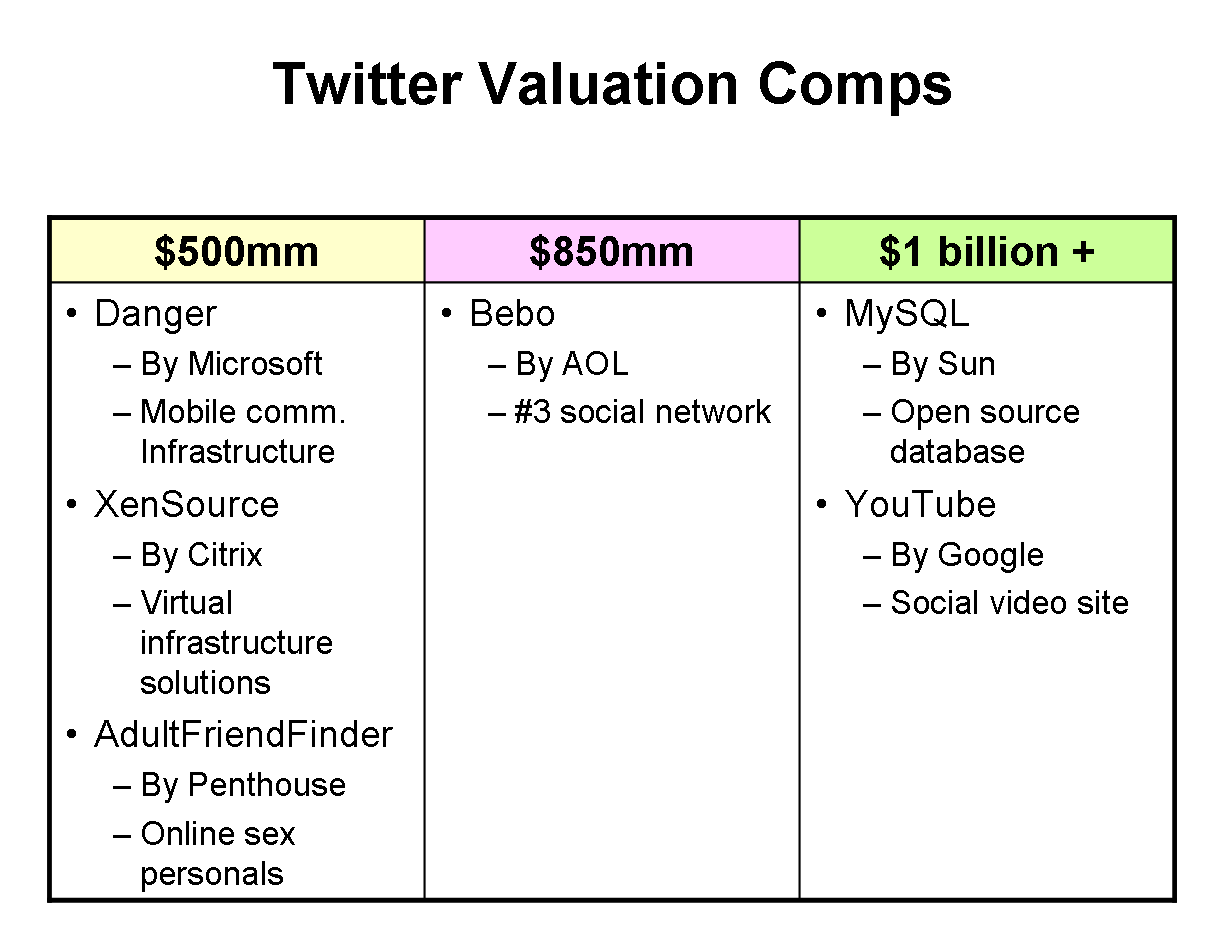
I researched purchase prices for technology companies in recent years. The table below shows acquisition prices for what I’ll call “market comparables”.

twitter-valuation-comps

Valuations are more art than science. Personally, I’m a big fan of triangulating on a value by looking at what other companies have gone for.

My point with the above table is to put some context around Twitter. Danger and XenSource were important niche plays. AdultFriendFinder was valued at $500 million. Given Twitter’s role in the emerging realm of microsharing, should it have the same valuation as AdultFriendFinder?

I know that there currently is no revenue for Twitter. It’s not like they’ve tried and failed. They haven’t even tried. But my guess is Twitter’s revenue path lies beyond punching up some ads on Twitter profiles or in Twitter streams. Those may be there, but like any platform, there will be other ways to monetize.

And let us not forget YouTube’s (non existent) revenue model when Google purchased them for $1.65 billion.

What Do You Think?

I’ve laid out my thinking here. Twitter is a rare platform play that’s hit a strong growth curve. Previous acquisitions say that Twitter should be able to take advantage of those factors for any valuation.

How about you? Weigh in on the comments below, or just answer this quick poll (RSS readers – click out to take the poll!).

*****

See this post on FriendFeed: http://friendfeed.com/search?q=%22Twitter%E2%80%99s+Valuation+-+More+Like+AdultFriendFinder+or+YouTube%3F%22&who=everyone

BackType’s Co-opetition with Disqus, IntenseDebate

friendfeed-add_edit-svcs-comments

Disqus “makes commenting easier and more interactive, while connecting websites and commenters across a thriving discussion community.”

IntenseDebate lets you track your own comments and those of people you follow.

BackType “is a service that lets you find, follow and share comments from across the web.”

Right now, it’s pretty easy to say that Disqus competes with IntenseDebate. Then you read what BackType is doing, and you think, “and they’re competing with Disqus and IntenseDebate too”. Well, they are, they aren’t.

It’s complicated.

I tweeted this last night:

“Just added BackType to my FriendFeed. An interesting competitor to Disqus and Intense Debate.”

That tweet set off a great discussion on FriendFeed. Two folks jumped in. Louis Gray, who has several posts up about BackType, had a couple insightful replies:

“It is a comments tracker and search, not a comments replacement system.”
“My point is that you would not install BackType on your blog. BackType is a superset comments tracker. It finds my comments on Moveable Type, Disqus, Blogger, WordPress, you name it. Then I can search it or follow people. Show me how you would replace your comments on your blog with BackType code and we have a discussion.”

And Phil Glockner added some great food for thought:

I agree with Louis that I don’t think BackType is competing directly. I do think their service overlaps with something centralized commenting systems already do, which is to.. well, track comments across various blogs and other places. BackType opens the scope by supporting tracking your comments wherever they are, in whatever form. But unlike Disqus and ID, it most definitely isn’t a centralized comment service. In other words, Backtype is not the engine you would use to create new comments.

They both really brought home the differences between BackType, and Disqus and IntenseDebate (ID). Disqus and ID are software applications that do a lot of comment management things for bloggers. Spam protection, threading, comment rating, reblog, etc. But I think there’s more to the story here. FriendFeeder Rahsheen puts his finger on it with this comment in the discussion:

I can’t actually put backtype on my blog and have people leave comments in it, but as far as sharing where I’m commenting…it pretty much owns

That’s where the line between competitor or not gets fuzzy.

Is Comment Tracking Geared for Bloggers or Blog Readers?

When I wrote my tweet, I was thinking about BackType from the perspective of a commenter, not a blogger. What I like about Disqus and ID is the ability to see all my comments across the blogosphere in one place, and the ability to track what and where others are commenting.

If I use Disqus for that purpose, then I’ll only see comments made on Disqus-enabled sites. If I use ID for that purpose, then I’ll only see comments made on ID-enabled sites.

But if I use BackType, I see comments by people everywhere! This is because BackType is a bottom-up approach: “Hey commenter! Just provide your commonly-used comment auth credentials, and we’ll find your comments!” It’s an incredibly simple, elegant approach to tracking comments.

BackType tracks comments made via Disqus, and I assume ID as well. For instance, I can see Robert Scoble’s comments on Fred Wilson’s post My Techmeme Obsession on both Disqus and on BackType. But only on BackType will I see his comments on the TechCrunch post A sheepish apology.

So if I’m interested in tracking Robert’s comments across the blogosphere, which site should I use, Disqus or BackType?

BackType also pulls in comments made on Digg and Reddit, as Louis Gray wrote about recently. Even better! So as a user, where should I spend my time?

Disqus and IntenseDebate Will Compete on Other Bases

The reason I say that BackType is in “co-opetition” is that part of the value prop for Disqus and ID is the ability to have a centralized place for your comments, and to follow those of others. It’s not their only value, but it is part of the story.

If things like ad dollars built on site visitors is something these guys are looking at, then there is definitely competition. It’s a battle for attention.

But I believe there are going to be some interesting revenue models for Disqus and ID beyond site visitors. And that makes it less of a competition. BackType founder Christopher Golda made this comment on the FriendFeed discussion:

Thanks for the comments everyone — we don’t believe we are a competitor with either Disqus or ID; in fact, we recommend both. Anything that improves the quality of comments is complementary to BackType 🙂

Focus on the last part of that statement. If Disqus and ID improve the experience for commenters and bloggers, it ultimately is for the good of BackType. I’m not convinced there won’t be some competitive overlap, but I can also see the distinct value props of Disqus and ID relative to BackType.

*****

See this post on FriendFeed: http://friendfeed.com/search?q=%22BackType%E2%80%99s+Co-opetition+with+Disqus%2C+IntenseDebate%22&who=everyone

Three Ways to Double the Value of Your Social Software

I did a Connectbeam webinar yesterday, Double the Value of Your Social Software. One thing about webinars is they really force you to crystallize your thinking, and you get to try out some cool new ideas. This one was a lot of fun for me. I enjoyed bringing some unconventional examples to the discussion.

So how exactly does one “double the value” of social software? The core of the argument is that integrating the various social software apps inside companies produces a new layer of value. In terms of how this happens, I developed three areas of focus:

  1. Expand information’s reach
  2. Create an employee skills database
  3. Diversify and strengthen workers’ sources of information

The Slideshare below is the presentation I used in the webinar. Below the Slideshare, I describe the background and the three areas of focus.

“Enterprise Silos” 2.0

The great thing about companies rolling out the tools of Web 2.0 is that it lets people from everywhere contribute. Multiple people jump on wikis, blogs, microblogging, etc. Social software can tear down the departmental and geographic walls that separate employees.

So it’s ironic that these wall-busting apps end up as new walled gardens of participation. Employees update their Confluence wiki, they blog on Movable Type and Yammer away. But there’s no integration of the apps.

There’s a screaming need to pull these social software apps together. The folks over at venture capital firm Foundry Group laid out a nice investment theme with regard to Glue.  A lot of the logic from that post applies to the proliferation of social software apps inside companies.

By connecting the different social software apps inside companies, companies will realize a new source of value from them, “doubling” their value.

With that, let’s look at the three new sources of value when you integrate these apps.

Expand Information’s Reach

It’s true that information is the key driver of success in the market today. That’s a truism, overplayed theme, I know.

But, it has had its effects inside companies. You see this theme played out in architectural decisions, such Service Oriented Architectures, which makes integrating data and processes much easier. Mashups are another area where we see this.

How about the consumers of data? How to optimize the creation, distribution and consumption of data inside the enterprise?

This is an area where Enterprise 2.0 can learn a lesson from the world of e-commerce. E-commerce companies work hard to optimize the finding and purchasing processes on their sites. Every extra step it takes to find something or to purchase it causes some percentage of consumers to drop out. So they work hard to provide a full, but easy experience.

How about applying that thinking to accessing the employee-generated content inside companies?
How to reduce the steps to accessing this content?

There are three components for what I’ll call an Information Reach Program:

  • Search
  • Serendipity
  • Notifications

Let’s take a look at those three components.

Search: A Forrester Research survey found that only 44% of employees can regularly find information on their corporate intranet. Meanwhile, Pew Research found that 87% of people can regularly find what they want on the Internet.

Where do you think employees will turn first for information? Now there’s nothing wrong with googling something. New information needs to be brought into the enterprise. It’s healthy and vital.

But the pendulum has swung too far toward looking externally, particularly with the rise employee-generated content. Thing likes social bookmarking, blogging and wikis are letting employees find and filter an array of great information. Yet it’s too easy to ignore.

One way to counteract that? Integrate employee-generated content with search engines. When an employees runs searches, they get their usual search results. But why not also show them related content from the company’s social software? Slide #12 in the Slideshare presentation shows Connectbeam’s example of that.

Serendipity: Also known as, finding useful information when you weren’t expecting it. Or as Dennis Howlett put it:

Serendipity: the 21st C word for ‘bloody good luck.

If search is purposeful, serendipity is passive, and in-the-flow of whatever else you’re doing. For serendipity to work, you have to expose people to a range of information during their activities. And let’s be honest – much of that information will score low on the usefulness scale.

But I argue that you need to cionsider serendipity from a portfolio perspective. If you can enable employees to be exposed to random information in high volumes, there will be cases of great matches between something a worker needs and a piece of information she wouldn’t normally see.

Key here is putting this information in-the-flow of daily work. If all employees do is watch a cascade of information, they’re not being very productive.

Notifications: “It’s not information overload. It’s filter failure.” says Clay Shirky. Search is purposeful, serendipity is luck. How about those nuggets of informaiton that you want to know, but aren’t actively searching for and miss during the course of the day? Notifications are the third component of the Information Reach Program.

Key here is to let people personalize their notifications, because people aren’t monolithic in their interests. Top down push processes diminish employees’ interest in tracking the data presented. Filter on groups (e.g. departments, projects, communities of interest), individuals and keywords. These go a long way toward answering Clay Shirky’s point about filter failure.

Create an Employee Skills Database

When you integrate the different social software apps, you can create rich set of data that well-describes what each employee knows and is working on.It’s not just your position and previous titles that matter – it’s your contributions, visible and accessible by all.

We’re seeing steps toward this approach on sites like LinkedIn, with its new apps platform. When you view a person on LinkedIn, you see more than their resume. You get a living, dynamic view of their work. Someday, all that content you’re piping into your LinkedIn  profile should be searchable by others – beyond the current resume entries.

Same idea holds inside enterprises. If you could aggregate employees’ contributions across the social software apps, you have a much richer view of their skills, knowledge and interests than the typical corporate directory.

Connectbeam customer and all-around smart guy Rich Hoeg of Honeywell put it nicely at the recent Defrag conference:

With Connectbeam, I was looking for a social bookmarking application. I ended up with a skills database.

Yes, that’s a Connectbeam plug. But the logic applies more broadly.

Diversify and Strengthen Workers’ Sources of Information

I’ve discussed previously on this blog a fantastic research paper that evaluated the power of employees’ social networks to affect productivity. Basically, the more diverse an employee’s sources of information, and the stronger her connections to a large number of peers, the more productive she is.

Now tie this idea in with Harvard professor Andrew McAfee’s thinking about employees’ Strong, Weak and Potential ties inside companies. Employees already maintain Strong ties inside companies. That’s the status quo out there.

The opportunity for companies is to work those Week and Potential ties. Move them closer to close ties. How?

  • Make employee contributions as findable as possible (i.e. expand information’s reach)
  • Associate activity and tags to individuals
  • Enable easy following of the activities of others
  • Fish where the fish are – put employee generated content where people do their work

Wrapping up

This webinar was a lot of fun, and I think you’ll notice some different thoughts than what is usually seen in these presentations. There are several ideas included in it that really merit exploration separately. I’ll probably do that on this blog, and over on the Connectbeam blog as well.

*****

See this post on FriendFeed: http://friendfeed.com/search?q=%22Three+Ways+to+Double+the+Value+of+Your+Social+Software%22&who=everyone

Do Not Kill Off Marketing During a Recession

It is a mystery to me why some companies (often the ones who find themselves eventually dying away) will react to a downturn by cutting marketing expenses. Cutting expenses is a super smart thing to do, but you should NOT cut back on your marketing.

David Risley, The Single Biggest Mistake in an Economic Downturn Is…

I like David’s sentiment, and I put together this graphic to complement it:marketing-radar

In the world of business sales, you cannot predict which prospects will become sales.  But, you know that you need touchpoints with companies. Which prospects will turn into customers? Hard to predict that.

One reaction to the reduced sales that accompany a recession is to cut back on marketing. Unfortunately, that’s just doubling down on your problems. There are fewer bona fide prospects out there during a recession as companies cut back. Which increases the value of each remaining prospect.

Thus, if you reduce the span/frequency of your marketing efforts, you’re going to miss some of the remaining prospects in the market. If you reduce the number of prospects with whom you engage, you can predict the effect on your sales.

That being said, there are wonderful opportunities to do more with less in terms of marketing, thanks to the rise of social media. Jeremiah Owyang and Chris Brogan can tell you more about how to do that.

*****

See this post on FriendFeed: http://friendfeed.com/search?q=%22Do+Not+Kill+Off+Marketing+During+a+Recession%22&who=everyone