Delicious and Diigo: Differ in What It Means to Be “Social”

Andy Brudtkuhlhas has a nice post, 6 Reasons Diigo is Better Than Delicious. In the post, one of the reasons he cites for Diigo’s being better is its social aspects:

Diigo has an extra level of social networking that Delicious does not provide – at least not in a usable manner. You can connect with people that have similar interests based on what you tag.

I’ve been playing with them a bit. Here’s an initial impression I have of how “social” works in the two bookmarking services:

  • Diigo uses content to find people
  • Delicious uses people to find content

Delicious, an original web 2.0 company, still has “user-generated” as its core raison d’être. Diigo has the later-stage web 2.0 philosophy of being a “social network”.

Diigo: Social Is as Social Does

Diigo has been built to find people based on common bookmark and tag interests. It has social network features throughout:

  1. Finding people on Diigo is much easier than on Delicious
  2. Diigo generates user matches based on tag and bookmark compatibility
  3. User profiles
  4. You can see who has visited your profile page
  5. You can comment on the bookmarks of others
  6. You can share bookmarks with specific users

Networking on Diigo Is Easier

A basic function – finding other users – is much easier on Diigo than on Delicious. The graphic below shows the results of a search for my name:

On Delicious, you have to know someone’s Delicious handle. On Diigo, you can use a person’s regular name. Diigo’s approach is more like that of today’s various social networks:

Social networks make finding users easy. So does Diigo. Delicious doesn’t.

Diigo Social Recommendations

Diigo attempts to match you to others based on common bookmarks and tags. As the graphic below shows, it’s not exactly Toluu-like in its matching.

Levels of compatibility at 2% and 3% don’t quite inspire clicks for further investigation. Social recommendations are a work-in-progress at Diigo. Delicious doesn’t do recommendations.

Diigo User Profiles

For each link, Diigo provides a user profile of everyone who bookmarked the link:

So when you check out others who bookmarked something you like, you can quickly determine if they are someone to whom you want to subscribe. Delicious also lets you look at someone’s activity, but you have to click on their handle to see their page. There’s no profile provided on the list of users who bookmarked a link.

Diigo Visitors Info, Commenting, Bookmark Sharing

I’ll skip the screen shots for these Diigo functions. But here’s how they foster social networking:

  • Who visited my profile? Potential matches. Also lets you know when your social network paid your bookmarks a visit.
  • Commenting. Commenting enables discussion with others. Socializing.
  • Bookmark sharing. You can call out specific users with whom to share a bookmark. Very social.

Delicious Has More of a Crowdsource Feel

Where Diigo is social, Delicious emphasizes the interests of all users. What are people finding interesting. That’s not to say it doesn’t have social network aspects. On Delicious, you can:

  • Add users to your network
  • View your network’s bookmarks
  • Become a ‘fan’ of someone

But Delicious pretty much stops there on the social aspects. The rest of Delicious is centered around bringing order to the huge volume of crowdsourced bookmarks.

Delicious: Who Bookmarked That Link When?

The new Delicious has a really cool timeline that shows who bookmarked a given link when:

That timeline is a thing of beauty. Users, dates, tags, notes. Where Diigo wants to get you socializing around a bookmark, Delicious wants to provide you with information about how a link fared with the public at large.

As mentioned above in the Diigo user profile section, Delicious doesn’t provide user profiles in this listing.

Wrapping It Up

The new Delicious continues its mission of organizing a massive number of user-generated bookmarks and tags. It looks cleaner, and I like the way information is presented. Information organized by an army of user librarians. “Social” in this context means your bookmarks and tags are exposed to others, and you can find related content based on what others are bookmarking and tagging. People are the basis for discovering content.

Diigo wants people to interact via common interests in content. It has a lot of social network hooks. “Social” in this context means establishing and building relationships with others. Content is the basis for finding people.

I’d love to hear your thoughts on the different approaches of Delicious and Diigo. And you can find me on both services:

*****

See this post on FriendFeed: http://friendfeed.com/search?q=%22Delicious+and+Diigo%3A+Differ+in+What+It+Means+to+Be+%E2%80%9CSocial%E2%80%9D%22&public=1

I’ve Joined Connectbeam, and Social Media Got Me the Job

On Wednesday August 13, I start my new job as Senior Product Manager for Connectbeam. Connectbeam provides social bookmarking and networking to the enterprise. The goal is to foster better information management and discovery, and to connect colleagues around projects and common interests.

Going a bit further, here is a note from privately-held Connectbeam’s about page:

Connectbeam’s architecture and core application (Spotlight) were designed to help people in any role, across the enterprise, connect with both the growing pool of information and colleagues with the expertise and experience to help them get their jobs done more intelligently and more quickly. We enable this by aggregating the social metadata that is generated naturally by using the web into a single repository that everyone in the company can access and use.

Current customers include: Procter & Gamble, CSC, Bristol-Myers Squibb, Honeywell, 3M, Intel, Pfizer and Booz Allen Hamilton.

Why Connectbeam?

The problem Connectbeam is tackling greatly interests me. How to manage information to make individuals smarter, help people find information and determine the ways in which common interests establish and build relationships. There are many posts on this blog along those lines. Here are six of them:

  1. FriendFeed ‘Likes’ Compatibility Index
  2. Hey Yahoo! Forget MSFT, GOOG. Change the Search Rules.
  3. Who Is Your Information Filter?
  4. Knowledge & Innovation: The Journey Is as Valuable as the Destination
  5. Tag Recommendations for Content: Ready to Filter Noise?
  6. Social Media Consumption: You Want Signal or Discovery?

I also like Connectbeam’s delivery model. I am a fan of cloud computing, and in my experiences at eFinance and Pay By Touch, customers got comfortable. But I also ran into companies that only wanted applications behind their firewall, which is what we sold at BEA Systems. Security, control and reliability are still important, and recent outages at Amazon S3 and Gmail highlight those concerns. Connectbeam runs as an appliance behind companies’ firewalls.

Connectbeam delivers its model as an integration with existing search engines and other applications. For instance, Connectbeam now has an integration with Microsoft’s SharePoint, the most pervasive collaboration software out there. The Microsoft SharePoint Senior Technical PM even tweeted about it.

I’m a big believer in the ability of enterprises to improve the ways that information is created, disseminated and managed by employees. Those that get this right will be better-positioned in our information-centric economy.

FriendFeed Has Opened My Eyes

I joined BEA Systems to do product marketing for enterprise 2.0. Prior to that, I had done a little tweeting and had a Facebook profile. But not a whole lot of social media. I started blogging in February to eat my own dog food when I was marketing web 2.0 to companies. I needed to immerse myself in the world to really understand it.

Well, blogging has become quite important for me. FriendFeed has become just as important.

FriendFeed opened my eyes to the possibilities of knowledge as the basis of relationships. The ways in which content from a variety of sources is a powerful, addictive basis for learning, conversations and collaboration. How activity streams are compelling reads. I’ve been active on FriendFeed since March, and it shocks me how much I know about web 2.0 and technology in general versus last year. I’ve still got much to learn, and FriendFeed will continue to be a good source for that.

So why can’t companies get better around that too? Having eaten my own dog food on FriendFeed, I’m ready to work with employees and companies to improve the ways in which information is created, tracked and shared.

How Social Media Got Me the Job

You’ve probably seen more than a few posts saying that today’s resume is your Google search results. Your social network sites, content, updates, what others say about you…all of it is searchable.

Like me, Connectbeam CEO Puneet Gupta subscribes to Google Alerts for “enterprise 2.0”. Well one of my blog posts was listed in an alert. It caught Puneet’s attention, so he read the blog a bit more. Liking what he saw, he then investigated my name out on the web. Among the sites he found was one where I was a recommended blogger to follow (thanks Daryl, Franklin, Louis, Mark, Mike, Rob, Steven). Those recommendations were in part made due to the wonderful effects FriendFeed has for bloggers.

It didn’t hurt that I had been involved with enterprise 2.0 at BEA Systems. So after doing some due diligence, he left this comment on my blog:

Hutch:
Would love to connect with you and discuss some ideas.

I reached out to him, did some interviews, and the rest is history.

Looking Ahead

The new job will give me a more structured basis for looking at the ways in which information is managed. I plan to look more deeply at some of the consumer social bookmarking sites.I’m a product manager for Connectbeam, but a lot of my job will involve product marketing too.

I expect working in this area will influence my blogging subjects some. But I’ll blog about other fun stuff along the way as well.

Gotta go – my commute is from San Francisco to Mountain View. Need to battle the 101 traffic.

*****

If you want an easy way to stay on top of Enterprise 2.0, I invite you to join the Enterprise 2.0 Room on FriendFeed. The room takes feeds for Enterprise 2.0-related items on Twitter, Del.icio.us and SlideShare. To see this room, click here: http://friendfeed.com/rooms/enterprise-2-0

*****

See this post on FriendFeed: http://friendfeed.com/search?q=%22I%E2%80%99ve+Joined+Connectbeam%2C+and+Social+Media+Got+Me+the+Job%22&public=1

My Three Nits with FriendFeed’s iPhone Interface

On my recent trip to Hawaii, I had a chance to road test my brand spankin’ new 3G iPhone. My web surfing largely consisted of FriendFeed. So I had a good chance to try out the iPhone interface for FriendFeed.

Overall, it was great experience. The links, pictures, comments and Likes came through well. But a week of living only with the iPhone did make me see some things that could be improved:

  1. The text input box on the iPhone and the Web interfaces have completely different purposes
  2. It’s too easy to inadvertently hide or Like things as you scroll the page with your finger
  3. Refreshing the FriendFeed page is a pain because you have to scroll back to the top of the screen (if you don’t know the iPhone “tap” trick)

I’m no UI expert, I certainly don’t have the UI chops of FriendFeed’s Kevin Fox. But why not dive in and see if there are ways to improve things?

Inconsistent Input Boxes Lead to Embarrassing Mistakes

Both the FriendFeed web UI and iPhone UI have text entry boxes at the top of the screen. But the text entry purposes are completely different:

On the web, the text box is to perform a search. On the iPhone, the text entry box is to post a comment. But people used to the web interface and the search box have made the mistake of a search term being posted to FriendFeed via the iPhone. Three examples:

  • Robert Scoble’s ego search for “Scoble
  • J. Phil’s search for “recluse
  • A European blogger also did an ego search for his name (since deleted)

A different mobile app, FF To Go, has a similar post box at the top of the page, as opposed to a search box. After Thomas Hawk’s wife Mrsth made a similar mistake trying to search for “thomas hawk“, FF To Go founder Benjamin Golub commented:

Sorry; many people make that mistake, any advice on how I could help that not happen again?

To which FriendFeed user Madsimian replied:

@bgolub The problem is simply that the normal web interface has ‘search’, not ‘share’, on the homepage. I’d change the link to ‘search’ for a link to ‘share’, and make the text box on the homepage search. I’ve done what @mrsth has done, twice.

Making the iPhone interface consistent with the web interface would help. On the web, you have to click “Share something” before posting a comment. Why not have the same approach on iPhone?

Accidental Liking and Hiding

As you scroll down the screen, your finger can accidently tap the hide or Like links for a given post. I did this while in Hawaii. Hugh MacLeod tweeted the German word for blowjob. I had no intention of Liking that (really!!!).

Yet a subsequent scroll down the page showed that I had Liked that entry. Which meant people who followed me also saw it, and saw that I Liked it. I quickly un-Liked it.

I also noticed hidden entries at the bottom of the page that I didn’t remember ever hiding.

I commented about this on FriendFeed, and Ben Hedrington noted the same issue:

Done it a number of times… hid Marshal K for a bit, sorry Marshall! Seems like it needs a solution.

How about this? Dedicate a strip of white space on the side of the screen for scrolling? No links appear in that space. I know the space is already cramped, but perhaps a centimeter-wide strip could be carved out?

Refresh the Page from the Bottom of the Screen

Once you’re to the bottom of the page, there’s no obvious way to refresh the page. So you scroll all the way back up to the top of the page. This is something that others have noted as well:

  • Justin Korn: “On iPhone particularly, but would work/be helpful on main as well…a back to top/refresh button at the bottom of the page. On iPhone it is REALLY a pain to scroll all the way back up to the top just to refresh.”
  • Andrew Burd: “I would love a “top of the page” button on the bottom of the iPhone interface. I wear out my scrolling finger trying to navigate between the rooms and my friends area”
  • Mike Reynolds: “New FF on iPhone: “Best” page needs a “go to top” link at bottom of the page. Otherwise, I have to scroll all the way to the top.”

However, it turns out there is a way to handle this. You simply tap the top of the Safari browser on the iPhone, and it automatically returns you to the top. Works just fine.

This nit is an iPhone buyer education issue. But if iPhone buyers regularly fail to know about this option, FriendFeed is one of the sites that would benefit from having a return to top link at the bottom of the page.

*****

So those are three things that occurred to me during my week of iPhone-only access. Still, the iPhone interface was great for FriendFeeding, and AT&T’s 3G coverage was just fine around Honolulu.

*****

See this post on FriendFeed: http://friendfeed.com/search?q=%22My+Three+Nits+with+FriendFeed%E2%80%99s+iPhone+Interface%22&public=1

Applying Circuit Breakers to a Social Media Mob Mentality

Cyndy Aleo-Carreira has a good post out today, When FriendFeed Creates a Mob. The post describes the activity on FriendFeed related to a Thomas Hawk post regarding the director of visitor relations at the San Francisco Museum of Modern Art. In case you’ve missed it, here’s a quick summary:

  1. Thomas Hawk was shooting pictures at the SFMOMA
  2. The director of visitor relationships told him to leave
  3. After pleading his case, Thomas was kicked out of the SFMOMA
  4. Thomas blogged about it, asking people to Digg the story to get it maximum attention
  5. Many people on FriendFeed dugg it, and currently the post has 3,780 diggs

In her post, Cyndy points out that we’re only hearing one side of the story: Thomas Hawk’s. I can’t blame Thomas for that. He was only blogging the incident from his point of view. That’s what blogging is about. But she and Jeremiah Owyang both argue that the use of the guy’s name and calling him a “jerk” (it was originally “asshole”) meant that the post transcended a normal beef, like Comcast not handling someone’s moving well. It was personal, not a slam against a faceless organization.

Was it a mob mentality that took hold?

For the record, I did participate in this:

I trust Thomas Hawk’s point of view, so I was comfortable with the Digg and the Like. Noting the Digg count was probably a bit much. Generally, I thought of it as an authentic telling of an event by Thomas, and wanted to show my support. But I pretty much left it there. I’m not a photographer nor have I had any problems at the SFMOMA.

Also, if the SFMOMA director came out with his own explanation of events, I’d Like that, digg it, share it. I’m not out to tar and feather the guy. Rather, there is a greater issue of individual liberties versus the protection of artists’ rights and individuals’ privacy here. A worthy area for discussion and examination, as Steven Hodson points out. I’m glad that Thomas wrote up his experience, and that it got attention. It should.

But Cyndy’s post does cause me to wonder how one would stop a mob mentality taking hold on FriendFeed, or any social media site.

When Mob Mentality Overwhelms Our Information Filters

In a recent post, I wrote about the emergence of a new role in social media: Information Filters. Particularly on FriendFeed, but on other social media sites as well, we rely on others to surface content that is interesting to us. They do this through their Google Reader shares, Diggs, direct posts, Likes, comments, etc. Some people have a natural talent for this, and they become powerful information filters for others.

I’d say that Information Filters are the primary line of defense against any mob mentality taking hold. Through the various ways they share or don’t share, Information Filters hold strong sway over the agenda of what is discussed.

What would a mob mentality look like?

  1. Our Information Filters buy-in to a “get this guy” mentality and start spreading the word as rapidly as possible
  2. The sheer volume of links, Likes and comments overwhelms the more thoughtful discourse that typically marks FriendFeed

#2 above in particular is where things get dicey. You’re no longer relying on your usual Information Filters. The frequency with which you’re seeing an issue show up becomes the measure of its importance, not the trusted referrals of your Information Filters.

Three Options for Applying Circuit Breakers to a Mob Mentality

Off the top of my head, I can come up with three ways to slow down a mob.

  1. Automatic restrictions: Like the New York Stock Exchange’s trading curbs, FriendFeed would automatically apply the brakes to a URL that gets to much play on the site. New shares of the site link stop bouncing to the top of FriendFeed. New comments and Likes no longer cause the link to bounce to the top. This, of course, would be terrible. Really good posts would have a tough time going viral.
  2. FriendFeed staffers intervene: Similar to the automatic restrictions, except it’s done manually on an ad hoc basis. This is better because truly egregious cases could be addressed, not just an “hot” story. But it puts the FriendFeed folks in a really bad position. As soon as they put the kibosh on a story, the howls of censorship would begin and the vibe of FriendFeed would tank.
  3. Our information filters exercise judgment: This is the right call. We rely on our Information Filters to find content that is interesting, sharp and correct if facts are used.

Information Filters = Circuit Breakers

As noted earlier, Information Filters are people adept at finding interesting content and sharing it. Interestingly, Mona N is exactly on of these people. She finds all sorts of unusual things that people love. I know I do. So her pumping up Thomas Hawk’s SFMOMA blog post was a case of an Information Filter saying “Hey, this is really important information for you to know and act on!”

By virtue of their role, information filters can also act as the brakes should things ever get out of control. Why?

  • They tend to have a large number of followers
  • Many of their followers are frequently reading what they share
  • The ongoing conversation they have with others establishes their “cred” when it comes to discussing new ideas, opinions and news

People who are Information Filters can simply not share whatever it is everyone else is talking about. The lack of their participation reduces some of the heat that can surround an issue. They can also more actively put a stop to an overly emotional mob that forms. With posts, comments, blog shares, etc. People will listen to them. Their participation this way can allow cooler heads to prevail.

It Is Social Media After All

On FriendFeed, Derick Valadao left a great comment on Cyndy’s post:

To those who would say behaviour like that stated in the article isn’t group think I have to disagree. We voice our opinions here on popular entries because we think it will be the right thing to say. We want to affirm the sentiments of the post (for the most part). I have yet to see a social network that can combat against this phenomenon. When we reward opinions with popularity or regard we inevitably create this phenomenon. That of why I appreciate small voices in the crowd who are willing to go against popular opinions. Now we should ask ourselves how we can build that into a social structure if we ever intend ok bringing credible interesting stories to our community.

I look to our Information Filters to play an important role in Derick’s call for a social structure. Having users, particularly those who have been “voted” as our information filters, dampen the creation of any mob tendencies fits well with the idea of social media. It is all about the users. We really should sort these things out ourselves.

It does put the onus on those who enjoy positions as information brokers to elevate their game, and to think hard about the effect they have on the people and organizations they shine a light on. Jeremiah Owyang has a new post out Tracking the Toronto Explosion on Twitter: Opportunities and Risk. I’ll close with a quote from his post:

The community (myself included) must be mindful of what’s real and what’s not, over hyping or spreading false information [that] could impact lives.

*****

See this post on FriendFeed: http://friendfeed.com/search?q=%22Applying+Circuit+Breakers+to+a+Social+Media+Mob+Mentality%22

What Are the Top-Ranked Search Keywords for Your Blog?

Just going through the blog stats after a week off. I noticed my blog post about Facebook’s new newsfeed getting a lot of hits via search.

Just for the heck of it, I figured I’d list some of the search terms that rank my blog pretty highly in Google search results (note my rankings are as of 3 pm on August 10, 2008; the rankings seem to fluctuate a fair amount):

1. “Farewell email“: My blog post How to Write a Farewell Email to Your Co-Workers usually ranks in the top 5, and often is #1.

2. “Pay By Touch“: Two blog posts make it into the top 5 results: Pay By Touch & the Peanut Butter Manifesto, Farewell, Pay By Touch, Farewell.

3. “Facebook slow“: The post Facebook’s New Newsfeed: Slow. Over-engineered. I Like It. has climbed to #5 in the search results for this term.

4. “Should I buy an iPhone“: Shockingly, Should I Buy the Apple 3G iPhone of the Nokia N95? comes in at #7 in response to that search term.

5. “Blog aggregators“: Coming in at #4 for that search term is Explosion of the Blog Aggregators…How to Keep Up.

That’s not a complete list, I’m sure. But some that I’m currently seeing in terms of traffic.

As an aside, compare the search terms where my blog ranks highly to my tag cloud:

There’s something of a disconnect, as you’ll notice lots of FriendFeed, Twitter, blog and social media posts. Those posts don’t receive quite the same search engine positioning. But they are very popular topics written about by many others.

Me? I’ve just happened to land a few hits for less popular blogging topics. And the iPhone search engine ranking probably resulted from a fortuitous link from MacSurfer.com, which gave it good link juice.

How about your blog? What are your blog’s top search terms?

Off for a Week’s Vacation

We Track Tweets and Genes. So Why Not Tomatoes?

The recent salmonella outbreak is yet another reminder of the vulnerability of our food supply. It was the latest in a series of food contamination events that have hurt and killed consumers:

Stopping the spread of bacteria that cause the problems will be an ongoing battle. And it’s not just natural bacteria, but any type of tampering that might occur.

While we can’t stop all forms of contamination that might occur, we should be getting better at quickly tracking down the sources of the contamination. What’s needed is a way to track the “chain of custody” for produce from the fields all the way to the grocery store or restaurant.

Apparently this is still pretty challenging to accomplish.  Consequently. the food industry has resisted imposition of expensive tracking systems, according to an article by the Associated Press:

The [food] industry pressured the Bush administration years ago to limit the paperwork companies would have to keep to help U.S. health investigators quickly trace produce that sicken consumers, according to interviews and government reports reviewed by The Associated Press.

Surely there are ways in which improvements can be made. We continue to make strides everywhere in tracking things down to their unit levels. Is the produce industry that different?

We’re Tracking Genes and Conversations

Two areas that come to mind as examples of dramatically improved unit-level tracking are genes and online conversations.

Scientists have successfully mapped the human genome. Amazingly, we now have the ability to track which genes affect in our bodies. From this work, scientists will develop genetic diagnostic tools and therapies.

Entrepreneurs have successfully built platforms that track conversations. Twitter tracks each tweet individually. Many writers use individually tracked tweets as references for blog posts. Being able to reference what people has advanced the cause of accessibility of ideas everywhere.

We continue to get back at unit-level tracking in so many areas. How about produce?

The Tomato Industry’s $250 Million Loss

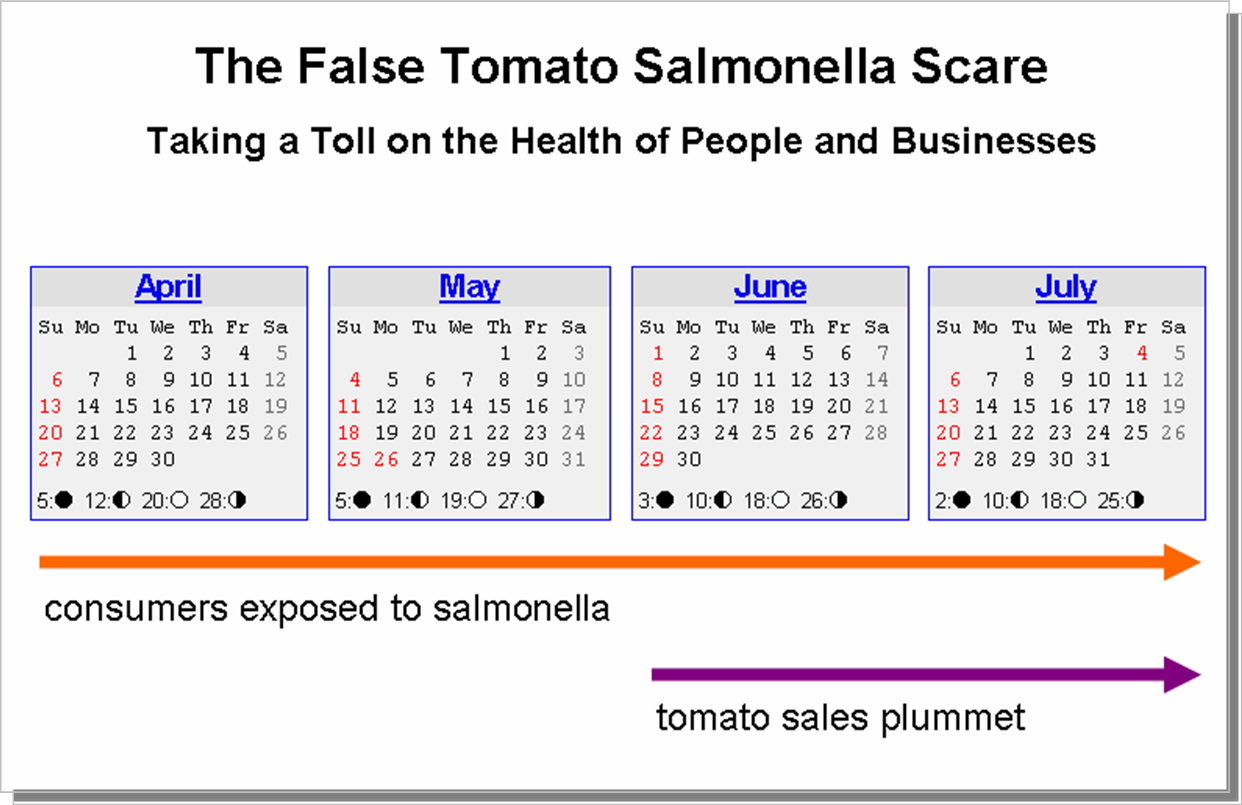
The timeline below highlights two issues with the lack of well-developed produce tracking processes:

The first reports of salmonella occurred in April. People were getting sick. I assume health officials at various levels of government started to investigate. The outbreak continued in May and June, when the U.S. Food & Drug Administration (FDA) issued a warning that tomatoes were suspected of carrying the bacteria.

Now let’s stop here for a second. Reports started in April and the whole month of May. It took quite a while for the initial warning to be issued.

After the warning, government investigators continued their efforts to track down the exact point of origin for the salmonella. In total, 1,700 samples of soil, water and tomatoes were analyzed. But still, investigators were unable to pinpoint tomatoes as the source for the salmonella.

On July 17, the FDA cleared tomatoes as carriers of salmonella. The focus turned to jalapeño peppers as suspects.

So the tale of the timeline?

  1. People have been exposed to the risk of salmonella for four months now. For two months, no one had any idea of the source. For two more months, investigators were tracking down tomatoes. More than 1,300 people have become sick with this particular salmonella strain.
  2. The tomato industry lost $250 million after the FDA issued its warning about tomatoes.

One reaction to this? From the New York Times:

Industry leaders have said they hope to get compensation from Congress to make up for losses, and those who are to appear Thursday said they also planned to demand a stricter burden of proof before the F.D.A. blames a particular food product for any future outbreak.

It’s an understandable request. But the industry itself can do more to reduce these problems as well.

Post 9/11 Legislation and Industry Efforts to Manage Cost

Tracking a full chain of custody for produce was one of the proposals for the post 9/11 Bioterrorism Act of 2002. The costs to implement the legislation were a concern to the industry. As the New York Times reports, the actual legislation does not sufficiently meet chain of custody requirements:

The rule requires importers, processors and distributors to keep track of where they buy produce and where it goes. A major hurdle facing investigators in this outbreak, however, is that processors frequently repack boxes of tomatoes to meet a buyer’s demands. In doing so, officials said, they are not required to record the tomatoes’ farm, state or even country of origin.

The rule requires only that produce handlers keep track of food one step back and one step forward in the supply chain and does not apply to retailers or growers. Because the rule does not specify the format for records, investigators are sifting through a hodgepodge of paper trails to identify the source of the contaminated produce.

I understand industry resistance to new regulations which can add costs to their operations. Particularly an industry like agriculture, which we’ve been doing for what…10,000 years?

Unfortunately, the industry’s success in reducing the regulatory burden may have come back to bite them. Tomatoes were not the culprit in the salmonella outbreak, but the existing tracking infrastructure hindered the speedy determination of that fact. With the business losses and loss in consumer confidence, industry leaders are waking up to the reality of their lobbying success:

“In retrospect, yes, if they (the regulations) had been broader and a bit more far-reaching, it could have helped with this,” said Robert Brackett, senior vice president of the Grocery Manufacturers Association.

What’s Needed to Unit Level Tracking

Some things that come to mind in tracking produce at the unit level:

Unique Identifiers for Units of Produce

Tweets have unique identifiers. So do FriendFeed entries, genes and vehicles. Assign unique identifiers to produce at the unit level. The picture to the right shows a typical unit of tomatoes in the grocery store: 6 tomatoes on their original vine. There’s a label per bunch of tomatoes. How about using that label to record the unique identifier for the tomatoes? The unit-level IDs are assigned at the field level.

The FedEx Approach: Every Step of the Way Is Recorded

Once we’ve got unique identifiers, every point along the way from the field to the grocer or restaurant is recorded. Location, time. This system needs to be quick, efficient and relatively inexpensive like FedEx.

Web-Based Lookup and Retrieval

Once all this great information is assembled, it needs to be easily accessible. A hosted repository that appropriate parties can tap as needed.

Once an outbreak occurs, officials can find the unique identifiers on any suspected produce. They look up the unique ID, and immediately know where to focus their investigative efforts. No more fumbling around, running forensics to determine from where the food came.

With quick access to the chain of custody, people’s health and lives can be spared, business losses are minimized and consumers can be more confident in the food they eat.

We’ve put a man on the moon. We’ve confirmed water on Mars. We’ve mapped the human genome. We track conversations.

How about tracking our food supply?

*****

See this post on FriendFeed: http://friendfeed.com/search?q=%22We+Track+Tweets+and+Genes.+So+Why+Not+Tomatoes%3F%22&public=1

What’s the Story of Your Life?

In the recent post Who Is Your Information Filter?, I noted that individuals are emerging as leaders in the distribution of information. These Information Filters have good judgment as to what their subscribers like.

But there is certainly more to the being a good filter. Here’s an example of what I mean. Dare Obasanjo wrote a post titled Giving Sh*t Away is not a Business Strategy. Eric Rice and I both shared the post on July 12. Check out the results on FriendFeed:

The Likes and comments on Eric’s share included some folks who are subscribed to me.

This is the sort of thing that I love to explore. What makes people respond to the sharing of identical content from one person, but not another?

Interactions and relationships are an important part. Robert Scoble made this point in a comment on FriendFeed.

There’s an additional factor as well. Here’s one way to describe it:

  1. Experience and passions make up your narrative, the story of your life.
  2. A narrative gives context.
  3. Context loads the information you share with meaning.
  4. Meaning draws interest by others.

This takes a little explaining.

A Lesson in Mark Rothko’s Paintings

Mark Rothko was an abstract painter, famous for paintings of rectangles (multiforms) with different colors. His life shared the drama that seems to mark many great artists. He was Jewish, and saw the persecution of Jews in Czarist Russia. His family emigrated to the United states. He was highly intelligent, rapidly advancing through school and receiving a scholarship to Yale. He divorced twice. He drank heavily. He ultimately committed suicide.

And yet he was pivotal in the abstract movement of the mid-1900s. He hated being called an “abstract artist”, but he was leader in the genre. His is a rich history of art, intellect and  experimentation.

Growing up, I’d see art like his and think, “I could paint that. What’s so special about that painting?” Typical punk kid.

But to that point, I went ahead and tried my hand at painting in the Rothko style. Below are a painting by Mark Rothko, and one by my own hand:

This was my first painting effort since middle school. Please pardon the brush strokes.

With practice, I could get the hang of the brush strokes. With time, I bet I could replicate Mark Rothko’s style pretty well.

Which would make me a hell of an abstract painter, right?

Obviously, the answer is no. Even if I could duplicate the style, no one would care. Why? I don’t have a narrative to back it up. I didn’t come up with the style, I wasn’t a participant in the abstract movement, I’m not a student of art or of Rothko, I’m not a painter.

The silly adolescent that I was didn’t want to understand that. And yet understanding the importance of Rothko’s narrative imbues his paintings so much meaning.

There is a lesson here in terms of people who shine as Information Filters.

The Information You Share Fits a Larger Narrative

The context surrounding a piece of content is an important, underestimated component of what makes it valuable to an audience. If Thomas Hawk and I were to favorite the same photo on Zooomr, I suspect Thomas’s favorite would garner more Likes and comments on FriendFeed than would mine. Which makes all the sense in the world.

Thomas is a professional photographer, shooting photos for magazines and other media. He regularly blogs about issues affecting photography. He’s the CEO of a photo sharing site. When he shares a photo, you know he “gets” a wide range of attributes for that photo:

  • Lighting
  • Subject matter
  • Angle
  • Lens
  • Dimensions
  • Etc.

Me? I’m just a dude who likes a picture. The pictures I share lack a larger narrative.

Curious about this, I took a look at my Google Reader shares on FriendFeed. Here are five that received the most attention (excluding my own blog post shares), and five with no Likes or comments:

My online narrative is really defined by this blog. So the lists above don’t surprise me. The five that fit my narrative are consistent with blogging, information consumption and distribution, and enterprise 2.0. The five that don’t fit my narrative reflect themes I generally don’t hit on here: online advertising, acquisitions, SAAS and the environment.

Does that mean I should stop sharing them? Hell no! But it does show that the people who subscribe to me have particular interests, consistent with my narrative.

Attention Paid to A-Listers: It’s Not Just Hero Worship

I do think there’s an important point to be made. Sometimes people get exasperated that something they’ve blogged about or posted didn’t get a lot of traction, while an A-Lister talks about the same thing and everyone falls over themselves to Like, comment, share the content, etc. This is generally ascribed to an overly worshipful flock. I’m sure there’s a bit of truth in that.

However, I think an overlooked element is that a lot of the well-known figures out on the web have a strong narrative.

When they share something, it’s really part of the larger narrative they’ve been sharing with a lot of people over time.

What’s Your Story?

I bring up A-Listers because its a familiar meme. But there are regular people who have a particularly strong narrative in a subject area. You see people reacting to the content they share, because it fits what they’re about.

Strong narratives make people strong Information Filters.

How about you? What’s the story of your life?

I’m @bhc3 on Twitter.

Who Is Your Information Filter?

This comment by Michael C. Harris on FriendFeed the other day caught my eye:

Heaps of fantastic shares from unknowns get almost completely ignored and yet Scoble shares “Scoble” and gets 50 comments

Michael is hitting on something very important. In FriendFeed, not all shared items are created equal. I’ve noticed some people are really good at getting people to click through on a shared item and start a conversation.

I think of these people as the new Information Filters. They have a knack for getting their subscribers to check out stuff they find interesting. More so than your average social media user.

Over time, a logical outcome would be this: as the Information Filters share information with their subscribers, click-throughs and comments occur on that content. Which attracts new people into the discussion. Who then subscribe to the Information Filter. Which increases the click-throughs and comments. Repeat…

Good Information Filters can find themselves with a lot of power to direct traffic, and subtly influence what others take in when it comes to information. This isn’t without precedent. Television and the web are prior examples of this.

Migration of News Consumption Habits

Both television and the web have seen changes in the way people get their news. In both TV and the web, the changes are based on the strength of someone’s personality and judgment as to what the audience wants:

In 2004, CNN reported a Pew Research Center survey of news viewing habits. The survey found that 21% of people aged 18 – 29 got their news on the presidential election from Jon Stewart and Saturday Night Live. A follow-up report “Where Americans Go for News” by Pew also noted:

During these late night hours, many young people are tuning into comedy shows such as David Letterman and Jay Leno. Those under age 30 are among the most likely to watch these types of shows 17% watch Leno or Letterman regularly, compared with 8% of 30-49 year-olds and 12% of those age 50 and older.

What do Jon Stewart, David Letterman and Jay Leno offer that the traditional news broadcasts don’t? Humor, obviously. They also get to pick the most interesting news items for their shows. NBC News anchor Brian Williams noted the obligation of professional news organizations to offer news that likely doesn’t interest most audiences:

Some people call it ‘eat your peas’ journalism because it has to include everything that’s good for you to know to be a good citizen of the world. We put it out there.

In this comment, you see the larger societal obligation felt by the mainstream news media. They cover everything, even the stuff you don’t care for. There’s a tension between ensuring people get a full range of information about our multi-faceted world, and what people are willing to pay attention to.

The web has undergone a similar change in reading habits. Matt Drudge’s Drudge Report has eclipsed traditional news outlets in terms of influence. From The Telegraph’s article Matt Drudge: world’s most powerful journalist:

So much internet traffic can be directed to an item linked to by Drudge that unprepared websites have been known to collapse under the strain.

For politicians, the effect is akin to a needle injecting information into the media bloodstream. A positive story can give a shot of adrenaline to a flagging campaign. More commonly, negative information can be like a dose of poison being administered.

Drudge rose to prominence when he famously put the Monica Lewinsky story in play. Since then, his traffic has grown enormously. It’s not just about that one scoop. Drudge has a good sense about what is newsworthy. From the Washington Post blog The Fix:

The second major reason for Drudge’s influence, according to the Fix’s informal poll of Drudge-ologists is his ability to sniff out a potentially big story when others — including reporters — miss it at first glance.

“He can identify what’s a big deal even when the reporters who actually cover and report on an event don’t realize what they have,” said one GOP strategist granted anonymity to speak candidly. “He scoops reporters’ scoops.”

What do Jon Stewart, David Letterman, Jay Leno and Matt Drudge have in common?

  • They don’t actually find and report news (for the most part)
  • They only present what they find interesting
  • They have shrewd judgment as to what audiences will like
  • Their personalities are part of their effectiveness as news filters – people trust them

Each of these guys have emerged as a key Information Filter.  New social media platforms, such as FriendFeed, are starting to see the emergence of their own Information Filters.

You Are Who You Follow

This is something Robert Scoble emphasizes: you define yourself by who you follow. Early FriendFeed employee Kevin Fox described the general role of your friends on FriendFeed:

The nature of FriendFeed is that you start to think that the world is like you, because your friends shape your FF world. I think the FF world is full of Obama supporters, and other people thing it’s full of Twitterers. Pick your friends wisely because they define your FF.

In an equal world, information shared by any of your friends will merit click-throughs and discussion. But the practical reality is that some people will be more “equal” than others in terms of driving the discussion agenda. There are two highly correlated components to that:

  • Number of subscribers
  • Reputation for identifying what is interesting

The sheer number of subscribers make some people Information Filters. The big power users on Twitter: Leo Laporte, Dave Winer, Robert Scoble, Jason Calacanis, etc. These guys really drive discussions around ideas, opinions and news. If you subscribe, you can’t help but be overwhelmed by the discussions they can kick off.

The reputation for finding interesting stuff is a little harder. Like Matt Drudge and Jon Stewart, you need to have a sense for what people want to know and find interesting. Some people are naturals at this, but I think anyone can learn how to identify interesting stuff.

Louis Gray is a really good Information Filter. Out of curiosity, I took at look at the last 30 Google Reader shares he put into FriendFeed. And I compared them to my last 30. I wanted to analyze the interaction around them: Likes, comments.

The chart to the right graphs the total Likes and comments for the 30 Google Reader shares of each of us. Louis is clearly good at putting things out there and having people discuss them. You’ll see the Likes and comments on his shares are double mine.

I consider Louis to be one of my Information Filters. He’s great at identifying the good stuff. And he takes this role seriously. He wrote a post Roll Your Own Blog Leaderboard with Google Reader Trends, in which he identifies the blogs he’s sharing most often.

The Effects of Our Information Filters

NBC News’ Brian Williams had this to say in response to the increasing application of personal filters to news:

Do you have a problem with people personalizing the news vs. you saying ‘these are the top stories’? Is there a danger in that if you give people too much personalization?

Williams: That’s for others to decide. I will say that if you’re using a filter, if you wake up in the morning and you have loaded up your computer, in other words to say, ‘Foreign news totally bums me out, this Iraq thing, it just ruins my day. Keep it away from me.’ Is that what [James] Madison had in mind, do you think? Is that what [John] Adams and [Ben] Franklin and [Thomas] Jefferson had in mind? Did they expect a little more informed electorate, to quote Mr. Jefferson? Did they expect a little more from us as citizens? I can’t judge people.

Democracy, on the other hand, looking at the argument, it’s their right [to filter]. I’m a lover of news and information, I’m a lover of American history, it’s my hobby. So if I had my druthers… Some people call it ‘eat your peas’ journalism because it has to include everything that’s good for you to know to be a good citizen of the world. We put it out there.

I can’t start programming the ‘NBC Nightly News’ with just the news that doesn’t bum people out. Just the news they want to see and hear. But I can’t stop someone from using filters, from using pay-as-you-go technology to get what they want. I will probably have my own opinion in a couple years about what we’ve become as a society as a result of if we stop getting the news that’s at all negative.

There’s a similar concern about over-reliance on our Information Filters in social media. That it becomes too easy to rely on what they find, and put in front of us. Robert Scoble asked a question that touched on this recently:

Hmm, how come you all like commenting on Google Reader Shared Items here in FriendFeed but you all do so little Google Reader reading yourselves?

Check it out for a good discussion around the merits of using FriendFeed exclusively for reading new blog posts.

Choose Your Information Filters Carefully

Brian Williams alluded to the “eat your peas” element of being an informed citizen. That is, take in information even when it doesn’t interest you. But that’s really fighting against human nature. We’re time-constrained, and social media has made it easier than ever to perpetuate our natural tendency to rely on the advice of friends for what is interesting.

So really, the best thing to do is to choose your Information Filters wisely.

What do you think? How do you select your Information Filters?

*****

See this post on FriendFeed: http://friendfeed.com/search?q=%22Who+Is+Your+Information+Filter%3F%22&public=1

Weekly Recap 072508: Twittering into the Mainstream

Twitter got some big play this week: 2 good, 1 bad…let’s start with good…

USA Today had a nice feature on Twitter, Twitter took off from simple to ‘tweet’ success…this quote from the article really gets it right about Twitter these days…

Twitter has become so popular, so fast, that keeping up with its fast-growing user base is a real issue. So many people now use Twitter to update friends that the system often crashes.

The outages are the markers of a company that is experiencing success beyond its expectations…

The New York Times ran a story about how companies use Twitter, blogs and other social media to keep up with customer issues and questions…

If you’re scoring at home, that’s two mainstream, huge-circulation newspapers writing positive stories about Twitter this week…if you wonder a couple years from now how Twitter became so mainstream, remember weeks like this…

But not all was well with Twitter this week…the company inexplicably chopped off subscribers from every user…there were a lot of pissed Twitterers…people threatened to leave Twitter…but when the followers were restored?…

Temporary retraction .. comes back up 50 more followers ? I can’t help it … it’s sticky”

Twitter’s je ne sais quoi

*****

I’ve never said jailbreaking

*****

SmugMug seems to have figured out FriendFeed’s visual dynamics…SmugMug pictures come thorugh big, bright and beautiful on FriendFeed, especially compared to Flickr pictures…

SmugMug pix on FriendFeed, courtesy of Dave Cohen:

Dave Cohen SmugMug Pictures

Dave Cohen SmugMug Pictures

Same pix, this time Flickr on FriendFeed:

Dave Cohen Flickr Pictures

Dave Cohen Flickr Pictures

Great advertisement for SmugMug…and the little guy is cute regardless of the photo service…

*****

Noticed a change in my Google Reader shares these days…I’m tending to share blog posts that I haven’t already seen a few times on FriendFeed…that means fewer TechCrunch shares…more emphasis on those nuggets that haven’t seen wide circulation yet…

Figured people were seeing the big blogs enough already…

*****

I got to do a guest post on Louis Gray’s blog this week…really good reactions out there in the blogosphere, which was great…blogger Barry Schwartz thought enough of the post that he wrote his own post in response, Am I Losing the Connection?

Unfortunately, Barry got the author wrong…he overlooked the “guest post” announcement at the start of the post, and naturally figured Louis wrote it…from Barry’s post…

  • Louis Gray wrote a blog post named Bloggers’ Interactions With Readers Decrease With Prominence
  • Louis Gray documents what are “interactions:”
  • “It’s these two dynamics that cause some bloggers to head onto the next stage,” explains Louis.

Sigh…I am happy the post resonated, but it’d be nice to get a little recognition…so I left a comment on Barry’s post a few days ago:

Barry – glad you liked the post. One small correction – I actually wrote that particular post. Louis was kind enough to let me guest post on his blog.

As for losing your connection to the industry. Look to people like Fred Wilson and Louis Gray as examples. I don’t think any blogger should feel the need to connect with every reader. Just like connecting anywhere else – pick your spots, right?

Despite the comment, Barry hasn’t updated his blog…Barry – you’re losing touch with your readers!…

Well, I’m not alone…Rob Diana wrote a piece on Louis’s blog, Can Microblogs Just Talk to Each Other?…Dave Winer thought it was Louis’s post…such are the benefits and perils of guest blogging…

*****

According to Allen Stern, Mahalo employees are busily writing articles for Google Knol…Unsure of Google Knol’s future impact on his company Mahalo, Jason Calacanis is making sure they have plenty of articles with links pointing to Mahalo pages…

*****

Plan to buy an iPhone this week, if they have inventory

*****

See this post on FriendFeed: http://friendfeed.com/search?q=%22Weekly+Recap+072508%3A+Twittering+into+the+Mainstream%22&public=1

Google Knol: A Massive Blogging Platform

Google opened up its Knol service on Wednesday July 23. From the Google blog:

The web contains vast amounts of information, but not everything worth knowing is on the web. An enormous amount of information resides in people’s heads: millions of people know useful things and billions more could benefit from that knowledge. Knol will encourage these people to contribute their knowledge online and make it accessible to everyone.

Allow millions of people to freely write up their own thoughts and contribute knowledge. Where have I heard that before? Oh yeah…

You know what Knol is? It’s a blogging platform. A hosted, multi-author blogging platform

As Mathew Ingram notes, Knol is compared to Wikipedia and Mahalo. Here’s how I’d break down the three services.

  • Wikipedia is a wiki
  • Mahalo is an editor-controlled links aggregation site
  • Knol is a giant blogging site

Wikipedia is a collaborative effort toward creating a single information page. Mahalo is handpicked information created in a top-down fashion by experts. Knol is a bunch of separate blog posts on a given subject.

I Wrote My First Google Knol

To find out more about Google Knol, I decided to write up a knol. My knol is Using FriendFeed to Increase Blog Readership. I took my old post Ten FriendFeed Visitors Beats 1,000 StumbleUpons Any Day, and got rid of the comparisons to StumbleUpon and Digg. The knol focuses on how FriendFeed is actually good for bloggers.

I figured that post was a good one to start with. It got Likes from FriendFeed co-founders Paul Buchheit and Bret Taylor:

The post was also (ironically) quite popular with Stumblers. So I cleaned up the references to other sites and added some things around attention optimization.

Yup, I was ready to rock-n-knol.

Knol = Blogging

The process of creating a knol was really easy:

  1. Go to knol.google.com
  2. Click on “Write a knol”
  3. Sign in with your Google account
  4. Start writing

I thought there might be some sort of test to prove my expertise, or some approval period while someone checked my credentials. Nope.  It was just another Google Accounts sign-up.

The process reminded me of signing up for wordpress.com and starting to write. Here’s the knol blogging interface:

Once I got in there, it was just like blogging. I wrote my paragraphs. Created section titles. Added graphics.

I did assume a somewhat more professorial tone in the knol than I do here.

Knols Allow Some Wiki-Like Collaboration on Blog Posts

The overall Knol site is not itself a wiki. But there are wiki elements available for individual knols. Three collaboration options are available, set by th author:

  1. Wide open editing by anyone who is signed in
  2. Moderated editing – all edits must be approved by the author
  3. No editing – no one except the author can make changes

So there could be knols that are set up as true community build-out efforts (#1 option above). That’s pretty much Wikipedia. The difference is that there may be several knols on a given subject – some by solo authors, some by a group of collaborators. Wikipedia has only a single page per subject.

Knols Allow Comments – Just Like Blogs

People can make comments on your knol. A good discussion can occur around a subject. This is just like a blog.

Knols Allow Ads – Just Like Blogs

An author can elect to allow ads to appear beside the knol. I did this, signing up for Google AdSense for the first time in my life. I don’t expect to earn a penny, but I want to see what ads run there.

Blogs, of course, can also have ads.

Knol Includes an Author Profile – Just Like Blogs

When you create your first knol, Google automatically creates a second one for you: your profile page (link to mine). A really nice feature that, again, is a hallmark of blogs (the About page).

Aside from a  bio, the profile page includes a listing of the knols that someone has written.

What’s the Difference Between Google Knols and WordPress.com?

Really, there’s no reason the content of knols will differ that much from blogs. I searched for “back pain” on Google Knol and WordPress.com. Here are two results:

The knol is the more scholarly of the two. But the wordpress.com blog holds its own in terms of information.

There are two key differences from what I can see:

  1. Brand. Knol is branded as an expert/knowledge site. Blogs are that, but also include a lot of opinion and first-person experiences.
  2. Ranking. Readers can rate a knol on a 1-5 star scale. These rankings will help the best content emerge at the top of search results.

Google knols may also have better “Google juice” than most blogs. Search Engine Land suspects knols will inherit a Google page rank advantage in search results.

Try Writing a Knol!

For me, writing a knol was a lot less pressure than adding to a Wikipedia entry. It was just like writing a blog post. Now I am conscious of the purpose of knol, and don’t expect to fill it with my blog posts. But perhaps over time people will be less wary of adding opinion to knols. From the Google blog post introducing Knol:

The key principle behind Knol is authorship. Every knol will have an author (or group of authors) who put their name behind their content. It’s their knol, their voice, their opinion. We expect that there will be multiple knols on the same subject, and we think that is good.

Note the inclusion of opinion in there. Once you open that up, you’ve fundamentally got blogging. Knol might be good for people who don’t want to maintain a full blog, but would love to write a few articles providing knowledge and opinion.

Go take a look at the knol I wrote (link). Please rate it. Comment on it. I’m curious what all that interaction looks like.

And then go blog your own knol. If you do, leave a link in the comments so I can check it out.

*****

See this post on FriendFeed: http://friendfeed.com/search?q=%22Google+Knol%3A+A+Massive+Blogging+Platform%22&public=1

The New Facebook Newsfeed: Slow. Over-engineered. I Like It.

Facebook recently rolled out several changes related to activity streams and commenting. As TechCrunch’s Michael Arrington noted, these changes represent the “Friendfeedization” of Facebook. The changes include the ability to import activities from other services (e.g. Twitter, blogs, Last.fm, etc.).

Before looking at these changes, let’s take a moment to understand Facebook’s market position. Recent numbers indicate that Facebook continues its tremendous growth. Mashable’s Adam Ostrow reported that Facebook had a terrific June in the United States:

According to Nielsen Online, Facebook swelled to 29.2M unique visitors in the US, up more than 10 percent from May.

It’s clear the site continues to do well with larger numbers of mainstream users. But among the tech cognoscenti, there is a different view of Facebook. Dave Winer wrote this on FriendFeed:

Am I the only one who doesn’t give a flying fcuk about Facebook?

There were a number of concurring comments. And that’s fair. I really haven’t been on Facebook much in the last several months.

But Facebook is definitely working to improve the experience on its site. Now one might argue that with mainstream users’ growth, what do they need to do? From my perspective, they need to make the site more interactive.

So we have the new changes. Let’s look at them.

Services Import = More You, More Activity

Definitely a component of the FriendFeedization. Having been on FriendFeed for several months, I’ve gained a healthy appreciation for others’ content: Flickr photos, Last.fm music, blogs, tweets, direct posts of cool and funny stuff. It really is like people are TV channels on FriendFeed.

Bringing these into Facebook is a great complement to the usual apps and group joining that seems to dominate the newsfeed. It will be nice to see more of the things my friends like.

Hopefully it will help the level of activity on the site. Compared to FriendFeed’s Mississippi River of content, Facebook is a quiet brook.

Newsfeed Rules Make the Activity Stream Pretty Quiet

Facebook has rules that govern what content makes it into the newsfeed of members. This is a difference to the wide open flow of Friendfeed. In FriendFeed, users control the noise. In Facebook, the site controls the noise. And according to TechCrunch, those noise control rules will be updated. It will be harder for many apps’ activity to make it into the newsfeed.

Great for managing those annoying app updates. But not so good for fostering increased interaction around users’ activities, as only a fraction of them will get through. A half-commitment to lifestreaming.

Maybe it’s just me, but my newsfeed is dominated by Facebook photos. Keep those in there, but I’d like to see a greater variety of entries show up.

Commenting = Great Addition, Wish It Was More “In the Flow”

This is the most direct FriendFeedization feature: commenting on the activities of friends. I really love this feature. Previously, it was see something in the newsfeed, then go post a message to the person. Nice that it’s all bundled together now. Conversation around activities.

I already received some benefit from the feature. I now know of a website that will tell me where iPhones are available. How’d that happen? I commented on an item on my Facebook newsfeed:

My friend Amy isn’t on FriendFeed. But her status update, my question, and her response, are exactly the kinds of interactions that regularly occur on FriendFeed.

One observation about the commenting. After someone responds to a comment on their entry, the ‘comment’ button disappears. No chance to follow-up commenting in the main newsfeed. You can see this in the graphic above. There’s no ‘comment’ button to click.

You can go to the user’s profile page and post a follow-up comment. So it is possible to continue the conversation, but Facebook takes it out of the newsfeed flow.

One other point versus FriendFeed. In Facebook, you get notifications of comments on an item. This contrasts with FriendFeed’s “bounce to the top” approach of seeing new comments. Notifications are just fine for me.

Facebook Is Still a Little Strange to this FriendFeed Addict

FriendFeed is very good with presenting content and letting users make quick interactions around it. Facebook isn’t quite that. Consider this exchange. My sister had an update in the Facebook newsfeed from one of her apps. Here’s how that conversation went:

My sister’s update: Helen has updated the Cities I’ve Visited map, by TripAdvisor.

Me: Which city?

My sister: Which city, what? 😉

So I’d have to add the TripAdvisor app to my profile, then navigate over to my sister’s profile, and figure out what my sister updated. Painful.

Facebook Is Slow and Heavy

Facebook is very slow. Every page takes forever to load. Facebook’s slowness is a restrictor plate on interactions there.

Robert Scoble talked with Facebook founder Mark Zuckerberg about this, and posted this comment on FriendFeed:

Mark Zuckerberg and I talked about FriendFeed today. He says he likes the search engine here. Explained that Facebook’s scale is slowing them down. Says that 90 million users make things go slow.

In that FriendFeed thread, Duncan Riley points out that Google Search is lightning fast with billions of users. But to be fair, Google Search doesn’t need to access everyone’s individual rules, settings and apps loaded specifically to everyone’s page. Doesn’t make the slowness any better though.

Facebook Status Updates Are the Best Comment Fodder

The status updates are great because they provide a natural basis for conversation. The things people do are those things which they’re most likely going to talk about. As the experience with my sister’s TripAdvisor app shows, commenting on actvities with apps is a little more painful.

One of my friends did include a blog post about Pandora and the iPhone in her newsfeed. I clicked on that, read the post, and came back to the newsfeed to make a comment. Felt very FriendFeed-ish.

I ‘Like’ the New Facebook Newsfeed

All that being said, I do like the new newsfeed.I have a whole circle ofd friends who do not hang out on FriendFeed. And the stuff that makes up their streams is different from those I follow on FriendFeed.

It’s a slower pace over on Facebook, but that’s OK for what it is. I use FriendFeed to learn information and points of view. I use Facebook to keep track of all those other little life details.

*****

See this post on FriendFeed: http://friendfeed.com/search?q=%22The+New+Facebook+Newsfeed%3A+Slow.+Over-engineered.+I+Like+It.%22&public=1