Spammers on Twitter and FriendFeed: Really a Problem?

Spam is a well-known issue in the email world. Personally, I’ve set up an email account used specifically for some online applications requiring an email address, just to manage the inevitable spam that will result. Spammy comments on blogs are also an issue, which Askimet handles nicely on wordpress.com.

But is spam an issue on Twitter and FriendFeed?

Two things I’ve recently read discuss the issue of spam hitting those services. One is on TechCrunch today, “Twitter Starts Blacklisting Spammers“. From the post,

You know you’ve made it as a communications medium when you start attracting spammers. On Twitter, the problem is getting bad enough that the service is starting to blacklist people who spam other members.

The other was more a question in one of the comments on another post on this blog:

I would just add that, although I love FriendFeed, I would not be surprised to see, as FF gets more popular, it too is overrun by silly people and spammers, to where its traffic sent is huge but equally as useless. These social sites go through a lifecycle of usefulness to pointlessness on their own.

Am I missing something here? If someone is spammy on these services, you simply unsubscribe. This isn’t email. Someone can’t start sending you spam on Twitter or FriendFeed just because they have your member URL. I do see spammers subscribe to me on Twitter, but I never subscribe back. I don’t see their spam.

I can understand the service providers wanting to manage this. But for members, the beauty of these tools is their permission-based nature.

You can’t spam me unless I let you.

UPDATE: Good discussion of this on FriendFeed (here). Mitchell Tsai notes the possibility of comment spam on FriendFeed.

Ten FriendFeed Visitors Beats 1,000 StumbleUpons Any Day

The average StumbleUpon visitors stay a few seconds on the site and then leave having visited one page. That’s exactly how I use the StumbleUpon toolbar, clicking the Stumble! button quickly unless a site particularly grabs my interest immediately.

Traffic Growth #5 – What Value In StumbleUpon Visitors?
Fog of Eternity – Robin Cannon

Robin’s observation probably rings true for most bloggers. Sites like StumbleUpon and Digg can drive significant traffic to a site. If ad impressions or clicks are important to a blog, then those visitors might have value. If your goal is to build an audience with whom you mutually learn and build relationships, those sites aren’t worth much.

Traffic from StumbleUpon and Digg is like loading up on empty calories. They fill you up for a while, but they have no nutritional value and leave you hungry for more soon thereafter.

FriendFeed, on the other hand, lets bloggers build a solid foundation of long-term readers who in turn serve as the best sources of new readers.

FriendFeed Difference: Trusted Referrals

What makes FriendFeed such a great platform for building your blog readership? Two big reasons:

  • Trusted referrals
  • Blogger participation

FriendFeed enables trusted referrals at two levels of a blogger’s social networks. The first level are those people who subsribe to the blogger’s feed. They’ll be the first to see new content. These members may then comment, share or bookmark the new blog post.

The second level is more distant from the blogger. This is the “friend of friends” feature, as shown below:

With this FriendFeed feature, your blog is reaching people who do not subscribe to you. In the example above, I’m seeing Rex Hammock’s blog post because he’s a friend of Robert Scoble. A crucial thing to notice though…I only see Rex’s blog post because our mutual friend Robert ‘liked’ the post. His action is the key that makes this feature pop up. In other words, you’re not just bludgeoned with a huge flow of unfiltered feeds in the friend-of-friend feature.

I personally have used the friend-of-friend many times to follow new people I didn’t know. I have moved from being a second-degree member of the bloggers’ social network to a first degree member (i.e. a subscriber). This is a powerful feature of FriendFeed, both for bloggers to gain new readers and for members to discover new content.

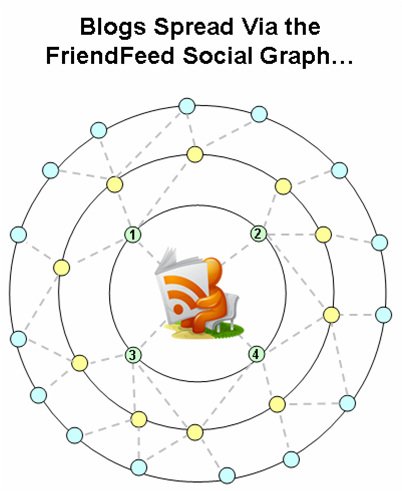
The pictures below show how the FriendFeed social graph works. The initial picture shows a blogger’s beginning social graph. Four people subscribe to his FriendFeed updates. But those four have their own connections, enabling their networks to see the blog post. If they like it, then their friends will see it too. A viral process for blog exposure:

The outer bands of the blogger’s social graph get exposure to the blog. As the blog is viewed further away from the core, the viral distribution falls off. But some of the members in the outer bands will subscribe to the blogger’s FriendFeed, which increases his core social network:

The new subscribers become the source of additional readers through their social networks. A new blog post comes out, and their friends will see it, bringing new subscribers. And so it goes, on and on. With enough time, a blogger will have a terrific base of people that enjoy discussing similar topics.

StumbleUpon, Digg: Drive-By Readers

Contrast the slow-building, strong ties forged in FriendFeed to the fast, drive-by traffic coming from StumbleUpon and Digg. Sure, the traffic is great. But you likely won’t see those readers again. With StumbleUpon, many of those visitors are just clicking their ‘Stumble!’ button. With Digg, the blog serves as content for a community that exists entirely outside of the blogger’s social graph. So the blog post gets its moment in the sun with the Digg community, which then moves on to other content.

Final Thoughts

FriendFeed makes it easier for a blogger to build readership than did previous options. I also have a suspicion that exposure via FriendFeed makes it easier for smaller bloggers to make it onto Techmeme.

What do you think? Is FriendFeed becoming the true social graph of bloggers and their readers?

*****

See this item on FriendFeed: http://friendfeed.com/search?q=ten+friendfeed+visitors+beats+stumbleupons&public=1

Explosion of Blog Aggregators…How to Keep Up?

I don’t know about you, but I’ve seen the names of a number of aggregation sites out there. It’s a very popular space, and I have not really understood who they were or what made them tick. But my growing enjoyment of FriendFeed made me wonder about what these other sites are up to. So I put together a high level survey of several of them.

There’s a really long table below. Before that, a few notes are in order.

Selected apps: This is by no means an exhaustive list. For instance, I just got into Yokway today, but haven’t had a chance to try it out. I just came up with a list from the serendipitous finds I’ve had. I also focused on earlier stage companies – no Digg, del.icio.us or StumbleUpon.

How stuff gets in there: There are three way that blog posts and news articles are added to these aggregation sites:

  • Submit: Users add a specific web page to the site, often via a toolbar ‘add’ button.
  • RSS share: Google Reader lets you ‘share’ an item in your RSS feeds that you like, posting it to your publicly accessible ‘shared items’ page, which is tracked by an aggregation site
  • RSS feed: The aggregation site takes a feed of all posts from a blog or news site

What’s interesting: Every site has its own secret sauce for what makes it tick. I tried to find things that seemed to each site apart from others.

Experience: I rate the user experience of these sites based how much was required to use them effectively. In this earlier blog post, I describe examples of light and heavy user experiences. Generally, lighter is better, but heavy can be OK for really good, distinctive features.

The point of this chart: It’s not to praise or bury any of these apps. Just to put together a list of what’s out there. If you’re an information seeker, a writer or seeking social connections with like-minded people, then you should check out some of these sites.

After the chart, I include links to other blogs with more information, plus a few thoughts as well.

Quick thoughts in dot…dot…dot fashion:

Diigo’s people matching based on common bookmarks and tags is a really cool idea, it reminds me of Toluu‘s matching based on common blog subscriptions…LinkRiver and Reddit have a very similar philosophy, with Reddit deploying a lot more categorization than LinkRiver….ReadBurner and RSS Meme are also very similar…Shyftr may have a light experience, but I’ll admit I found the overall user experience confusing right now (they’re in beta, it will improve)…Twine’s automatically generated tags for different categories was really interesting, need to explore that more…no notes on FriendFeed, just click ‘FriendFeed’ in my tag cloud for information about it…I kind of like getting my daily Social Median emails with news updates…Blog Rize has a spare UI, but it is strangely compelling…luckily, none of my blog posts have received the ‘lame’ or ‘facts wrong’ ratings on Blog Rize…

Wrapping up, here are some blog posts to get you started on the various apps:

I may be posting about some these sites in the days to come.

*****

See this item on FriendFeed: http://friendfeed.com/e/9bdd0ad9-a377-f65d-6140-8dc4e835c6c3

FriendFeed Is from Mars, Twitter Is from Venus

While we theorize that women spend more time on social networks, building and nurturing relationships, we also theorize that men are less likely to spend as much time nurturing relationships as they are acquiring relationships from a transactional standpoint.

Friends of Men vs. Women on Social Networks, Rapleaf, 4/30/08

Blogger Corvida is a prolific Twitterer (Louis Gray Twitter noise ratio 9.75). She decided to go cold turkey on Wednesday 4/30/08 to see what non-Twitter life was like. She avoided FriendFeed as well. She blogged about the experience. These thoughts stood out to me:

Twitter is crack people (I’ve been saying this for months)! Twitter is more than just a social hub for me. Twitter is ME!

[FriendFeed is] not as addictive and I peruse it leisurely and more so for the conversations than the content. I wasn’t feigning for Friendfeed, but I sorely missed it.

My immediate thought was that I’m exactly opposite. I’ve really become a fan of FriendFeed, and think of Twitter as something I peruse on a more leisurely basis. And yet there are a lot of similarities between the services. Indeed, when Twitter was suffering outages today, people migrated to FriendFeed, as the conversation here shows.

Why the difference between Corvida and me?

  1. Myers-Briggs
  2. Men Are from Mars, Women Are from Venus

Myers-Briggs

You may be familiar with Myers Briggs – it’s a personality assessment test. After you take the assessment, you get assigned a 4-letter code. The first two letters in that code? “E” or “I”. Explanation of the letters from Wikipedia:

  • Extroversion: People with a preference for Extraversion draw energy from action: they tend to act, then reflect, then act further. If they are inactive, their level of energy and motivation tends to decline.
  • Introversion: Those whose preference is Introversion become less energized as they act: they prefer to reflect, then act, then reflect again. People with Introversion preferences need time out to reflect in order to rebuild energy.

Twitter is a constant, keep-up-with-the-action experience. Now I’m always an “I” when I take those Myers-Briggs tests, so it’s no surprise that I don’t find the Twitter experience as compelling as Corvida (who has to be an “E”). It is fun though.

FriendFeed streams can flow quickly, particularly as you subscribe to many people. But via ‘Likes’ and comments, two things make a particular update findable repeatedly:

  • Each interaction causes the update to pop to the top of the page again
  • Your comments and ‘Likes’ serve as bookmarks, making the content and all its associated comments easily findable

So FriendFeed satisfies the introversion crowd: reflect, act, reflect again. It also has enough action for the extroversion crowd as well.

Men Are from Mars, Women Are from Venus

More from the Rapleaf study:

While we theorize that women spend more time on social networks, building and nurturing relationships, we also theorize that men are less likely to spend as much time nurturing relationships as they are acquiring relationships from a transactional standpoint. Spending less time on a social network but transacting more equates to having roughly the same number of friends as women, who spend more time on social networks, but are busier sustaining relationships.

The report doesn’t explain what a “transaction” is. I’m going to assume that men tend to have relationships around some sort of structure – a “transaction”. Women tend to have more general conversations to sustain their relationships, not needing the organization of a “transaction”.

FriendFeed has “transactions”. They’re the content updates that flow through there. Blog posts, tweets, FriendFeed messages, Flickr pix. Those updates are the conversational structures – your comment on the content itself, your ‘Like’, your comment on someone else’s comment. You have group conversations.

Twitter is less of a transactional place. It’s more of relationship-sustaining place. You can maintain parallel one-on-one conversations with many people at once. There’s not really an organizing principle in Twitter. That’s been one of its attractions. It’s a wide open social thing.

I enjoy the conversations around content that define FriendFeed. More so than general relationship building, for which Twitter is really good. As Corvida said, “Twitter is more than just a social hub for me. Twitter is ME!”

Final Thoughts

I know I’ve horribly oversimplified things here. Plenty of guys love Twitter and are really good at it. Plenty of women enjoy the conversational scrum around content that can define FriendFeed. And there’s plenty of room for reflection, not just action, on Twitter.

But assuming there’s truth to the averages, those are some thoughts into what will drive the relative successes of Twitter and FriendFeed.

*****

See this itme on FriendFeed: http://friendfeed.com/e/f8827724-34f6-fa36-fca5-a00c75bc171d

Early Adopters: Attention Is Migrating to FriendFeed

Based on the reaction to a recent post about Twitter early adopters, it’s clear there’s an appetite to understand when trends emerge and applications migrate across the technology adoption lifecycle.

To that end, there are important updates about FriendFeed.

FriendFeed has been out for a few months as this cool app that lets you look at what your friends are doing across social media. If you were to stop there, it sounds nice, but somewhat useless to everyday activities. “Yeah, I check it every so often to see what my friends are up to.”

But, it is so much more. FriendFeed is emerging as the one lifestream platform to rule them all. The ability to see and interact across a range of services is proving addictive. And it may inadvertently disrupt a few other services along the way.

Four recent comments show that a trend is emerging. People are consuming updates from their social apps not directly from the apps themselves, but primarily from FriendFeed. FriendFeed is starting to get the lion’s share of attention and page views, to the detriment of other services.

Here are the quotes.

Robert Scoble tweeted about his declining use of Google Reader due to FriendFeed:

FriendFeed has replaced much of what made RSS cool to me. I’m still reading Google Reader, but less.

Thomas Hawk messaged on FriendFeed about his declining use of Flickr due to FriendFeed:

I find that I’m going to Flickr’s most recent photos from my contacts much less than I used to and going to friendfeed to view my contacts and imaginary contacts flickr photos much more.

Steven Hodson commented about potentially leaving Twitter altogether due to FriendFeed:

FriendFeed as for me it is a much better resource than Twitter will every be. It has gotten to the point where even now I’m seriously thinking of moving strictly to FF.

Jason Kaneshiro blogged about his declining use of Google Reader, due to FriendFeed

FriendFeed is replacing Google Reader as my information aggregator / filter.

If you’re trendspotting, you’d do worse than to look at the comments of those four to see where the early adopters are moving.

Finally, the compete.com graph below shows March 2008 had a huge spike in visitors to friendfeed.com:

How about you? Are you feeling it?

*****

See this item on FriendFeed: http://friendfeed.com/e/0b9e5d3f-e644-6105-5e28-7b4a95e1b34a

Proposal to Clean Up the FriendFeed Clutter

FriendFeed is wonderful for giving you so much interesting information. But there are times where the flow of information is excessive and redundant. This occurs when the same the link shows up multiple times for the same user:

  • Post it to your blog
  • Share it on Google Reader
  • Bookmark it to del.icio.us
  • Post it to Reddit
  • Etc…

Eric of Internet Duct Tape blogged about this. And a really good discussion about the clutter occurred here…on FriendFeed. A couple different perspectives:

FF could make this easier and ‘collapse’ multiple items into one i.e. if I share something from Google Reader and bookmark it on delicious, only one item should appear in FF. I wonder if FF is too focused on where we doing things rather than what we’re doing? – Andy Davies

what I’m saying is that, if you add the same links to 2 different services, there’s no need to add both services to FF. Just one would be enough. Of course, if there are things that are unique for each one of them, it’s understandable. – Alejandro S.

Andy wants a technical solution, Alejandro is looking for a change in behavior. I lean toward the technical solution because there is information in the service that the person uses. A save to del.icio.us means the person has a personal interest in it. A save to Reddit means the person is explicitly putting the page “in play” for others to pick up interest. I don’t want to lose that.

I propose two alternatives for reducing the clutter of same-link feeds:

  1. Person-centric: if a user has the same feed more than once, the same-link feeds are aggregated together under a common link for the user
  2. Link-centric: all same-link feeds for all friends appear under a common link

The two alternatives are really different. #1 amounts to a small clean-up mechanism. #2 is more radical. It changes the FriendFeed experience. But perhaps in an interesting way.

Is it more important to track action around the link or the person?

Person-Centric: A Lightweight Cleanup

The “parent” consists of the user + web page title . All user actions that relate to the parent URL are aggregated, as shown below:

Each time a new feed with the same URL is posted by the same user, it’s just added to the list. Note that Tweets with the link are added as well (even with a URL shortener).

This would clean up the feed, but retain the current person-centric nature of FriendFeed.

Link-Centric: Centralized Comments,FriendFeedmeme,

In this scenario, the web page is the “parent” All user actions fall under a common web page link:

A couple things happen with this approach:

  1. For a given item, all comments are centralized in a single place. This makes the conversation easier to follow. Comments can still be attached to a particular person’s action to retain specific conversational preferences.
  2. The combining of all actions for a single item creates a visual meme, showing how much activity surrounds the item.

These are all feeds and comments you’d see under your ‘friends’ tab. They’re just aggregated.

Person-Centric or Link-Centric?

Is it more important that John found a bunch of different links interesting (person-centric)? Or that John, Susan, Mike, and Cheri found a single link interesting (link-centric)?

What better defines the experience of FriendFeed?

*****

See this item on FriendFeed: http://friendfeed.com/e/f08cbf30-129c-11dd-b613-003048343a40

FriendFeed Tags Make Your Stuff Findable

A theme I come back to repeatedly here is that FriendFeed will be a terrific platform for research and discovery. In fact, for this purpose, FriendFeed gets better the more people use it. That’s a contrast from the information overload meme that has emerged, in which too many friend updates overwhelm people.

Another way to put it: “Research” FriendFeed versus “Friends’ Updates” FriendFeed.

A good point of comparison for Research FriendFeed is Google. Google is the first stop for most people when they want to find information on something.

A key difference between FriendFeed and Google is that Google indexes all the content on each page. A Google search will go deep into a web page’s content. FriendFeed has only limited information in each update:

  • Blog or article title (blog post, del.icio.us, Google Reader, Reddit, etc.)
  • 140-character message from Twitter
  • Name of the Flickr photo
  • Etc.

This puts a lot of pressure on the title of the article to well-represent its content. Many times it does. But more often than not, the article is richer in information than the title can convey. Also, contorting your writing – including the title – to maximize search effectiveness is just a bad move. Bad for writing, bad for reading, bad for authenticity.

These two dynamics – lack of full content, incomplete information in the title – call for innovation within the FriendFeed world.

Where will that innovation be? FriendFeed comments.

Comments are free-form, and easy to add. And they’re part of the FriendFeed search index. If a good conversation erupts around an activity feed, those comments can be helpful for searches. But the conversation may not hit the mark either. And the majority of updates do not have a rich conversation around them.

As the author of a blog post, you may want to take a more active role in whether your content shows up in searches on selected terms. May I suggest tagging as an answer here?

In a comment, simply type ‘tag:’, followed by any tags you’d normally use. Using the “tag” prefix lets everyone know that it’s not a conversational comment. It’s a metadata comment.

Here’s an example. I recently wrote a post called, “Innovation Requires Conversations, Gestation, Pruning“. The article can apply to any general environment where innovation occurs. However, the focus of the post is really on employees inside companies. Internal blogs can be powerful centers for incubating innovation.

The post has a strong Enterprise 2.0 theme. Yet the title of the post doesn’t tell you that. So I went into the comments section for the FriendFeed blog post update, and added this:

tag: enterprise 2.0

Sure enough, the post now shows up in a search for ‘enterprise 2.0’. It also showed up in my RSS feed of ‘enterprise 2.0′ updates from FriendFeed.

Not everyone will bother with tags, of course. But tags are mighty useful things. If you create content and want to make sure it’s findable, tags are a good strategy to make sure it’s “findable”.

And this idea extends to adding your own tags to others’ content. You could create your own tags to associate to content you like and want to track.

And tags help others understand the context of the content.

This post may be a bit early. But it is something to think about in a future where FriendFeed is the third leg of research: Google, Wikipedia, FriendFeed.

*****

See this item on FriendFeed: http://friendfeed.com/search?q=%22FriendFeed+Tags+Make+Your+Stuff+Findable%22&who=everyone

Social Media Overload: Be Smart About It!

Complaints about social media information overload remind me of alcoholics griping about all the drinks they’re being served. It’s not the bartender! It’s you!

For instance, TechCrunch’s Erick Schonfeld writes today about information overload. The post got a lot of play. And it’s instructive that Erick’s post was an outcome of using the desktop client Twhirl to manage all his Twitter and FriendFeed updates. Apparently Twhirl and AlertThingy are in some sort of desktop feed arms race (Sarah Perez coverage, RWW). Yup – you can always be “plugged in”.

So what’s the answer for information overload? Here’s what I’m doing for FriendFeed.

Prudently Add FriendFeed Subscriptions

I’m still adding people to my FriendFeed subscriptions. It’s still early, and I’m enjoying the flow of updates. Before I add a subscription, I take a look at each person’s activity streams. If the streams look like something I’d like to follow, I subscribe. If not, I hold off. Pretty basic, unoriginal policy eh? Yet it does cut back on the stuff you don’t want.

Strategy: subscribe to that which will interest you to reduce the noise factor

Serendipity

There aren’t enough hours in the day to constantly monitor the flow of activity through FriendFeed. I’ve got a day job plus kids that keep me plenty busy. So I check in on FriendFeed only occasionally.

This means I’m missing plenty of updates. But I do enjoy what I can see. I call this serendipity. The discovery of information at a given moment in time. That’s still a pretty good experience with FriendFeed.

Strategy: embrace serendipity, recognize you can’t possibly consume all updates

Focus on a Few Specific People

When I do have time, I will look at the activity stream for specific people to whom I subscribe. I’ll go to their profile and catch up on things I missed. I couldn’t possibly do this for everyone I follow, but I can do it for a few.

Strategy: closely follow the updates of only a few select people

Create an RSS Feed for Updates Matching Your Interests

FriendFeed is a fantastic research and discovery application. With a bit of a hack, you can create RSS feeds of FriendFeed updates that match pre-selected search criteria. For instance, I follow FriendFeed activity streams with the term “enterprise 2.0”.

This way, I stay on top of updates that interest me without having to monitor everything. And RSS is persistent, centralized, and easily viewable.

Strategy: use RSS to follow updates on topics of interest to you

Careful with AlertThingy and Twhirl

Installing AlertThingy or Twhirl as desktop clients makes FriendFeed streams constantly visible. If you’re already suffering from information overload, this is the equivalent of an alcoholic strapping on a CamelBak filled with bourbon. Access is just a sip away.

These apps remind me of the Bloomberg machines used by equity traders. Traders need to be constantly on top of the news. Missing key information by just one minute can cost them big dollars as the market moves quickly.

Are activity streams that important? No – unless you’re one of the big-time professional bloggers who needs to break, or react to, a story quickly. Otherwise they’re just too distracting and contribute to the information overload. As Mark ‘Rizzn’ Hopkins of Mashable writes (about Twitter, but also applies to FriendFeed), That’s Why It’s Called Work. If They Called It Twitter, They Wouldn’t Pay You.

Strategy: don’t install or at least occasionally turn off AlertThingy or Twhirl

That’s what I’m doing. What are your strategies for managing the social media information deluge?

*****

See this item on FriendFeed: http://friendfeed.com/e/e4953d64-e268-dc82-cb25-094ba338b49d

Social Media: Lighter Beats Heavier Every Time

www.waystupid.com

Interesting tweet from Stanislav Shalunov regarding SocialThing:

Asking for my passwords makes SocialThing sound like a phisher. Won’t use for now. http://tinyurl.com/4dquxn

His tweet expressed something that I’ve been noticing for some time. I am gravitating more and more to the “lighter” interaction social media apps.

What is “lighter”? It’s the flick of a wrist. Enter text + submit. One-click subscriptions. Here are three comparisons, including the controversial one of aggregator comments versus direct blog comments.

Twitter vs Facebook

Facebook is heavy. To build out your network, you have to:

  • Invite others
  • Request a connection and wait for the response

These processes make a lot of sense for what Facebook is about – true relationships. When your friend invite shows up in the other person’s inbox, what’s their reaction? That’s the key to maintaining the integrity of true relationships there. I have turned down friend requests there from complete strangers. It’s why I’m comfortable blogging about my kids there but less so elsewhere.

And it inhibits using Facebook for me.

Twitter’s model makes social network set-up a breeze. Find someone you’re interested in, click “follow”. Done. But Twitter does support Facebook-like controls:

  • You can block specific individuals
  • You can set your updates to be private, only available to those you approve

Most people just leave their subscriptions wide open on Twitter. Which is great for the user experience. I have made connections on Twitter that I would never have made on Facebook.

The other thing that’s easier – communications. I’m a voyeur a Twitter, jumping in when I want. I just use the @sign to respond to someone, or the occasional direct message . Facebook’s status updates post to the newsfeed and a few are shown on your home page. But those aren’t really conversations. To talk with someone, you use the Facebook message system. Again, that’s really cool – you don’t need to remember email addresses. But it also is heavier.

No surprise Twitter’s been growing like a weed.

FriendFeed vs SocialThing

FriendFeed and SocialThing have a lot in common in that they show the activity streams of friends across different services. But there are key differences, which are well summarized by Mark Krynsky at the Lifestream Blog.

Creating your network: FriendFeed has the lightweight Twitter model. Find someone, subscribe. Done. SocialThing imports the friends you’ve made on each of the services. This is also light. But you can’t add new users directly inside SocialThing. You’ve got to go to the individual service, add the friend and then SocialThing is updated. This is heavier than FriendFeed.

Importing your services: FriendFeed asks for your login ID for a service (Twitter ID, Flickr ID, del.icio.us ID, etc.). enter it. Done. Your updates start flowing. SocialThing wants your ID and password. This enables SocialThing to send updates back down to each service. But as Stanislav expressed above, getting passwords is heavy.

Interaction on the originating services: SocialThing lets you respond to a friend directly back on the originating service, like Twitter. FriendFeed is adding this capability for Twitter, and perhaps others. But if you want to comment directly on the originating service, for the most part you have to leave FriendFeed and go to that service. Socialthing’s support for direct comments is the lighter experience.

It’s still early. But FriendFeed has the edge in the “lightness wins” battle right now.

Friendfeed Comments vs Blog Comments

Man, do I really want to write this? Well, here goes. Comments on FriendFeed are a lot lighter than those on blogs. Which means it’s an easier experience.

Blog comments have these qualities:

  • You want to be pithy in your comment. The blog post addressed a weighty topic, and you want to comment in keeping with that.
  • You enter your name, email and website each time
  • You might encounter a captcha
  • The blogger may hold comments in reserve until they’re reviewed
  • If you mess up, you can’t change your comment

Meanwhile, on FriendFeed, comments have these qualities:

  • You can comment pithily
  • You can write more of a meta-comment about the post
  • You can talk with others via comments
  • You can click ‘Like’ to provide a quick, simple comment about the blog post
  • Comments are easy. Click Comment. Enter text. Click Post. Done.
  • You can edit or delete your comments

This doesn’t mean commenting on blogs isn’t worthwhile or valuable. Reaching out to the writer is an important part of the participatory ethos of blogging. Your comment also breaks the ice on a post, making it easier for others to join in.

But there’s no denying the lightness of comments on FriendFeed. Expect their volume to increase.

I’ll predict that FriendFeed comments are those that bloggers never would have gotten on their blogs in the first place.

So the lightness of FriendFeed comments won’t steal from bloggers’ on-site comments. They’ll add to them. And that’s a good thing for the conversation.

What do you think?

*****

See this item on FriendFeed: http://friendfeed.com/e/92524b04-4b9d-c0db-e09e-931c4f3e5084

Imagining an Email Social Network

Email has been proposed as a nearly ready-to-go social network. Just how would that work?

In September 2007, Om Malik asked Is Email The Ultimate Social Environment? And in November, Saul Hansell wrote, Inbox 2.0: Yahoo and Google to Turn E-Mail Into a Social Network. Both looked at the idea that email providers have most of what was needed to build their own social networks. There is potential there, but it’s not a slam dunk.

The Social Network Stack

If an email system is to become social, it needs to address the social network stack. To keep things simple, let’s assume there are three parts to the social network stack:

  1. Self-Expression = who you are, what you like, what you’re doing
  2. Relationships = people connections, of all different types
  3. Interactions = how you engage your network

Within each part, there are components that define the experience of the social network. This diagram describes those:

Self Expression: Email Needs a Profile Page

There isn’t a profile page in email systems. You log in, and you see your email. Adding a profile page really shouldn’t be too hard for Google or Yahoo. Even issues of privacy for the profile page are quite manageable for the two Web giants.

Apps on the profile page? Google’s got iGoogle widgets and OpenSocial. Not a problem.

Yahoo has demonstrated with its durable portal that it can pull together information from different sources. Wouldn’t be too much of an issue for them either. According to the New York Times’ article, Yahoo’s Brad Garlinghouse already has an idea for the profile page:

In this vision, people have two pages: a profile they show to others and a personal page on which they see information from their friends as well as anything else they want, like weather or headlines.

Relationships: They’re in the Emails, But Handle with Care

This is the biggest advantage the email providers have: they know your relationships. They’re sitting on a mountain of information about people’s connections to others. As the New York Times’ Saul Hansell wrote:

Web-based e-mail systems already contain much of what Facebook calls the social graph – the connections between people.

This is the killer advantage Yahoo and Google have over other social networks. They know your connections right off the bat. And that’s not all. They know how often you email those contacts.

Imagine how this could work:

  • Email frequency is used to set your initial relationship level with someone else. Lots of recent back-n-forth means strong bond. Lots of one-way emails to you means it’s a company. Few two-way emails means you have a weak relationship.
  • Your address book categories – personal, work – can become relationship definition metadata.
  • If you don’t have your email address book organized by relationship types, the email provider analyzes the words to categorize the relationship. Romantic, friendship, professional. Yes, this is Big Brother scary, but Gmail already does this to display ads. Still, if not done right, this might backfire big time.

I do wonder how much value this really has though. Email address books are used to kick start your enrollment into social networks like Facebook. It’s not hard to import these.

The assessment of your email connections – strength and type of relationship – is cool, but don’t you know that already? Arguably, such analysis really is a way to save time on making your own decisions about these relationships. But if you’re engaged with your network, you’re probably going to take control of this.

Subscribe or Dual Opt-In: Twitter or Facebook? FriendFeed or LinkedIn? The recent stars on the social apps scene have a subscribe model. Your can read the updates of people on Twitter and FriendFeed, just by declaring that you want to. Pretty wide open. But a key factor here: when you join Twitter or FriendFeed, you do so knowing that anyone can read your updates. People with whom you email never had that expectation. So every user either needs to opt-in to having their updates read by their email contacts, or you must send a friend request to whomever you want in your social network.

Type of Relationship: Friend, common interest, professional? This is another one that requires thought. I’ve argued previously that different social networks are good for different types of relationships. Being a one size-fits-all is not easy. It requires a decent amount of management for the user: do I share my kids’ pictures with my colleagues and the people in my Barack Obama 08 group? Dedicated purpose social networks make managing the different aspects of your life easier. Otherwise, all your co-workers will know your political preferences, party pictures and relationship status. Email providers have all of your email contacts; they need to either pick a focus for their social networks or let users create their own types.

Interactions: Watch Those Activity Streams

Most of the Interaction stack is well within the range of Google and Yahoo. Yahoo’s been in the groups business for a long time. Google relaunched the JotSpot wiki as Google Sites. A wiki can be a good group site.

Apps were already discussed under self-expression. Messages? Of course – this is email.

Activity updates are an interesting concept. The biggest current activity in email apps is…email. But I’m not sure those qualify as updates you want broadcasted:

Should emails be shared?

Emails are pretty private, aren’t they? Not really something people will want to broadcast out to their social network…

Google and Yahoo could integrate activity streams from other parts of their social networks pretty easily.

So What Are Email’s Advantages as a Social Network?

I’m not sure there are intrinsic advantages email enjoys that make it superior as a potential social network. Rather, it has these two user-oriented advantages:

  • People wouldn’t have to go to a lot of trouble to set them up. Just present them with the opportunity when they log in to their, with very few clicks or decisions initially.
  • We tend to check our email daily, hourly. So recurring engagement with your social network is a lot easier than with destination social networks.

That being said, Facebook, MySpace, LinkedIn, Bebo, Ning and FriendFeed have a tremendous head start and brand. They also have clearly defined, different experiences.

If they choose to roll out their own social networks, Google and Yahoo will start ahead of the game. But success won’t be because of the email. It’ll require a differentiated social network experience. Just like anyone else entering the space.

FriendFeed RSS Is a Fantastic Discovery Tool

FriendFeed will be one of the best research & discovery tools there is. I don’t say that lightly. Here’s why.

Jeremiah Owyang has a post up today, My Essential Twitter Tools. He lists seven things he uses to get the most out of Twitter. Among the items are these:

  • Search: Use Tweetscan to see who’s talking about you, your brand, or a topic you’re interested in. For example, I may not just search on “jowyang” but also on “owyang” as some don’t use the full name.
  • Aggregation: Friendfeed puts all of our RSS content onto one page, making it easy to see from one glance (rather than going to different properties) and you can even reply from friendfeed to different tools. It’s smarter to organize around people, rather than tools.

Tweetscan is a great resource for finding out information on a topic. You see what others are talking about and passing along for a given topic.

Well, FriendFeed is even better. On FriendFeed, people share their Twitter posts, the same content that Tweetscan searches. But they share many other application there as well.

  • Micro posts: Twitter, Jaiku, Pownce, Google Talk,
  • Websites, blogs: new blog posts, StumbleUpon, shared items on Google Reader, del.icio.us, ma.gnolia, Digg, Reddit
  • Presentations: Slideshare
  • And lots of other sources

All of these content sources are searchable. And they all have an aspect lacking in many search and discovery mechanisms: human filtering.

When someone takes the trouble to save or distribute content, that content has already passed an initial test. Does it have value to someone? If you save something to del.icio.us, that is your endorsement of its value. Add it to LinkRiver? Means you found the web page interesting. Sharing a blog post on Google Reader means the blog post held value. Recommend a book on Goodread? You get the picture.

The conversations that are captured are also incredibly valuable. They give insight into people’s thinking around a subject. They hold data that is useful. Many times, the micro posts include a reference to content that someone found valuable, even if that person didn’t bother to bookmark it to del.icio.us or share it on their Google Reader.

The implicit endorsements of content – via different services or conversations – are a tremendous benefit to someone doing research.

There’s also plenty of original source content that’s findable. Slideshare presentations. New blog posts. Videos. Photos.

Finally, from the recommendations, conversations and content, you can find people who share your interests. You may want to do the social thing and add them to your FriendFeed network. Or you can check out what other sites, content and conversations they have in their FriendFeed to potentially find other useful information. Heck, even reach out to the person to discuss a subject.

Adding RSS to this whole thing really powers it. You don’t have to go to the FriendFeed site to do a search. You can have new content delivered to your RSS feeder.

RSS? FriendFeed doesn’t have RSS?

Mark Krynsky over at Lifestream Blog has a wonderful hack that turns FriendFeed search results into an RSS feed. Click here to go his post.

I won’t stop using Google to search for a subject. But for leveraging the human filtering, I’ll use FriendFeed search. And for ongoing knowledge discovery, even when I’m not actively searching for a subject, I’ll use FriendFeed search RSS.

What do you think? Will FriendFeed become a primary research & discovery tool?

I’m @bhc3 on Twitter.

Scoble Loses Interest in Facebook – 5,000 “Friends” Will Do That

In social networks, bigger is not necessarily better. Robert Scoble, famously with 5,000 Facebook friends, recently posted this on Twitter.

Spent some time cleaning off my Facebook Profile. Stripped it way down. Much nicer now, no crap. I haven’t been into FB for months. Sigh.

Normally this may not rate as important news. In fact, Scoble had a Feb. 22, 2008 post up on his blog titled Is Facebook Doomed? But there, his issue is primarily one of limits on the number of friends and messages. He still liked Facebook fundamentally.

But then came his recent tweet. While many technorati are expressing their ennui with Facebook, with Scoble it’s significant for two reasons:

  1. He’s the living embodiment of Web 2.0 openness and try-it-all, push-it-to-the-max gusto
  2. He’s argued passionately that 5,000 friends is just fine for Facebook

Let’s start with the idea that 5,000 “friends” is appropriate for a social network. It can be…but not for Facebook.

Facebook Is for Social Interactions, Not One-Way Communications

Let’s imagine having 5,000 friends on Facebook. What must that be like?

Newsfeeds. That newsfeed must be constantly in overdrive. People’s statuses updating. New groups they joined. Apps added. New friend connections. Friends compared. Blah, blah, blah…! A 5,000-friend newsfeed must be like a stock ticker. Hit refresh every second and a new set of newsfeeds displays.

Inbox. When you have 5,000 friends, your Inbox and Notifications are probably largely untouched. How do you go through the sheer volume of messages? Inbox from hell is what that is.

App invites. How many times has Scoble been invited to try every inane app out there? Especially since its Scoble. Get him to try your app and mention it on his blog or Twitter, and you’re on your way. Not enough hours in the week to try all the new apps.

Reaching out to friends. How do you figure out which of your 5,000 friends you interact with each day? Assume Scoble attempts a meaningful exchange with 13 friends each day, on top of all his other duties. That translates to contact with each friend once per year.

Here’s what Scoble said in his blog post defending his decision to have 5,000 friends:

In social networking software a “friend” is someone you want in your social network. Period. Nothing more. The fact that people assume that you should only have “real friends” in your social network is just plain wrong.

See, I have this theory about social networks: different ones are good for different types of social interactions. What Scoble is looking for is something different than Facebook. His interactions have more of a one-way quality to them. He’s really good with discovering and analyzing new things, and is eager to share them with the world. And that’s really cool. But he really doesn’t want to know that you just joined the Austin networking group, posted your child’s picture or that you’re working on that report for your boss. Nothing wrong with that – I don’t either. But I didn’t add you as one of my 5,000 friends.

Different Social Applications for Different Purposes

I believe Facebook is fundamentally tuned to be an interactive lifestream social network. That means it wants to be the place where all parts of your life are captured and shared. It’s built around that goal. Which makes it terrible as a large-scale broadcasting platform.

So it’s no surprise that Scoble has tired of Facebook. I assume he’s still getting to broadcast his life to the 5,000 friends. I’ll bet a lot of those updates occur as apps connected to his various preferred social apps: Twitter, Jaiku, Flickr, etc. For him, Facebook is more of a broadcasting server, not a place for true social interaction.

For Scoble’s social networking style, he’s already got what he needs: his blog. He talks about what interests him. He responds only to comments that interest him. To complete his lifestream, more widgets for his favorite social apps could be added.

FriendFeed is emerging as an app to satisfy the social network needs of power users like Scoble. Unlimited (well, theoretically) numbers of people can subscribe to his feed: blog posts, Facebook status updates, Twitter posts, Flickr photos, etc. Anyone can comment on his lifestream. But he doesn’t need to subscribe to these same people. No app spam, inbox overload, etc. However, I notice he already has 1,700 “friends” there.

I suspect Scoble will probably find a better home for his mode of social networking on FriendFeed. And Facebook is just fine for what it wants to be: lifestream platform for interacting with your actual friends.

Scoble Is Great for Analysis

This post is not meant as a criticism of Scoble. Quite the opposite. He pushes the boundaries of all these social apps, and does so in a very public way. He’ll give you his take on his own actions. But by pushing things to the extreme, he also provides a great lens for analyzing Web 2.0. That guy’s got a cool life.