WordPress Content Recommendations: Off to a Good Start

I love recommendations. Well done, they make my life easier and provide a great source for learning things I didn’t know. So I’m pretty excited about a new feature rolled out by WordPress.com, “possibly related posts”, on April 26, 2008.

At the bottom of blog posts on wordpress.com, you’ll see a list of several blogs under the heading, “Possibly related posts: (automatically generated)”. These are posts which should have some relation to the blog post you just read. WordPress is working with Sphere to deliver these recommendations.

There’s an priority ranking to the recommendations:

  1. Similar posts on the same blog
  2. Similar posts from around wordpress.com
  3. Articles, blog posts from elsewhere on the Web

Two areas are of interest here: (i) what recommendations appear on your blog; (ii) what other blogs are showing your posts shown as ‘possibly related’.

Recommendations That Appear on Your Blog

I surveyed five of my blog posts to see what were listed as possibly related posts. They’re shown below, along with a rating of ‘yes’ for related, ‘no’ for not related, ‘sorta’ for posts that might appeal to some readers of the blog post.

I. Ten FriendFeed Visitors Beats 1,000 StumbleUpons Any Day (link)

  • Wired blog: FriendFeed Offers Developers the Key to Build Custom Social Apps (link): no
  • New York Times: Friends May Be the Best Guide Through the Noise (link): yes

II. You Can’t Win If You Don’t Play: A Blog Hits 50 Posts (link)

  • This blog: When Your Blog Is LouisGrayCrunched… (link): yes
  • A wp.com blog: asylum street spankers, and a word about hits (link): sorta
  • CBS Sportsline: Major League Baseball (link): no

III. How Do Solo Bloggers Break into the Techmeme !00? (link)

  • A wp.com blog: break (link): sorta
  • A wp.com blog: Ichimonji No Kata – Raiko No Kata – Kukishin Dakentaijutsu (link): no
  • Scobleizer: New PR Trend: Anti-Gaming TechMeme? (link): yes

IV. The Best Blogs You’re Not Reading? Toluu Knows (link)

  • A wp.com blog: ‘A Fistful of Euros’ awards (link): yes
  • A wp.com: The demise of letter writing: oh, really? (link): yes
  • A wp.com: Reading blogs simply (link): no

V. How to Write a Farewell Email to Your Co-Workers (link)

  • A wp.com blog: How To Write Emails People Will Actually Read (link): yes
  • A wp.com: Email Etiquette (link): yes
  • A wp.com blog: Getting Better Results from your Email Marketing (link): no

The recommendations are off to a decent start. “Related” is a subjective measure, and my ratings above may not match what another reader would think.

How about comparing the WordPress recommendations to other sites? Here’s what Kleiner Perkins-backed startup Aggregate Knowledge’s discovery algorithm currently shows on the Washington Post story, “Failed Yahoo Talks Leave Google on Top“:

Only one of four are related to the Yahoo – Google story. Admittedly, Aggregate Knowledge doesn’t tout itself as a ‘related articles’ service, but their list of other articles should be viewed in this context: “Will people click on those links?”

And here’s what the New York Times shows as “Related Articles” for the article “Friends May Be the Best Guide Through the Noise“, which discussed lifestream companies FriendFeed, Iminta and others:

None of the ‘related articles’ relate to the story.

Recommendations for Your Blog that Appear Elsewhere

What’s interesting here is that you, as a blogger, can see what other blogs have similar subject matter as you. Oh, and the possibility of increased traffic doesn’t hurt.

I’ve really only seen clicks to this blog on ‘possibly related’ recommendations from two sites (with links to posts that include links back to this blog):

  • Scobleizer.com (link)
  • Alexander van Elsa’s Weblog (link)

Neither of those is a surprise. Both have good posts related to social media and Web 2.0, subjects which are covered as well. The ‘possibly related posts’ from this blog shown there are relevant to the posts on which they appear.

Final Thoughts

I’m a fan of this feature, which is still in its early days. It does have its detractors though. Here are a couple comments posted on wordpress.com about the feature:

I actually hate the randomness of this, even though you’re using an engine to try to find related material. Here’s why this is a horrible bad idea, and really, you should turn it OFF everyone’s blog unless they specifically ask for it: If I want random, unvetted links on a topic, I’ll google it. The REASON why blogs are a great medium is one of TRUSTED information. If I know a blogger is smart, savvy, well connected, and honest, I will trust THEIR opinions, and look to what links THEY supply. Making these robot-choices LOOK like they are endorsed by the blogger is where this really falls down, and makes me want to shut it off immediately and everywhere. It is so unfortunate that this is on by default. I will recommend to everyone that they shut off this feature. This is so anti-blogging, it’s not funny, and in fact sad coming from a trusted blogging platform. I bet if you took this issue to serious bloggers first, they would have chimed in overwhelmingly in the negative camp.

Morriss Partee

What it seems to be designed for is to keep the readers IN wordpress, which is understandably your goal. What it PROBABLY will do for individual bloggers is take the reader away from his or her blog into someone else’s blog within wordpress, a dubious result in my way of thinking. But what do I know?

Alice

Count me as a fan, and I hope they continue to iterate through improvements to the recommendations. I fundamentally disagree with Morriss Partee. Blogging is about conversations, even if they go elsewhere. If my blog post piqued someone’s interest and they click to another blog, that’s fine by me. I’d rather the reader have a good time than try to trap him onto my blog.

Go WordPress, go!

*****

See this item on FriendFeed: http://friendfeed.com/e/7a1528d4-96c3-40ea-f5c3-6493372fa956

Ten FriendFeed Visitors Beats 1,000 StumbleUpons Any Day

The average StumbleUpon visitors stay a few seconds on the site and then leave having visited one page. That’s exactly how I use the StumbleUpon toolbar, clicking the Stumble! button quickly unless a site particularly grabs my interest immediately.

Traffic Growth #5 – What Value In StumbleUpon Visitors?
Fog of Eternity – Robin Cannon

Robin’s observation probably rings true for most bloggers. Sites like StumbleUpon and Digg can drive significant traffic to a site. If ad impressions or clicks are important to a blog, then those visitors might have value. If your goal is to build an audience with whom you mutually learn and build relationships, those sites aren’t worth much.

Traffic from StumbleUpon and Digg is like loading up on empty calories. They fill you up for a while, but they have no nutritional value and leave you hungry for more soon thereafter.

FriendFeed, on the other hand, lets bloggers build a solid foundation of long-term readers who in turn serve as the best sources of new readers.

FriendFeed Difference: Trusted Referrals

What makes FriendFeed such a great platform for building your blog readership? Two big reasons:

  • Trusted referrals
  • Blogger participation

FriendFeed enables trusted referrals at two levels of a blogger’s social networks. The first level are those people who subsribe to the blogger’s feed. They’ll be the first to see new content. These members may then comment, share or bookmark the new blog post.

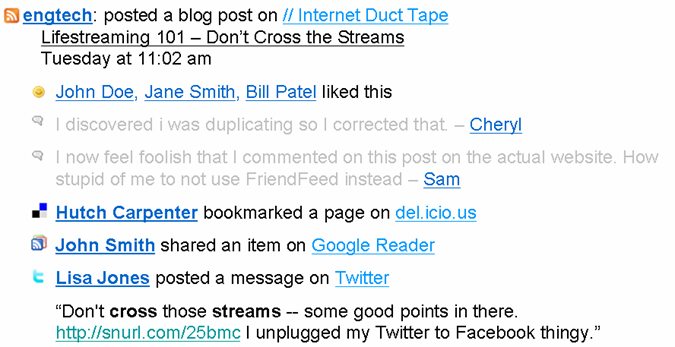
The second level is more distant from the blogger. This is the “friend of friends” feature, as shown below:

With this FriendFeed feature, your blog is reaching people who do not subscribe to you. In the example above, I’m seeing Rex Hammock’s blog post because he’s a friend of Robert Scoble. A crucial thing to notice though…I only see Rex’s blog post because our mutual friend Robert ‘liked’ the post. His action is the key that makes this feature pop up. In other words, you’re not just bludgeoned with a huge flow of unfiltered feeds in the friend-of-friend feature.

I personally have used the friend-of-friend many times to follow new people I didn’t know. I have moved from being a second-degree member of the bloggers’ social network to a first degree member (i.e. a subscriber). This is a powerful feature of FriendFeed, both for bloggers to gain new readers and for members to discover new content.

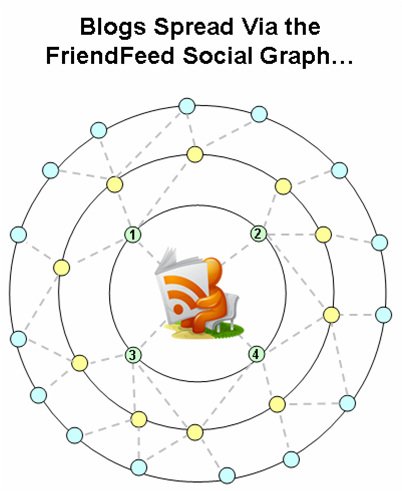
The pictures below show how the FriendFeed social graph works. The initial picture shows a blogger’s beginning social graph. Four people subscribe to his FriendFeed updates. But those four have their own connections, enabling their networks to see the blog post. If they like it, then their friends will see it too. A viral process for blog exposure:

The outer bands of the blogger’s social graph get exposure to the blog. As the blog is viewed further away from the core, the viral distribution falls off. But some of the members in the outer bands will subscribe to the blogger’s FriendFeed, which increases his core social network:

The new subscribers become the source of additional readers through their social networks. A new blog post comes out, and their friends will see it, bringing new subscribers. And so it goes, on and on. With enough time, a blogger will have a terrific base of people that enjoy discussing similar topics.

StumbleUpon, Digg: Drive-By Readers

Contrast the slow-building, strong ties forged in FriendFeed to the fast, drive-by traffic coming from StumbleUpon and Digg. Sure, the traffic is great. But you likely won’t see those readers again. With StumbleUpon, many of those visitors are just clicking their ‘Stumble!’ button. With Digg, the blog serves as content for a community that exists entirely outside of the blogger’s social graph. So the blog post gets its moment in the sun with the Digg community, which then moves on to other content.

Final Thoughts

FriendFeed makes it easier for a blogger to build readership than did previous options. I also have a suspicion that exposure via FriendFeed makes it easier for smaller bloggers to make it onto Techmeme.

What do you think? Is FriendFeed becoming the true social graph of bloggers and their readers?

*****

See this item on FriendFeed: http://friendfeed.com/search?q=ten+friendfeed+visitors+beats+stumbleupons&public=1

Explosion of Blog Aggregators…How to Keep Up?

I don’t know about you, but I’ve seen the names of a number of aggregation sites out there. It’s a very popular space, and I have not really understood who they were or what made them tick. But my growing enjoyment of FriendFeed made me wonder about what these other sites are up to. So I put together a high level survey of several of them.

There’s a really long table below. Before that, a few notes are in order.

Selected apps: This is by no means an exhaustive list. For instance, I just got into Yokway today, but haven’t had a chance to try it out. I just came up with a list from the serendipitous finds I’ve had. I also focused on earlier stage companies – no Digg, del.icio.us or StumbleUpon.

How stuff gets in there: There are three way that blog posts and news articles are added to these aggregation sites:

  • Submit: Users add a specific web page to the site, often via a toolbar ‘add’ button.
  • RSS share: Google Reader lets you ‘share’ an item in your RSS feeds that you like, posting it to your publicly accessible ‘shared items’ page, which is tracked by an aggregation site
  • RSS feed: The aggregation site takes a feed of all posts from a blog or news site

What’s interesting: Every site has its own secret sauce for what makes it tick. I tried to find things that seemed to each site apart from others.

Experience: I rate the user experience of these sites based how much was required to use them effectively. In this earlier blog post, I describe examples of light and heavy user experiences. Generally, lighter is better, but heavy can be OK for really good, distinctive features.

The point of this chart: It’s not to praise or bury any of these apps. Just to put together a list of what’s out there. If you’re an information seeker, a writer or seeking social connections with like-minded people, then you should check out some of these sites.

After the chart, I include links to other blogs with more information, plus a few thoughts as well.

Quick thoughts in dot…dot…dot fashion:

Diigo’s people matching based on common bookmarks and tags is a really cool idea, it reminds me of Toluu‘s matching based on common blog subscriptions…LinkRiver and Reddit have a very similar philosophy, with Reddit deploying a lot more categorization than LinkRiver….ReadBurner and RSS Meme are also very similar…Shyftr may have a light experience, but I’ll admit I found the overall user experience confusing right now (they’re in beta, it will improve)…Twine’s automatically generated tags for different categories was really interesting, need to explore that more…no notes on FriendFeed, just click ‘FriendFeed’ in my tag cloud for information about it…I kind of like getting my daily Social Median emails with news updates…Blog Rize has a spare UI, but it is strangely compelling…luckily, none of my blog posts have received the ‘lame’ or ‘facts wrong’ ratings on Blog Rize…

Wrapping up, here are some blog posts to get you started on the various apps:

I may be posting about some these sites in the days to come.

*****

See this item on FriendFeed: http://friendfeed.com/e/9bdd0ad9-a377-f65d-6140-8dc4e835c6c3

You Can’t Win If You Don’t Play: A Blog Hits 50 Posts

WARNING: this is a navel gazing post. If don’t want to read this, go see what’s on Techmeme.

This blog just hit 50 posts, nearly three months after it started. That number actually crept up on me – hit me when I wasn’t looking.

I wanted to recount a few things of note over the past few months. Ideally entirely in Larry King dot-dot-dot format. But I tend to be more verbose. Anyway, let’s dig in, shall we?

Dot…Dot…Dot

I’m having a lot of fun, the little blog experiment has taken on its own life…getting blog subscribers, FriendFeed followers and Twitter followers means I don’t have to pimp my blog on other blogs as much anymore…that Louis Gray, well, whew boy…one thing I’ve learned, there are informal, unstructured social networks of bloggers…speaking of which, I need a better connection with Sarah Perez…my appreciation for uber blogger Robert Scoble has increased immensely: insightful, witty opinions that fire up readers…best feeling in the world is to put a new post up on the blog at midnight, go to sleep, wake up and see Gmail filled with notifications of new blog comments, Twitter and FriendFeed follows, links from other blogs…my social media consumption workflow: gmail, this blog, FriendFeed, Google Reader, Twitter, in that order…appearing on Techmeme, like getting a plum part on a Law & Order episode for an unknown actor…Techmeme founder Gabe Rivera’s Twitter page currently has a picture of lion eating a zebra, which makes me think, what’s Gabe’s story?…how long until I screw up and write something I shouldn’t?…my blog idea process is ad hoc, haphazard and based on serendipity – every day is a surprise…

Biggest Surprises

I titled this post “You Can’t Win If You Don’t Play” as a way of saying that you need to just participate in order to see the benefits. I could not have foreseen some of the following things that occurred when I started this blog.

LouisGrayCrunched. Louis Gray wrote a very nice post on April 7, 2008 that said this was a blog people should be reading. He did it after I wrote a post reviewing the Toluu service. His post put this little blog on the map for a lot of his readers, many of whom are here now as well. I can’t tell you how grateful I am for his ongoing support.

Proposal to Clean Up FriendFeed Clutter. FriendFeed co-founder Bret Taylor picked up on a post I wrote suggesting ways to better organize the updates in FriendFeed. He posted it to FriendFeed and a there was a really nice discussion there around the ideas.

Web 2.0 Jedi. This post has really surprised me. It was picked up by Digital Inspiration, based in India, which has a huge following (“the 40th most-favorited blog on the Internet”, according to Technorati). Many, many clicks from there, and that blog has been a gateway to bloggers around the world. A number of international blogs have included the graphic and linked to the original post.

Techmeme. Three posts made it onto Techmeme (here, here, here). Can’t believe it.

Social Media Identities. I love the discussion that occurred here. Included industry folks with whom I don’t normally connect.

Twitter Just Grows and Grows. This simple post turned out to be quite popular. It told me there’s a real interest out there in Twitter, and information is harder to come by than I realized. TechCrunch later ran a post about the “real Twitter usage numbers”.

‘Peanut Butter’ searches. I continue to be haunted by the mysterious ‘peanut butter’ search visitors. People searching for ‘peanut butter’ continue to be my biggest source of visitors. Who are you? What search engine are you using (it’s not Google)? What makes you click through? I may never know the answer to these questions.

My 5 Favorite Posts of the Blog

This is like picking your favorite child, but here they are:

  1. FriendFeed RSS Is a Fantastic Discovery Tool
  2. Becoming a Web 2.0 Jedi
  3. Farewell, Pay By Touch, Farewell
  4. Proposal to Clean Up the FriendFeed Clutter
  5. Innovation Requires Conversations, Gestation, Pruning

Best Posts for Comments

These posts were most active in the comments section (including my comments):

  1. Becoming a Web 2.0 Jedi: 20 comments
  2. Social Media Identity: Personal vs. Professional: 16 comments
  3. The Best Blogs You’re Not Reading? Toluu Knows: 11 comments

Most Viewed Posts

  1. How to Write a Farewell Email to Your Co-Workers
  2. Early Adopters: Attention Is Migrating to FriendFeed
  3. Pay By Touch and the Peanut Butter Manifesto
  4. Becoming a Web 2.0 Jedi
  5. Farewell, Pay By Touch, Farewell

Top Referring Websites

My blog really isn’t part of the StumbleUpon and Digg worlds. FriendFeed has become my top day-in, day-out referral site.

  1. Techmeme
  2. FriendFeed
  3. Google Reader
  4. louisgray.com
  5. wordpress.com
  6. Digital Inspiration
  7. Twitter
  8. Stumbleupon

Top Search Terms

Peanut butter…peanut butter…peanut butter! Aaagh!

  1. peanut butter (several variations)
  2. farewell email (many, many variations)
  3. pay by touch
  4. peanut (basically a peanut butter variation)
  5. friendfeed rss
  6. blogs
  7. facebook
  8. reasons for fatigue

And that concludes the navel gazing. If you made it this far, thanks for reading.

*****

See this item on FriendFeed: http://friendfeed.com/e/9c2030a5-c02e-dd79-f274-caf58e1af8e8

FriendFeed Is from Mars, Twitter Is from Venus

While we theorize that women spend more time on social networks, building and nurturing relationships, we also theorize that men are less likely to spend as much time nurturing relationships as they are acquiring relationships from a transactional standpoint.

Friends of Men vs. Women on Social Networks, Rapleaf, 4/30/08

Blogger Corvida is a prolific Twitterer (Louis Gray Twitter noise ratio 9.75). She decided to go cold turkey on Wednesday 4/30/08 to see what non-Twitter life was like. She avoided FriendFeed as well. She blogged about the experience. These thoughts stood out to me:

Twitter is crack people (I’ve been saying this for months)! Twitter is more than just a social hub for me. Twitter is ME!

[FriendFeed is] not as addictive and I peruse it leisurely and more so for the conversations than the content. I wasn’t feigning for Friendfeed, but I sorely missed it.

My immediate thought was that I’m exactly opposite. I’ve really become a fan of FriendFeed, and think of Twitter as something I peruse on a more leisurely basis. And yet there are a lot of similarities between the services. Indeed, when Twitter was suffering outages today, people migrated to FriendFeed, as the conversation here shows.

Why the difference between Corvida and me?

  1. Myers-Briggs
  2. Men Are from Mars, Women Are from Venus

Myers-Briggs

You may be familiar with Myers Briggs – it’s a personality assessment test. After you take the assessment, you get assigned a 4-letter code. The first two letters in that code? “E” or “I”. Explanation of the letters from Wikipedia:

  • Extroversion: People with a preference for Extraversion draw energy from action: they tend to act, then reflect, then act further. If they are inactive, their level of energy and motivation tends to decline.
  • Introversion: Those whose preference is Introversion become less energized as they act: they prefer to reflect, then act, then reflect again. People with Introversion preferences need time out to reflect in order to rebuild energy.

Twitter is a constant, keep-up-with-the-action experience. Now I’m always an “I” when I take those Myers-Briggs tests, so it’s no surprise that I don’t find the Twitter experience as compelling as Corvida (who has to be an “E”). It is fun though.

FriendFeed streams can flow quickly, particularly as you subscribe to many people. But via ‘Likes’ and comments, two things make a particular update findable repeatedly:

  • Each interaction causes the update to pop to the top of the page again
  • Your comments and ‘Likes’ serve as bookmarks, making the content and all its associated comments easily findable

So FriendFeed satisfies the introversion crowd: reflect, act, reflect again. It also has enough action for the extroversion crowd as well.

Men Are from Mars, Women Are from Venus

More from the Rapleaf study:

While we theorize that women spend more time on social networks, building and nurturing relationships, we also theorize that men are less likely to spend as much time nurturing relationships as they are acquiring relationships from a transactional standpoint. Spending less time on a social network but transacting more equates to having roughly the same number of friends as women, who spend more time on social networks, but are busier sustaining relationships.

The report doesn’t explain what a “transaction” is. I’m going to assume that men tend to have relationships around some sort of structure – a “transaction”. Women tend to have more general conversations to sustain their relationships, not needing the organization of a “transaction”.

FriendFeed has “transactions”. They’re the content updates that flow through there. Blog posts, tweets, FriendFeed messages, Flickr pix. Those updates are the conversational structures – your comment on the content itself, your ‘Like’, your comment on someone else’s comment. You have group conversations.

Twitter is less of a transactional place. It’s more of relationship-sustaining place. You can maintain parallel one-on-one conversations with many people at once. There’s not really an organizing principle in Twitter. That’s been one of its attractions. It’s a wide open social thing.

I enjoy the conversations around content that define FriendFeed. More so than general relationship building, for which Twitter is really good. As Corvida said, “Twitter is more than just a social hub for me. Twitter is ME!”

Final Thoughts

I know I’ve horribly oversimplified things here. Plenty of guys love Twitter and are really good at it. Plenty of women enjoy the conversational scrum around content that can define FriendFeed. And there’s plenty of room for reflection, not just action, on Twitter.

But assuming there’s truth to the averages, those are some thoughts into what will drive the relative successes of Twitter and FriendFeed.

*****

See this itme on FriendFeed: http://friendfeed.com/e/f8827724-34f6-fa36-fca5-a00c75bc171d

Did You Notice a Change in Your Google PageRank?

Something changed the past few days in the Google PageRank of this blog. Posts that were getting a predictable average number of hits each weekday are suddenly zooming up in terms of views. I don’t know what my PageRank was before (being a blogger n00bie and all), but it’s a 5 now. Perhaps a new round of the Google dance?

I’m not alone in seeing this. Here are a few others who have noticed the change recently:

Frederic of the Last Podcast tweeted:

just noticed that my pagerank must have increased from 4 to 5 in the last few days – nice 🙂

Mark O’Neill of Better Than Therapy wrote:

I got a pleasant surprise today when I noticed that my Google pagerank has been increased by one. I am now a 6 which is nice.

And on Search Engine Land, Barry Schwartz noted:

Over the past few days, many webmasters and SEOs have been noticing an update to the PageRank score found in the Google Toolbar. Usually PageRank updates aren’t that noteworthy, but it seems something is different about this PageRank update.

I’m no expert on search engine optimization, but it is interesting to hear Barry say that something is different about this PageRank update. Click here for a post on Court’s Internet Marketing School discussing the PageRank changes, along with a ton of reader comments.

One Example: Farewell Email Post

I have a post on this blog that’s been up for nearly two months now. How to Write a Farewell Email to Your Co-Workers provides a humorous look at that ritual of leaving companies, the farewell email. Given that people tend to leave on Fridays, the page views of this post follow a predictable path, increasing each day to a weekly high on Friday.

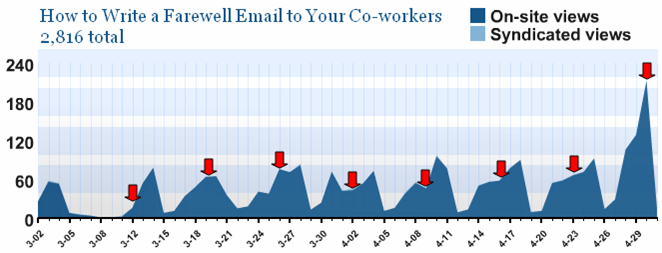
This Wednesday’s views were the highest ever for a single day, and we’re not even at Friday yet. The chart below shows the daily views for the post, with the Wednesdays highlighted by arrows.

I normally wouldn’t note the increase in views, as it risks coming across as some sort of bragging. But the magnitude of the change is pretty significant. And here’s why it’s happening. The post has now risen to the #2 position in a Google search on ‘farewell email’. It wasn’t that way before. I’d check on how the post ranked periodically, and it tended to be around the 10th or 12th result. So a jump of 8 or 10 places in search results is worth 3 times the hits. Now I see the SEO industry in a whole new light!

Of course, this blog isn’t about ad revenue. And the blog’s heavy Web 2.0 content may not appeal to the search engine visitors. But, I decided to add a message for my farewell email visitors:

Welcome to the blog. I know you’re here for tips on writing farewell emails. If you’re at all interested in Web 2.0, I invite you to look around the blog a bit. Use the tag cloud below, or the recent posts on the left-hand side to find info. Also, let’s connect on Twitter and FriendFeed: twitter.com/bhc
friendfeed.com/bhc3

From an advertising perspective, there’s a mismatch between the farewell email post and most of the blog’s other content. So I’m not ‘targeting’ the right audience. But if any of those visitors decide to stick around, I hope they get enjoy the blog.

*****

See this item on FriendFeed: http://friendfeed.com/e/a8133912-d2e9-f680-6592-a66e08abb717

Early Adopters: Attention Is Migrating to FriendFeed

Based on the reaction to a recent post about Twitter early adopters, it’s clear there’s an appetite to understand when trends emerge and applications migrate across the technology adoption lifecycle.

To that end, there are important updates about FriendFeed.

FriendFeed has been out for a few months as this cool app that lets you look at what your friends are doing across social media. If you were to stop there, it sounds nice, but somewhat useless to everyday activities. “Yeah, I check it every so often to see what my friends are up to.”

But, it is so much more. FriendFeed is emerging as the one lifestream platform to rule them all. The ability to see and interact across a range of services is proving addictive. And it may inadvertently disrupt a few other services along the way.

Four recent comments show that a trend is emerging. People are consuming updates from their social apps not directly from the apps themselves, but primarily from FriendFeed. FriendFeed is starting to get the lion’s share of attention and page views, to the detriment of other services.

Here are the quotes.

Robert Scoble tweeted about his declining use of Google Reader due to FriendFeed:

FriendFeed has replaced much of what made RSS cool to me. I’m still reading Google Reader, but less.

Thomas Hawk messaged on FriendFeed about his declining use of Flickr due to FriendFeed:

I find that I’m going to Flickr’s most recent photos from my contacts much less than I used to and going to friendfeed to view my contacts and imaginary contacts flickr photos much more.

Steven Hodson commented about potentially leaving Twitter altogether due to FriendFeed:

FriendFeed as for me it is a much better resource than Twitter will every be. It has gotten to the point where even now I’m seriously thinking of moving strictly to FF.

Jason Kaneshiro blogged about his declining use of Google Reader, due to FriendFeed

FriendFeed is replacing Google Reader as my information aggregator / filter.

If you’re trendspotting, you’d do worse than to look at the comments of those four to see where the early adopters are moving.

Finally, the compete.com graph below shows March 2008 had a huge spike in visitors to friendfeed.com:

How about you? Are you feeling it?

*****

See this item on FriendFeed: http://friendfeed.com/e/0b9e5d3f-e644-6105-5e28-7b4a95e1b34a

How Do Solo Bloggers Break into the Techmeme 100?

26% of US internetters have started a blog
Stat from Universal McCann study, courtesy of the blog 3008

A couple weeks ago, Steve Hodson at Winextra wrote a post that caught my eye. In Why today’s solo bloggers may not see Scoble-like fame…, he observes that the emergence of investor-funded professional blog networks (e.g. TechCrunch) will be the dominant industry structure going forward. Breaking the top end of that oligopoly will be tough for any solo blogger.

However several solo bloggers are regularly in the Techmeme 100, as Steve notes here. It got me thinking about how someone’s blog goes from a little experiment to achieving a large audience and becoming influential. The stat above about 26% of Web users starting blog strikes me as high, but let’s assume there’s a large number of individuals starting blogs.

From where I sit (far, far outside any kind of Techmeme rankings), I can envision three ways the influx of solo bloggers can break into the Techmeme 100. To be sure, there are other rankings beyond Techmeme. For instance, the Technorati 100 is a big deal. Political blog Huffington Post doesn’t show up on Techmeme, but it dominates the Technorati 100. The paths below apply to non-tech blogs and non-Techmeme rankings.

The three paths to the Techmeme 100 are:

  1. Long Slog
  2. Big Events
  3. Celebrity

Long Slog

Slow and steady wins the race. This is the most accessible to a the solo blogger. Through a lengthy amount of time, you accumulate readers. It’s a ground war, where you need to be “good enough” most of the time with flashes of occasional brilliance. Here’s what the growth chart would look like:

Patience. Quality posts. Devoted long time fans.

Big Events

This blog experiences a series of big events that give it jumps in subscribers. Each events attracts a flood of new visitors, some of whom decide to subscribe.

What might these big events be?

  • Recognition by bigger bloggers with huge followings
  • Freakishly popular posts
  • Specialized area of focus that suddenly becomes hot

I think that if a blogger emerges on the other side of these big events to have a wide following, there’ll be this sense that they burst on the scene. But like an actress who suddenly gets hot, you’ll never see all the bit parts and ‘B’ movies that she was in before.

‘Big events’ is the one that’s most likely to get solo bloggers into the big time. This is the path that requires the most luck.

Celebrity

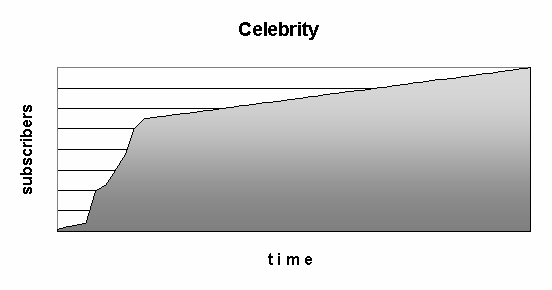
This is a path open only to a select few. Celebrities who have made a name for themselves in other realms, and then turn out to have talent in blogging as well. Celebrity blogs attract subscribers almost from day one:

Marc Andreessen has proven to be quite talented at blogging. And it didn’t hurt readership that he had already achieved legend status based on Netscape. Imagine if Microsoft buys Yahoo and Jerry Yang decides to start blogging on his own. I guarantee that will get subscribers (I know I’d subscribe).

Final Thoughts

Celebrities go right to the front of the line, but they’d better have blogging talent. Long slog blogs are testaments to the love of blogging. Big events seem to be the most likely path for the next Robert Scobles and Louis Grays to emerge.

*****

See this item on FriendFeed: http://friendfeed.com/e/d7b6d330-9c38-f5cf-f6f2-1de1582c0153

Are You a Twitter Early Adopter?

Are you a Twitter early adopter? You know, the kind of person who’s “in the know”? If you’re not using Twitter right now, apparently you ain’t!

As noted earlier, Twitter saw a remarkable surge in visitors in March 2008. The hockey stick growth says Twitter’s moving into the mainstream.

And apparently, we have dates for when you were “in the know” and when you were “following the crowd”.

From Jeremiah Owyang, it’s April 25, 2008.

April 25th, 2008 1:06 pm

******************************************************************

I’ve noticed an influx of new users, there’s clearly a change now. I consider everyone above this line to be ‘early adopter’

From Robert Scoble, it’s April 9, 2008:

Anyone who joins Twitter after today is not an early adopter. So, not interesting for me to follow.

So there you have it. If you joined on say, April 16, 2008, you’re in a tough spot. “Sorta” early adopter?

And we’ll leave open the question of why the hell it matters.

*****

See this item on FriendFeed: http://friendfeed.com/e/f059c0b0-12f3-c761-f53f-d51c70cc3167

Proposal to Clean Up the FriendFeed Clutter

FriendFeed is wonderful for giving you so much interesting information. But there are times where the flow of information is excessive and redundant. This occurs when the same the link shows up multiple times for the same user:

  • Post it to your blog
  • Share it on Google Reader
  • Bookmark it to del.icio.us
  • Post it to Reddit
  • Etc…

Eric of Internet Duct Tape blogged about this. And a really good discussion about the clutter occurred here…on FriendFeed. A couple different perspectives:

FF could make this easier and ‘collapse’ multiple items into one i.e. if I share something from Google Reader and bookmark it on delicious, only one item should appear in FF. I wonder if FF is too focused on where we doing things rather than what we’re doing? – Andy Davies

what I’m saying is that, if you add the same links to 2 different services, there’s no need to add both services to FF. Just one would be enough. Of course, if there are things that are unique for each one of them, it’s understandable. – Alejandro S.

Andy wants a technical solution, Alejandro is looking for a change in behavior. I lean toward the technical solution because there is information in the service that the person uses. A save to del.icio.us means the person has a personal interest in it. A save to Reddit means the person is explicitly putting the page “in play” for others to pick up interest. I don’t want to lose that.

I propose two alternatives for reducing the clutter of same-link feeds:

  1. Person-centric: if a user has the same feed more than once, the same-link feeds are aggregated together under a common link for the user
  2. Link-centric: all same-link feeds for all friends appear under a common link

The two alternatives are really different. #1 amounts to a small clean-up mechanism. #2 is more radical. It changes the FriendFeed experience. But perhaps in an interesting way.

Is it more important to track action around the link or the person?

Person-Centric: A Lightweight Cleanup

The “parent” consists of the user + web page title . All user actions that relate to the parent URL are aggregated, as shown below:

Each time a new feed with the same URL is posted by the same user, it’s just added to the list. Note that Tweets with the link are added as well (even with a URL shortener).

This would clean up the feed, but retain the current person-centric nature of FriendFeed.

Link-Centric: Centralized Comments,FriendFeedmeme,

In this scenario, the web page is the “parent” All user actions fall under a common web page link:

A couple things happen with this approach:

  1. For a given item, all comments are centralized in a single place. This makes the conversation easier to follow. Comments can still be attached to a particular person’s action to retain specific conversational preferences.
  2. The combining of all actions for a single item creates a visual meme, showing how much activity surrounds the item.

These are all feeds and comments you’d see under your ‘friends’ tab. They’re just aggregated.

Person-Centric or Link-Centric?

Is it more important that John found a bunch of different links interesting (person-centric)? Or that John, Susan, Mike, and Cheri found a single link interesting (link-centric)?

What better defines the experience of FriendFeed?

*****

See this item on FriendFeed: http://friendfeed.com/e/f08cbf30-129c-11dd-b613-003048343a40

Video Blog Comments (Ironically) Aren’t Conversational

TechCrunch has added video comments to its blogs, courtesy of Seesmic. Oh lordy. Think you’re feeling overwhelmed by social media? Try following video comments.

Online video has gotten traction as a one-way communication and entertainment vehicle. Is it ready to add “conversation” to its portfolio of uses?

Where Has Online Video Worked?

YouTube is undeniably the success story of online video. And what has been so successful there? Entertainment. Selected hits from amateurs have become mega hits, like the guy playing Pachelbel’s Canon on his electric guitar. The most popular videos on YouTube are professionally produced music videos, as reported by Michael Learmonth at Silicon Valley Insider. My 4 year old is a huge fan of Feist.

This entertainment is very much a one-way experience. They play. You watch.

Online video has also been useful as a communication tool. Google has been particularly active on this front, such as with this video explaining Google Apps.

The training video, again, is a one-way communication.

Seesmic’s Mission: Make Online Video a Conversation

Seesmic wants to turns these one-way communications into conversations among two, three, heck even dozens of people. You post a video, someone posts a video in reply and you post back. Kind of an asynchronous conversation. From the Seesmic site:

Until now, online communication has lacked personality as it’s been limited to text (IM, SMS, email). Now, Seesmic brings conversation alive through video. See and hear people share their experiences straight from their webcams, join in live conversations, and engage in real interactions with real people.

The concept is pretty innovative. As always, the question is whether it makes sense in real world usage.

My Rant About Online Video

I personally do not watch videos online much. If I land on a page that has video instead of text, I usually hit the browser’s ‘Back’ button pretty quickly.

Why? I don’t have time to wait on whether the video will be interesting. After the video loads, you then sit through its latency to see what the person is saying. It’s a crap shoot as to whether the time was worth it. Thus, the Silicon Valley Inside story about professionally produced videos YouTube dominating doesn’t surprise me. You know what you’re getting ahead of time.

Which brings us back to online video comments.

The Blog Video Comment Experience

The implementation on TechCrunch seems to be well-done, based on the video comments of several people. Kudos to Seesmic for making that happen. This is an innovative idea.

Three issues make video comments less conversational overall than basic text comments:

  1. You have no idea what you’re getting when you click a video
  2. It’s hard to reference someone’s comment
  3. It takes too much time

Video comment quality: Variance in comment quality is a well-known dynamic on blogs. It will apply to these video comments as well. This comments here and here on TechCrunch intrigued me…

The big difference is that with text, you can pretty quickly size up the quality with a quick scan. You have to endure much of the online video before realizing it won’t serve up nuggets of insight.

This is a turn off, and it undermines the participative quality of comments. If people aren’t watching your video comment, then you’re not really participating in the conversation.

Referencing comments: Say someone leaves a 60-second commentary on a post. You’re going to have to remember that interesting thing that was said 27 seconds into it. And then you’ll have to rewrite the interesting thing to properly reference it in your text comment. Or in your video reply.

The burden of tracking an audio commentary for response purposes hurts the conversational aspect of video comments.

Too much time: Keeping up with the entire thread of a conversation may require viewing several videos. On the TechCrunch post, I found the time for each of 43 video comments. Average run time = 29 seconds. Median = 24 seconds. The typical text comment doesn’t take 25 seconds to read. So your time investment just went up to stay on top of videos.

And that detracts from the conversation.

Final Word

I’ll admit to sticking through several of the 43 video comments on the blog. There is something to the idea of watching a person speak their comments. The hard part is to know which ones will be worth it. I assume over time, some people would just have a flair for the medium. Regular blog visitors will consistently click their videos.

But the majority of video comments will just be time sucks. There’s probably a real opportunity to implement some sort of rating system on comments, and on people who comment that will help filter out the video noise.

Still, I prefer text comments for the conversation. Learning on my time, not the video creator’s.

*****

See this item on FriendFeed: http://friendfeed.com/e/11b7e37d-c97f-e35c-b7fe-9f1588e3876a

Twitter’s Downtime…Remember AOL’s Access Problems?

Twitter’s current issues may remind the older crowd of the issues that America Online faced in the late 1990s. AOL had been humming along in growth, and then they hit an inflection point. They changed their offering to a low-cost, flat-rate fee for Internet access. Eventually, so many people signed up and used AOL that many people couldn’t actually get online. As Wikipedia relates it:

Originally, AOL charged its users an hourly fee, but in 1996 this changed and a flat rate of $19.99 a month was charged. Within three years, AOL’s userbase grew to 10 million people. During this time, AOL connections would be flooded with users trying to get on, and many canceled their accounts due to constant busy signals (this was often joked “AOL” standing for “Always Off-Line”).

I remember the news stories, and threats of government investigations related to AOL’s inability to deliver the service they promised. Of course, we know how that tale ended. AOL emerged as a dominant player in its day, eventually acquiring Time Warner.

The service disruptions and the noise they created turned out to be signals about how important the service had become.

Twitter’s taking a lot of heat in the blogosphere right now. But I think TechCrunch’s Michael Arrington has it right today when he says:

I now need Twitter more than Twitter needs me.

*****

See this item on FriendFeed: http://friendfeed.com/search?q=%22Twitter%E2%80%99s+Downtime%E2%80%A6Remember+AOL%E2%80%99s+Access+Problems%3F%22&public=1